pcf-power-pages — GitHub Copilot rule: code components in Power Pages
A Copilot rule that walks through moving Power Apps code components onto Power Pages forms and lists the APIs that will not run there.
.github/instructions/pcf-power-pages.instructions.mdWhat pcf-power-pages does
The rule covers the whole path: package a component built with Power Apps component framework, attach it to a field in a model-driven app form, then switch it on for the portal. Two routes exist on the Power Pages side. In Design Studio you pick the field and tick “Enable custom component”. In the Portals Management app you create a Basic Form Metadata record, set Type to Attribute, choose the attribute logical name and set Control Style to Code Component.
Field support is narrower than in model-driven apps. Currency, Decimal, Enum, OptionSet, TwoOptions, Whole and several SingleLine and DateAndTime formats are allowed. Anything outside that list will not bind. Several component APIs are off limits too: Device.captureAudio, Device.captureImage, Device.captureVideo, Device.getBarcodeValue, Device.getCurrentPosition, Device.pickFile and Utility. Setting uses-feature to true breaks the component, and so does binding one control to multiple form fields.
Before any of this, you need system administrator rights in the environment, site version 9.3.3.x or higher and starter site package 9.2.2103.x or higher. Components run in browsers under the Web client option. If a component needs to touch records, it can be wired to the portal Web API for create, retrieve, update and delete calls.
What it helps with
- move a code component from a model-driven app onto a Power Pages page
- enable a custom component on a form field in Design Studio
- attach a component to a basic form through the Portals Management app
- check whether a field type and format are supported
- wire a component to the portal Web API for record operations
Example prompts for the agent
- Add this code component to a field in the model-driven app and show me how to enable it in Power Pages
- Check whether SingleLine.Email is a supported field type for code components
- Build a component that reads and updates Dataverse records through the portal Web API
How to install pcf-power-pages
Manually: put the files in place
.github/instructions/pcf-power-pages.instructions.mdThe applyTo field sets which files it applies to
Manually: put the files in place
.claude/rules/pcf-power-pages.mdThe paths frontmatter field limits the files: move applyTo from the source into paths
AGENTS.md
Codex reads AGENTS.md: paste the rule text there
Manually: put the files in place
.cursor/rules/pcf-power-pages.mdcFrontmatter: description, globs, alwaysApply. Move applyTo from the source into globs, or the rule will not attach on its own
Manually: put the files in place
.devin/rules/pcf-power-pages.mdManually: put the files in place
.clinerules/pcf-power-pages.mdStep by step, with commands for each platform: AGENTS.md vs CLAUDE.md: what they are and which one to use
Questions about pcf-power-pages
How do I install pcf-power-pages in GitHub Copilot?
Place the rule file at .github/instructions/pcf-power-pages.instructions.md in your repository. Copilot applies it to files matching the applyTo pattern.
What does pcf-power-pages do?
It explains how to use Power Apps component framework code components on Power Pages pages, from packaging the component to enabling it on a form field. It also lists unsupported APIs and field types.
Which code component APIs are unsupported in Power Pages?
Device.captureAudio, Device.captureImage, Device.captureVideo, Device.getBarcodeValue, Device.getCurrentPosition, Device.pickFile and Utility are unavailable. The uses-feature element must not be set to true.
Source text
pcf-power-pages.instructions.md · MIT
---
description: 'Using code components in Power Pages sites'
applyTo: '**/*.{ts,tsx,js,json,xml,pcfproj,csproj}'
---
# Use Code Components in Power Pages
Power Pages now support controls built for model-driven apps created using Power Apps component framework. To use code components in Power Pages site webpages:
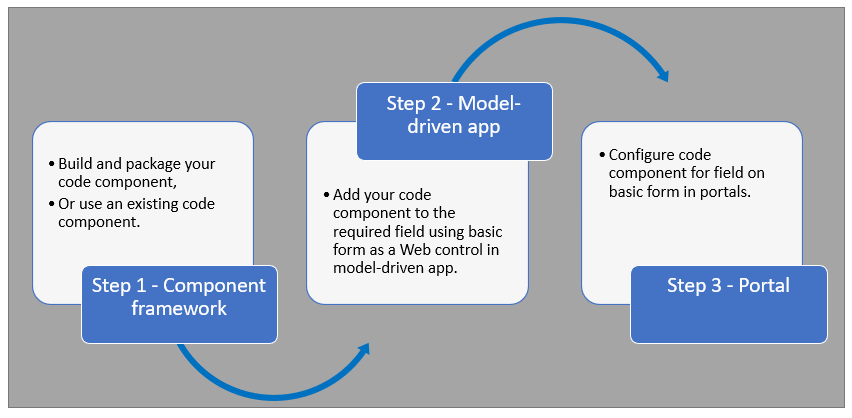
After completing these steps, users can interact with the code component using the webpage that has the respective [form](https://learn.microsoft.com/en-us/power-pages/getting-started/add-form) component.
## Prerequisites
- You need system administrator privileges to enable the code component feature in the environment
- Your Power Pages site version needs to be [9.3.3.x](https://learn.microsoft.com/en-us/power-apps/maker/portals/versions/version-9.3.3.x) or higher
- Your starter site package needs to be [9.2.2103.x](https://learn.microsoft.com/en-us/power-apps/maker/portals/versions/package-version-9.2.2103) or higher
## Create and Package Code Component
To learn about creating and packaging code components in Power Apps component framework, go to [Create your first component](https://learn.microsoft.com/en-us/power-apps/developer/component-framework/implementing-controls-using-typescript).
### Supported Field Types and Formats
Power Pages supports restricted field types and formats for using code components. The following table lists all supported field data types and formats:
**Supported Types:**
- Currency
- DateAndTime.DateAndTime
- DateAndTime.DateOnly
- Decimal
- Enum
- Floating Point Number
- Multiple
- OptionSet
- SingleLine.Email
- SingleLine.Phone
- SingleLine.Text
- SingleLine.TextArea
- SingleLine.Ticker
- SingleLine.URL
- TwoOptions
- Whole
For more information, see [Attributes list and descriptions](https://learn.microsoft.com/en-us/power-apps/developer/component-framework/manifest-schema-reference/property#remarks).
### Unsupported Code Components in Power Pages
The following code component APIs aren't supported:
- [Device.captureAudio](https://learn.microsoft.com/en-us/power-apps/developer/component-framework/reference/device/captureaudio)
- [Device.captureImage](https://learn.microsoft.com/en-us/power-apps/developer/component-framework/reference/device/captureimage)
- [Device.captureVideo](https://learn.microsoft.com/en-us/power-apps/developer/component-framework/reference/device/capturevideo)
- [Device.getBarcodeValue](https://learn.microsoft.com/en-us/power-apps/developer/component-framework/reference/device/getbarcodevalue)
- [Device.getCurrentPosition](https://learn.microsoft.com/en-us/power-apps/developer/component-framework/reference/device/getcurrentposition)
- [Device.pickFile](https://learn.microsoft.com/en-us/power-apps/developer/component-framework/reference/device/pickfile)
- [Utility](https://learn.microsoft.com/en-us/power-apps/developer/component-framework/reference/utility)
**Additional Restrictions:**
- The [uses-feature](https://learn.microsoft.com/en-us/power-apps/developer/component-framework/manifest-schema-reference/uses-feature) element must not be set to true
- [Value elements not supported](https://learn.microsoft.com/en-us/power-apps/developer/component-framework/manifest-schema-reference/property#value-elements-that-are-not-supported) by Power Apps component framework
- Power Apps Component Framework (PCF) controls bound to multiple fields in a form isn't supported
## Add a Code Component to a Field in a Model-Driven App
To learn how to add a code component to a field in a model-driven app, go to [Add a code component to a field](https://learn.microsoft.com/en-us/power-apps/developer/component-framework/add-custom-controls-to-a-field-or-entity#add-a-code-component-to-a-column).
> **Important**: Code components for Power Pages are available for web browsers using the client option of **Web**.
### Add Using Data Workspace
You can also add a code component to a form using [Data workspace](https://learn.microsoft.com/en-us/power-pages/configure/data-workspace-forms).
1. When editing a Dataverse form in the Data workspace form designer, select a field
2. Choose **+ Component** and select an appropriate component for the field
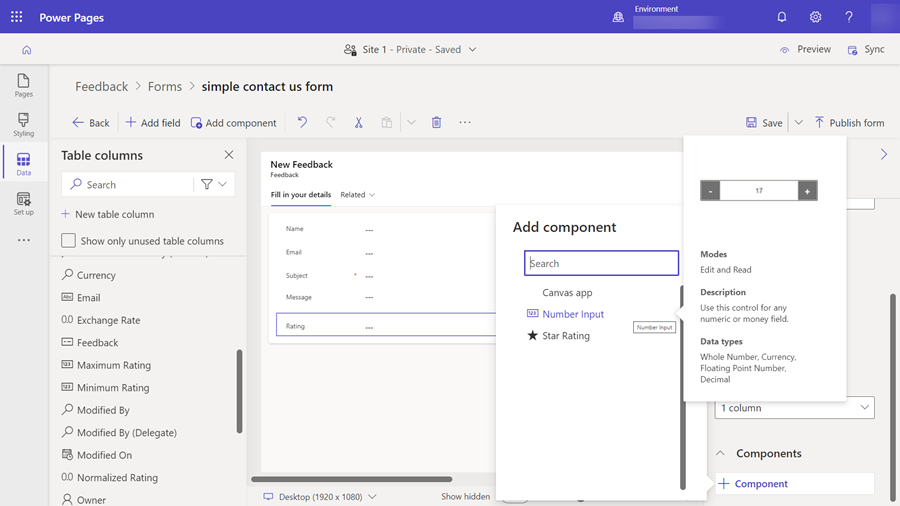
3. Select **Save** and **Publish form**
## Configure Power Pages Site for Code Component
After the code component is added to a field in a model-driven app, you can configure Power Pages to use the code component on a form.
There are two methods to enable the code component:
### Enable Code Component in Design Studio
To enable a code component on a form using the design studio:
1. After you [add the form to a page](https://learn.microsoft.com/en-us/power-pages/getting-started/add-form), select the field where you added the code component and select **Edit field**
2. Select the **Enable custom component** field
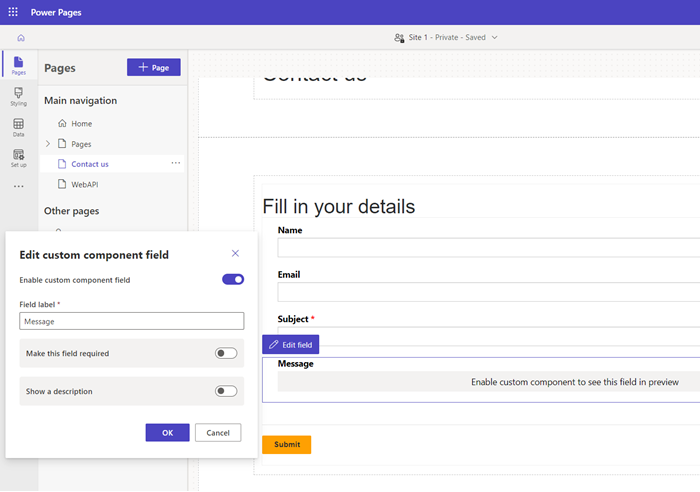
3. When you preview the site, you should see the custom component enabled
### Enable Code Component in Portals Management App
To add a code component to a basic form by using the Portals Management app:
1. Open the [Portals Management](https://learn.microsoft.com/en-us/power-pages/configure/portal-management-app) app
2. On the left pane, select **Basic Forms**
3. Select the form to which you want to add the code component
4. Select **Related**
5. Select **Basic Form Metadata**
6. Select **New Basic Form Metadata**
7. Select **Type** as **Attribute**
8. Select **Attribute Logical Name**
9. Enter **Label**
10. For **Control Style**, select **Code Component**
11. Save and close the form
## Code Components Using the Portal Web API
A code component can be built and added to a webpage that can use the [portal Web API](https://learn.microsoft.com/en-us/power-pages/configure/web-api-overview) to perform create, retrieve, update, and delete actions. This feature allows greater customization options when developing portal solutions. For more information, see [Implement a sample portal Web API component](https://learn.microsoft.com/en-us/power-pages/configure/implement-webapi-component).
## Next Steps
[Tutorial: Use code components in portals](https://learn.microsoft.com/en-us/power-pages/configure/component-framework-tutorial)
## See Also
- [Power Apps component framework overview](https://learn.microsoft.com/en-us/power-apps/developer/component-framework/overview)
- [Create your first component](https://learn.microsoft.com/en-us/power-apps/developer/component-framework/implementing-controls-using-typescript)
- [Add code components to a column or table in model-driven apps](https://learn.microsoft.com/en-us/power-apps/developer/component-framework/add-custom-controls-to-a-field-or-entity)
© github · MIT · github/awesome-copilot


