pcf-power-pages — правило для GitHub Copilot
Правило подсказывает Copilot, как переносить код-компоненты Power Apps в формы сайта Power Pages и какие API там не работают.
.github/instructions/pcf-power-pages.instructions.mdЧто делает pcf-power-pages
Файл описывает путь код-компонента из Power Apps component framework в веб-форму Power Pages: сначала компонент собирают и пакуют, затем добавляют к полю в форме model-driven app, а после включают на стороне портала. Включить можно двумя способами — через Design Studio, выбрав поле и галочку «Enable custom component», либо через Portals Management app, где создаётся запись Basic Form Metadata с типом Attribute и Control Style «Code Component».
Поддерживаются не все типы полей: Currency, Decimal, Enum, OptionSet, TwoOptions, Whole, часть форматов SingleLine и DateAndTime. Ограничения жёстче, чем в model-driven приложениях. Из API недоступны методы Device.captureAudio, Device.captureImage, Device.captureVideo, Device.getBarcodeValue, Device.getCurrentPosition, Device.pickFile и Utility, а элемент uses-feature нельзя выставлять в true. Компонент, привязанный к нескольким полям формы, тоже не заработает.
Перед включением нужны права системного администратора в среде, версия сайта Power Pages 9.3.3.x или выше и стартовый пакет сайта 9.2.2103.x или выше. Компонент работает в браузерах с клиентской опцией Web. Если компонент ходит в данные, его можно связать с portal Web API для создания, чтения, обновления и удаления записей.
Какие задачи решает
- перенести код-компонент из model-driven app на страницу Power Pages
- включить кастомный компонент у поля формы через Design Studio
- добавить компонент к basic form через Portals Management app
- проверить, поддерживается ли нужный тип поля и формат
- связать компонент с portal Web API для работы с записями
Примеры запросов агенту
- Добавь код-компонент к полю формы в model-driven app и подскажи, как включить его в Power Pages
- Проверь, попадает ли тип поля SingleLine.Email в список поддерживаемых для код-компонентов
- Собери компонент, который через portal Web API читает и обновляет записи Dataverse
Как установить pcf-power-pages
Вручную: положить файлы
.github/instructions/pcf-power-pages.instructions.mdПоле applyTo задаёт, к каким файлам применять
Вручную: положить файлы
.claude/rules/pcf-power-pages.mdПоле paths во frontmatter ограничивает файлы: applyTo из источника → paths
AGENTS.md
Codex читает AGENTS.md: вставьте текст правила туда
Вручную: положить файлы
.cursor/rules/pcf-power-pages.mdcВо frontmatter: description, globs, alwaysApply. applyTo из источника → globs, иначе правило само не подключится
Вручную: положить файлы
.devin/rules/pcf-power-pages.mdВручную: положить файлы
.clinerules/pcf-power-pages.mdПо шагам, с командами для каждой платформы: AGENTS.md и CLAUDE.md: что это, кто читает и какой выбрать
Вопросы о pcf-power-pages
Как установить pcf-power-pages в GitHub Copilot?
Скопируйте файл правила в .github/instructions/pcf-power-pages.instructions.md в репозитории. Copilot подхватит его для файлов, подходящих под маску applyTo.
Что делает pcf-power-pages?
Объясняет, как использовать код-компоненты Power Apps component framework на страницах Power Pages: от упаковки компонента до включения его у поля формы. Отдельно перечисляет неподдерживаемые API и типы полей.
Какие API код-компонентов не работают в Power Pages?
Недоступны методы Device.captureAudio, Device.captureImage, Device.captureVideo, Device.getBarcodeValue, Device.getCurrentPosition, Device.pickFile и Utility. Элемент uses-feature нельзя выставлять в true.
Исходный текст
pcf-power-pages.instructions.md · MIT
---
description: 'Using code components in Power Pages sites'
applyTo: '**/*.{ts,tsx,js,json,xml,pcfproj,csproj}'
---
# Use Code Components in Power Pages
Power Pages now support controls built for model-driven apps created using Power Apps component framework. To use code components in Power Pages site webpages:
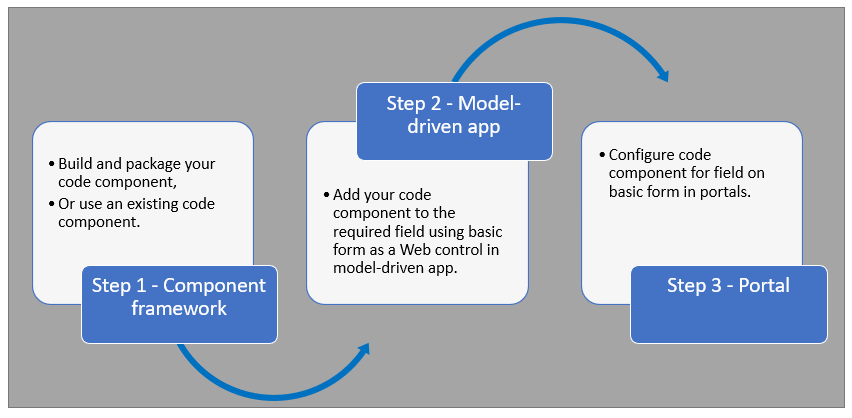
After completing these steps, users can interact with the code component using the webpage that has the respective [form](https://learn.microsoft.com/en-us/power-pages/getting-started/add-form) component.
## Prerequisites
- You need system administrator privileges to enable the code component feature in the environment
- Your Power Pages site version needs to be [9.3.3.x](https://learn.microsoft.com/en-us/power-apps/maker/portals/versions/version-9.3.3.x) or higher
- Your starter site package needs to be [9.2.2103.x](https://learn.microsoft.com/en-us/power-apps/maker/portals/versions/package-version-9.2.2103) or higher
## Create and Package Code Component
To learn about creating and packaging code components in Power Apps component framework, go to [Create your first component](https://learn.microsoft.com/en-us/power-apps/developer/component-framework/implementing-controls-using-typescript).
### Supported Field Types and Formats
Power Pages supports restricted field types and formats for using code components. The following table lists all supported field data types and formats:
**Supported Types:**
- Currency
- DateAndTime.DateAndTime
- DateAndTime.DateOnly
- Decimal
- Enum
- Floating Point Number
- Multiple
- OptionSet
- SingleLine.Email
- SingleLine.Phone
- SingleLine.Text
- SingleLine.TextArea
- SingleLine.Ticker
- SingleLine.URL
- TwoOptions
- Whole
For more information, see [Attributes list and descriptions](https://learn.microsoft.com/en-us/power-apps/developer/component-framework/manifest-schema-reference/property#remarks).
### Unsupported Code Components in Power Pages
The following code component APIs aren't supported:
- [Device.captureAudio](https://learn.microsoft.com/en-us/power-apps/developer/component-framework/reference/device/captureaudio)
- [Device.captureImage](https://learn.microsoft.com/en-us/power-apps/developer/component-framework/reference/device/captureimage)
- [Device.captureVideo](https://learn.microsoft.com/en-us/power-apps/developer/component-framework/reference/device/capturevideo)
- [Device.getBarcodeValue](https://learn.microsoft.com/en-us/power-apps/developer/component-framework/reference/device/getbarcodevalue)
- [Device.getCurrentPosition](https://learn.microsoft.com/en-us/power-apps/developer/component-framework/reference/device/getcurrentposition)
- [Device.pickFile](https://learn.microsoft.com/en-us/power-apps/developer/component-framework/reference/device/pickfile)
- [Utility](https://learn.microsoft.com/en-us/power-apps/developer/component-framework/reference/utility)
**Additional Restrictions:**
- The [uses-feature](https://learn.microsoft.com/en-us/power-apps/developer/component-framework/manifest-schema-reference/uses-feature) element must not be set to true
- [Value elements not supported](https://learn.microsoft.com/en-us/power-apps/developer/component-framework/manifest-schema-reference/property#value-elements-that-are-not-supported) by Power Apps component framework
- Power Apps Component Framework (PCF) controls bound to multiple fields in a form isn't supported
## Add a Code Component to a Field in a Model-Driven App
To learn how to add a code component to a field in a model-driven app, go to [Add a code component to a field](https://learn.microsoft.com/en-us/power-apps/developer/component-framework/add-custom-controls-to-a-field-or-entity#add-a-code-component-to-a-column).
> **Important**: Code components for Power Pages are available for web browsers using the client option of **Web**.
### Add Using Data Workspace
You can also add a code component to a form using [Data workspace](https://learn.microsoft.com/en-us/power-pages/configure/data-workspace-forms).
1. When editing a Dataverse form in the Data workspace form designer, select a field
2. Choose **+ Component** and select an appropriate component for the field
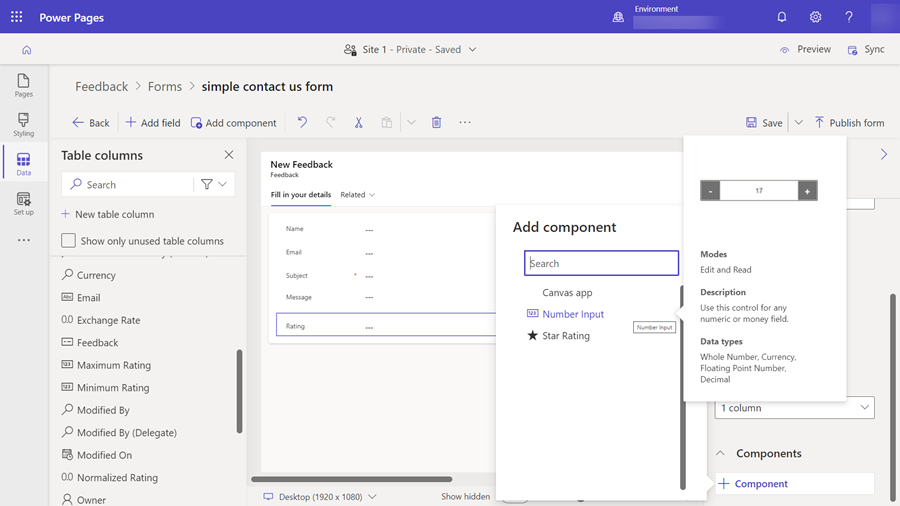
3. Select **Save** and **Publish form**
## Configure Power Pages Site for Code Component
After the code component is added to a field in a model-driven app, you can configure Power Pages to use the code component on a form.
There are two methods to enable the code component:
### Enable Code Component in Design Studio
To enable a code component on a form using the design studio:
1. After you [add the form to a page](https://learn.microsoft.com/en-us/power-pages/getting-started/add-form), select the field where you added the code component and select **Edit field**
2. Select the **Enable custom component** field
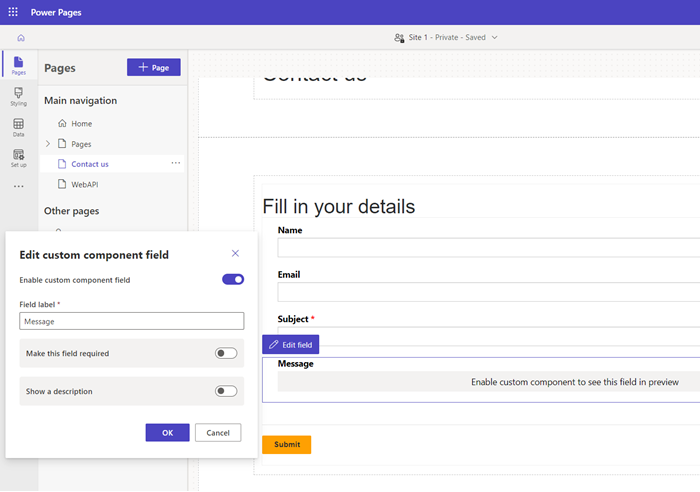
3. When you preview the site, you should see the custom component enabled
### Enable Code Component in Portals Management App
To add a code component to a basic form by using the Portals Management app:
1. Open the [Portals Management](https://learn.microsoft.com/en-us/power-pages/configure/portal-management-app) app
2. On the left pane, select **Basic Forms**
3. Select the form to which you want to add the code component
4. Select **Related**
5. Select **Basic Form Metadata**
6. Select **New Basic Form Metadata**
7. Select **Type** as **Attribute**
8. Select **Attribute Logical Name**
9. Enter **Label**
10. For **Control Style**, select **Code Component**
11. Save and close the form
## Code Components Using the Portal Web API
A code component can be built and added to a webpage that can use the [portal Web API](https://learn.microsoft.com/en-us/power-pages/configure/web-api-overview) to perform create, retrieve, update, and delete actions. This feature allows greater customization options when developing portal solutions. For more information, see [Implement a sample portal Web API component](https://learn.microsoft.com/en-us/power-pages/configure/implement-webapi-component).
## Next Steps
[Tutorial: Use code components in portals](https://learn.microsoft.com/en-us/power-pages/configure/component-framework-tutorial)
## See Also
- [Power Apps component framework overview](https://learn.microsoft.com/en-us/power-apps/developer/component-framework/overview)
- [Create your first component](https://learn.microsoft.com/en-us/power-apps/developer/component-framework/implementing-controls-using-typescript)
- [Add code components to a column or table in model-driven apps](https://learn.microsoft.com/en-us/power-apps/developer/component-framework/add-custom-controls-to-a-field-or-entity)
© github · MIT · github/awesome-copilot


