pcf-dependent-libraries — GitHub Copilot rule: what it does
Guides GitHub Copilot in configuring shared prebuilt libraries for Power Apps Component Framework (PCF) components to avoid bundling duplicates.
.github/instructions/pcf-dependent-libraries.instructions.mdWhat pcf-dependent-libraries does
This rule directs GitHub Copilot when configuring shared dependencies for Power Apps Component Framework (PCF) controls in model-driven apps. Rather than packing identical heavy libraries into every component, it guides moving shared code into a dedicated Library Control.
The guidance updates three core files. In featureconfig.json, it enables the pcfResourceDependency and pcfAllowCustomWebpack flags. In webpack.config.js, it isolates the package via the externals configuration. Finally, it registers the dependency element in the component manifest, with optional deferred loading via the load-type="onDemand" property.
Because dependent libraries in PCF are currently a preview feature, manifest schemas and configuration flags may shift in future framework updates.
What it helps with
- Extract repeated code into a shared PCF Library Control
- Configure
pcfResourceDependencyandpcfAllowCustomWebpackinfeatureconfig.json - Exclude external modules from bundling via Webpack
externals - Enable deferred library loading using
load-type="onDemand"in the control manifest
Example prompts for the agent
- Configure featureconfig.json and webpack.config.js to treat myLib as an external PCF dependency
- Update the control manifest to register a dependency on samples_SampleNS.SampleStubLibraryPCF loaded on demand
How to install pcf-dependent-libraries
Manually: put the files in place
.github/instructions/pcf-dependent-libraries.instructions.mdThe applyTo field sets which files it applies to
Manually: put the files in place
.claude/rules/pcf-dependent-libraries.mdThe paths frontmatter field limits the files: move applyTo from the source into paths
AGENTS.md
Codex reads AGENTS.md: paste the rule text there
Manually: put the files in place
.cursor/rules/pcf-dependent-libraries.mdcFrontmatter: description, globs, alwaysApply. Move applyTo from the source into globs, or the rule will not attach on its own
Manually: put the files in place
.devin/rules/pcf-dependent-libraries.mdManually: put the files in place
.clinerules/pcf-dependent-libraries.mdStep by step, with commands for each platform: AGENTS.md vs CLAUDE.md: what they are and which one to use
Questions about pcf-dependent-libraries
How do I install pcf-dependent-libraries in GitHub Copilot?
Place the rule file into your repository at .github/instructions/pcf-dependent-libraries.instructions.md.
What does pcf-dependent-libraries do?
It provides instructions for GitHub Copilot to share prebuilt libraries between PCF controls, reducing build sizes and component load times.
How is on-demand library loading configured in the manifest?
Set load-type="onDemand" on the <dependency> tag, then add <platform-action action-type="afterPageLoad" /> and a <feature-usage> element requiring the Utility feature.
Source text
pcf-dependent-libraries.instructions.md · MIT
---
description: 'Using dependent libraries in PCF components'
applyTo: '**/*.{ts,tsx,js,json,xml,pcfproj,csproj}'
---
# Dependent Libraries (Preview)
[This topic is pre-release documentation and is subject to change.]
With model-driven apps, you can reuse a prebuilt library contained in another component that is loaded as a dependency to more than one component.
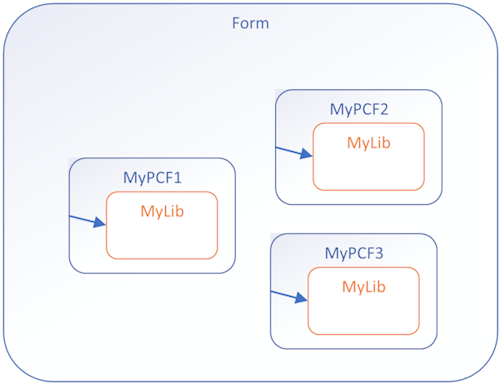
Having copies of a prebuilt library in multiple controls is undesirable. Reusing existing libraries improves performance, especially when the library is large, by reducing the load time for all components that use the library. Library reuse also helps reduce the maintenance overhead in build processes.
## Before and After
**Before**: Custom library files contained in each PCF component
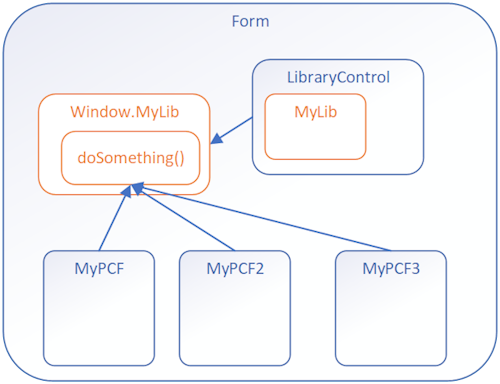
**After**: Components calling a shared function from a Library Control
## Implementation Steps
To use dependent libraries, you need to:
1. Create a **Library component** that contains the library. This component can provide some functionality or only be a container for the library.
2. Configure another component to depend on the library loaded by the library component.
By default, the library loads when the dependent component loads, but you can configure it to load on demand.
This way you can independently maintain the library in the Library Control and the dependent controls don't need to have a copy of the library bundled with them.
## How It Works
You need to add configuration data to your component project so that the build process deploys your libraries the way you want. Set this configuration data by adding or editing the following files:
- **featureconfig.json**
- **webpack.config.js**
- Edit the manifest schema to **Register dependencies**
### featureconfig.json
Add this file to override the default feature flags for a component without modifying the files generated in the `node_modules` folder.
**Feature Flags:**
| Flag | Description |
|------|-------------|
| `pcfResourceDependency` | Enables the component to use a library resource. |
| `pcfAllowCustomWebpack` | Enables the component to use a custom web pack. This feature must be enabled for components that define a library resource. |
By default, these values are `off`. Set them to `on` to override the default.
**Example 1:**
```json
{
"pcfAllowCustomWebpack": "on"
}
```
**Example 2:**
```json
{
"pcfResourceDependency": "on",
"pcfAllowCustomWebpack": "off"
}
```
### webpack.config.js
The build process for components uses [Webpack](https://webpack.js.org/) to bundle the code and dependencies into a deployable asset. To exclude your libraries from this bundling, add a `webpack.config.js` file to the project root folder that specifies the alias of the library as `externals`. [Learn more about the Webpack externals configuration option](https://webpack.js.org/configuration/externals/)
This file might look like the following when the library alias is `myLib`:
```javascript
/* eslint-disable */
"use strict";
module.exports = {
externals: {
"myLib": "myLib"
},
}
```
### Register Dependencies
Use the [dependency element](https://learn.microsoft.com/en-us/power-apps/developer/component-framework/manifest-schema-reference/dependency) within [resources](https://learn.microsoft.com/en-us/power-apps/developer/component-framework/manifest-schema-reference/resources) of the manifest schema.
```xml
<resources>
<dependency
type="control"
name="samples_SampleNS.SampleStubLibraryPCF"
order="1"
/>
<code path="index.ts" order="2" />
</resources>
```
### Dependency as On-Demand Load of a Component
Rather than loading the dependent library when a component loads, you can load the dependent library on demand. Loading on demand provides the flexibility for more complex controls to only load dependencies when they're required, especially if the dependent libraries are large.
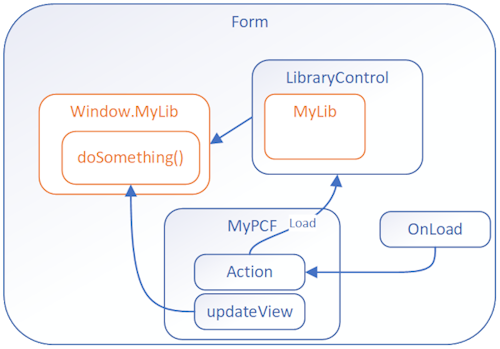
To enable on demand loading, you need to:
**Step 1**: Add these [platform-action element](https://learn.microsoft.com/en-us/power-apps/developer/component-framework/manifest-schema-reference/platform-action), [feature-usage element](https://learn.microsoft.com/en-us/power-apps/developer/component-framework/manifest-schema-reference/feature-usage), and [uses-feature element](https://learn.microsoft.com/en-us/power-apps/developer/component-framework/manifest-schema-reference/uses-feature) child elements to the [control element](https://learn.microsoft.com/en-us/power-apps/developer/component-framework/manifest-schema-reference/control):
```xml
<platform-action action-type="afterPageLoad" />
<feature-usage>
<uses-feature name="Utility"
required="true" />
</feature-usage>
```
**Step 2**: Set the `load-type` attribute of the [dependency element](https://learn.microsoft.com/en-us/power-apps/developer/component-framework/manifest-schema-reference/dependency) to `onDemand`.
```xml
<dependency type="control"
name="samples_SampleNamespace.StubLibrary"
load-type="onDemand" />
```
## Next Steps
Try a tutorial that walks you through creating a dependent library:
[Tutorial: Use dependent libraries in a component](https://learn.microsoft.com/en-us/power-apps/developer/component-framework/tutorial-use-dependent-libraries)
© github · MIT · github/awesome-copilot


