pcf-dependent-libraries — правило для GitHub Copilot: что делает
Помогает настроить переиспользование общих библиотек в компонентах Power Apps Component Framework (PCF), избавляя от дублирования кода в сборках.
.github/instructions/pcf-dependent-libraries.instructions.mdЧто делает pcf-dependent-libraries
Правило инструктирует ассистента при работе с Power Apps Component Framework (PCF) для модельных приложений. Вместо сборки одних и тех же тяжёлых скриптов внутри каждого контрола оно помогает вынести общий код в выделенный Library Control.
По шагам из документации Copilot настраивает три элемента проекта. В файле featureconfig.json выставляются флаги pcfResourceDependency и pcfAllowCustomWebpack. В корневом webpack.config.js библиотека объявляется в секции externals. Затем в XML-манифесте контрола регистрируется тег <dependency>, где также можно активировать отложенную подгрузку через атрибут load-type="onDemand".
Функциональность зависимых библиотек в PCF находится в статусе Preview, поэтому параметры сборки и схема манифеста могут поменяться в будущих обновлениях платформы.
Какие задачи решает
- Вынести повторяющийся код в общий Library Control для компонентов PCF
- Включить флаги
pcfResourceDependencyиpcfAllowCustomWebpackвfeatureconfig.json - Исключить разделяемую библиотеку из бандла через Webpack
externals - Настроить отложенную загрузку библиотеки через атрибут
load-type="onDemand"в манифесте
Примеры запросов агенту
- Сконфигурируй featureconfig.json и webpack.config.js, чтобы исключить myLib из бандла компонента PCF
- Добавь в манифест зависимость от samples_SampleNS.SampleStubLibraryPCF с загрузкой onDemand
Как установить pcf-dependent-libraries
Вручную: положить файлы
.github/instructions/pcf-dependent-libraries.instructions.mdПоле applyTo задаёт, к каким файлам применять
Вручную: положить файлы
.claude/rules/pcf-dependent-libraries.mdПоле paths во frontmatter ограничивает файлы: applyTo из источника → paths
AGENTS.md
Codex читает AGENTS.md: вставьте текст правила туда
Вручную: положить файлы
.cursor/rules/pcf-dependent-libraries.mdcВо frontmatter: description, globs, alwaysApply. applyTo из источника → globs, иначе правило само не подключится
Вручную: положить файлы
.devin/rules/pcf-dependent-libraries.mdВручную: положить файлы
.clinerules/pcf-dependent-libraries.mdПо шагам, с командами для каждой платформы: AGENTS.md и CLAUDE.md: что это, кто читает и какой выбрать
Вопросы о pcf-dependent-libraries
Как установить pcf-dependent-libraries в GitHub Copilot?
Добавьте файл правила в свой репозиторий по пути .github/instructions/pcf-dependent-libraries.instructions.md.
Зачем нужно правило pcf-dependent-libraries?
Оно подсказывает ассистенту правильную структуру конфигурационных файлов для подключения общих библиотек в PCF, уменьшая размер бандлов и время загрузки компонентов.
Какие элементы нужны в манифесте для отложенной загрузки библиотеки?
В теге <dependency> задаётся атрибут load-type="onDemand", а внутрь <control> добавляются элементы <platform-action action-type="afterPageLoad" /> и блок <feature-usage> с фичей Utility.
Исходный текст
pcf-dependent-libraries.instructions.md · MIT
---
description: 'Using dependent libraries in PCF components'
applyTo: '**/*.{ts,tsx,js,json,xml,pcfproj,csproj}'
---
# Dependent Libraries (Preview)
[This topic is pre-release documentation and is subject to change.]
With model-driven apps, you can reuse a prebuilt library contained in another component that is loaded as a dependency to more than one component.
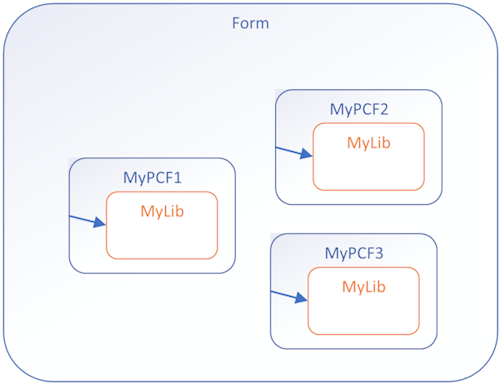
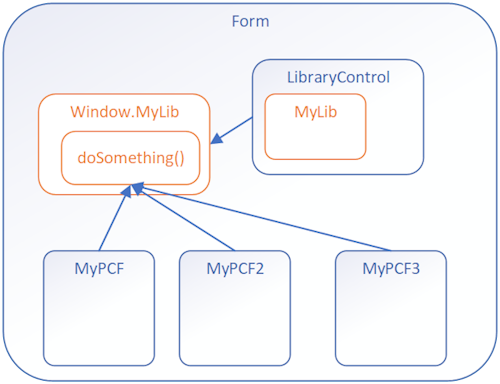
Having copies of a prebuilt library in multiple controls is undesirable. Reusing existing libraries improves performance, especially when the library is large, by reducing the load time for all components that use the library. Library reuse also helps reduce the maintenance overhead in build processes.
## Before and After
**Before**: Custom library files contained in each PCF component
**After**: Components calling a shared function from a Library Control
## Implementation Steps
To use dependent libraries, you need to:
1. Create a **Library component** that contains the library. This component can provide some functionality or only be a container for the library.
2. Configure another component to depend on the library loaded by the library component.
By default, the library loads when the dependent component loads, but you can configure it to load on demand.
This way you can independently maintain the library in the Library Control and the dependent controls don't need to have a copy of the library bundled with them.
## How It Works
You need to add configuration data to your component project so that the build process deploys your libraries the way you want. Set this configuration data by adding or editing the following files:
- **featureconfig.json**
- **webpack.config.js**
- Edit the manifest schema to **Register dependencies**
### featureconfig.json
Add this file to override the default feature flags for a component without modifying the files generated in the `node_modules` folder.
**Feature Flags:**
| Flag | Description |
|------|-------------|
| `pcfResourceDependency` | Enables the component to use a library resource. |
| `pcfAllowCustomWebpack` | Enables the component to use a custom web pack. This feature must be enabled for components that define a library resource. |
By default, these values are `off`. Set them to `on` to override the default.
**Example 1:**
```json
{
"pcfAllowCustomWebpack": "on"
}
```
**Example 2:**
```json
{
"pcfResourceDependency": "on",
"pcfAllowCustomWebpack": "off"
}
```
### webpack.config.js
The build process for components uses [Webpack](https://webpack.js.org/) to bundle the code and dependencies into a deployable asset. To exclude your libraries from this bundling, add a `webpack.config.js` file to the project root folder that specifies the alias of the library as `externals`. [Learn more about the Webpack externals configuration option](https://webpack.js.org/configuration/externals/)
This file might look like the following when the library alias is `myLib`:
```javascript
/* eslint-disable */
"use strict";
module.exports = {
externals: {
"myLib": "myLib"
},
}
```
### Register Dependencies
Use the [dependency element](https://learn.microsoft.com/en-us/power-apps/developer/component-framework/manifest-schema-reference/dependency) within [resources](https://learn.microsoft.com/en-us/power-apps/developer/component-framework/manifest-schema-reference/resources) of the manifest schema.
```xml
<resources>
<dependency
type="control"
name="samples_SampleNS.SampleStubLibraryPCF"
order="1"
/>
<code path="index.ts" order="2" />
</resources>
```
### Dependency as On-Demand Load of a Component
Rather than loading the dependent library when a component loads, you can load the dependent library on demand. Loading on demand provides the flexibility for more complex controls to only load dependencies when they're required, especially if the dependent libraries are large.
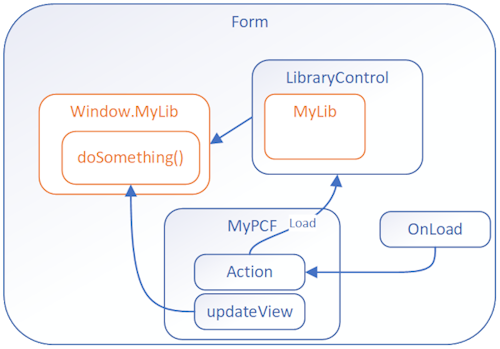
To enable on demand loading, you need to:
**Step 1**: Add these [platform-action element](https://learn.microsoft.com/en-us/power-apps/developer/component-framework/manifest-schema-reference/platform-action), [feature-usage element](https://learn.microsoft.com/en-us/power-apps/developer/component-framework/manifest-schema-reference/feature-usage), and [uses-feature element](https://learn.microsoft.com/en-us/power-apps/developer/component-framework/manifest-schema-reference/uses-feature) child elements to the [control element](https://learn.microsoft.com/en-us/power-apps/developer/component-framework/manifest-schema-reference/control):
```xml
<platform-action action-type="afterPageLoad" />
<feature-usage>
<uses-feature name="Utility"
required="true" />
</feature-usage>
```
**Step 2**: Set the `load-type` attribute of the [dependency element](https://learn.microsoft.com/en-us/power-apps/developer/component-framework/manifest-schema-reference/dependency) to `onDemand`.
```xml
<dependency type="control"
name="samples_SampleNamespace.StubLibrary"
load-type="onDemand" />
```
## Next Steps
Try a tutorial that walks you through creating a dependent library:
[Tutorial: Use dependent libraries in a component](https://learn.microsoft.com/en-us/power-apps/developer/component-framework/tutorial-use-dependent-libraries)
© github · MIT · github/awesome-copilot


