pcf-events — GitHub Copilot rule: custom events in PCF components
A rule that tells Copilot how to declare and handle custom events in Power Apps Component Framework components.
.github/instructions/pcf-events.instructions.mdWhat pcf-events does
The rule covers the PCF event mechanism: a component declares events in the manifest with the event element, raises them in code, and the hosting app reacts. In Canvas Apps you wire the handler with Power Fx expressions in the properties pane. In Model-Driven Apps you attach handlers through addEventHandler on formContext.getControl(...).
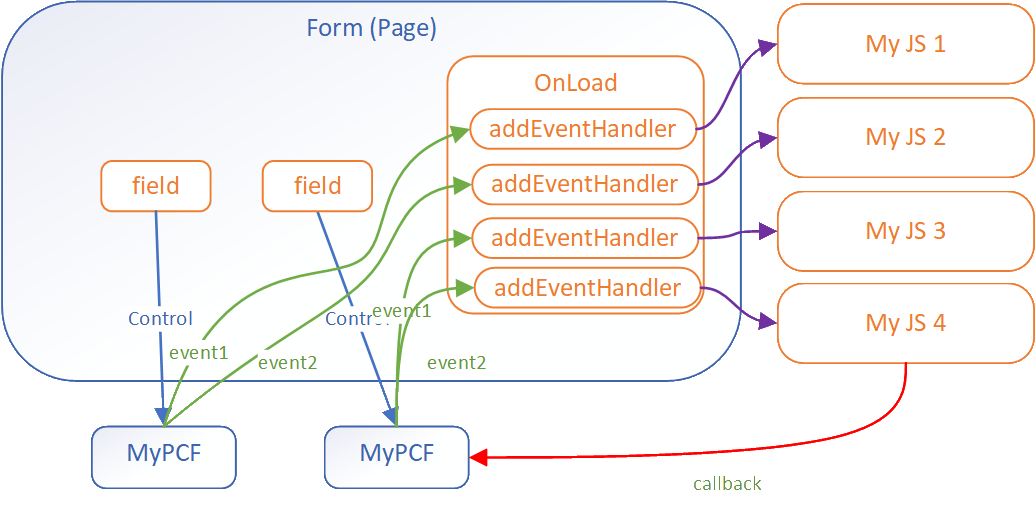
Model-Driven Apps can pass a payload with the event, including a callback function so the script handler can call back into the component. Events fire separately for each instance of the component on a form — worth checking if your logic assumes a single control.
The rule applies to **/*.{ts,tsx,js,json,xml,pcfproj,csproj}. The topic is marked pre-release, so the documentation may change and behaviour is worth verifying against the current version.
What it helps with
- declare a custom event in a PCF component manifest
- subscribe to a control event in Model-Driven Apps with
addEventHandler - handle a component event in Canvas Apps through Power Fx
- pass a payload and callback from the component to the script handler
- keep handlers straight when several instances of the control sit on one form
Example prompts for the agent
- add a customEvent1 event to the component manifest and raise it in code
- show me how to subscribe to customEvent1 with addEventHandler in Model-Driven Apps
- how do I pass a callback function in the payload of a PCF component event
How to install pcf-events
Manually: put the files in place
.github/instructions/pcf-events.instructions.mdThe applyTo field sets which files it applies to
Manually: put the files in place
.claude/rules/pcf-events.mdThe paths frontmatter field limits the files: move applyTo from the source into paths
AGENTS.md
Codex reads AGENTS.md: paste the rule text there
Manually: put the files in place
.cursor/rules/pcf-events.mdcFrontmatter: description, globs, alwaysApply. Move applyTo from the source into globs, or the rule will not attach on its own
Manually: put the files in place
.devin/rules/pcf-events.mdManually: put the files in place
.clinerules/pcf-events.mdStep by step, with commands for each platform: AGENTS.md vs CLAUDE.md: what they are and which one to use
Questions about pcf-events
How do I install pcf-events in GitHub Copilot?
Place the file at .github/instructions/pcf-events.instructions.md in your repository — Copilot picks it up for files matching applyTo.
What does pcf-events do?
It describes declaring and handling custom events in PCF components: the event element in the manifest, subscriptions in Canvas Apps and Model-Driven Apps, and payload passing.
Which files does the rule apply to?
Files matching **/*.{ts,tsx,js,json,xml,pcfproj,csproj}, as set by applyTo in its frontmatter.
Source text
pcf-events.instructions.md · MIT
---
description: 'Define and handle custom events in PCF components'
applyTo: '**/*.{ts,tsx,js,json,xml,pcfproj,csproj}'
---
# Define Events (Preview)
[This topic is pre-release documentation and is subject to change.]
A common requirement when building custom components with the Power Apps Component Framework is the ability to react to events generated within the control. These events can be invoked either due to user interaction or programmatically via code. For example, an application can have a code component that lets a user build a product bundle. This component can also raise an event which could show product information in another area of the application.
## Component Data Flow
The common data flow for a code component is data flowing from the hosting application into the control as inputs and updated data flowing out of the control to the hosting form or page. This diagram shows the standard pattern of data flow for a typical PCF component:
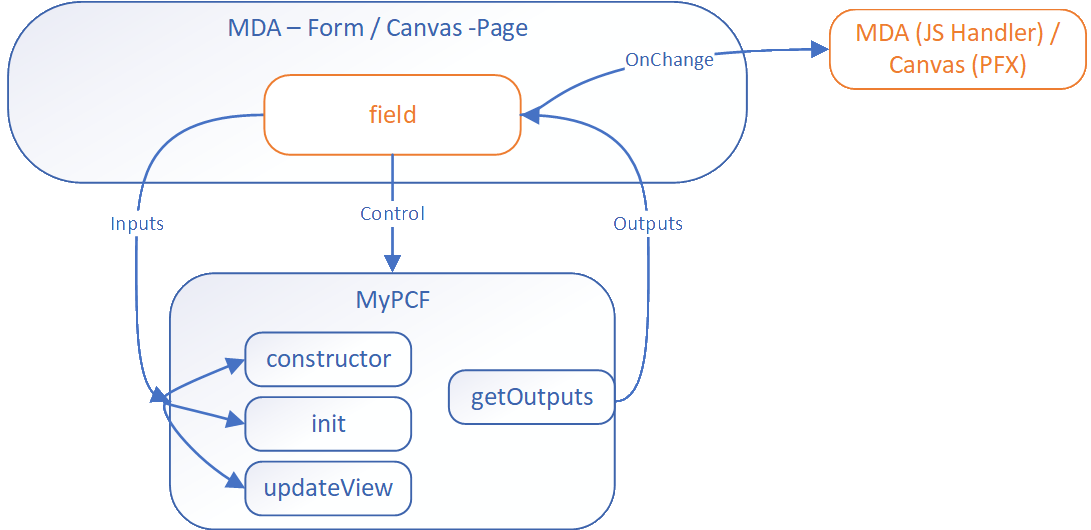
The data update from the code component to the bound field triggers the `OnChange` event. For most component scenarios, this is enough and makers just add a handler to trigger subsequent actions. However, a more complicated control might require events to be raised that aren't field updates. The event mechanism allows code components to define events that have separate event handlers.
## Using Events
The event mechanism in PCF is based on the standard event model in JavaScript. The component can define events in the manifest file and raise these events in the code. The hosting application can listen to these events and react to them.
### Define Events in Manifest
The component defines events using the [event element](https://learn.microsoft.com/en-us/power-apps/developer/component-framework/manifest-schema-reference/event) in the manifest file. This data allows the respective hosting application to react to events in different ways.
```xml
<property
name="sampleProperty"
display-name-key="Property_Display_Key"
description-key="Property_Desc_Key"
of-type="SingleLine.Text"
usage="bound"
required="true"
/>
<event
name="customEvent1"
display-name-key="customEvent1"
description-key="customEvent1"
/>
<event
name="customEvent2"
display-name-key="customEvent2"
description-key="customEvent2"
/>
```
### Canvas Apps Event Handling
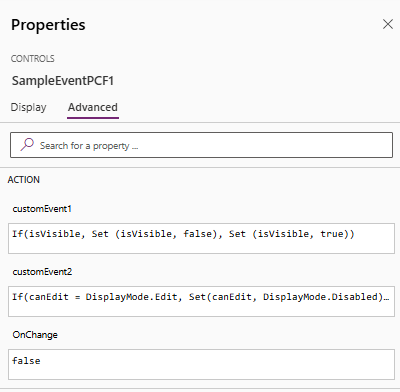
Canvas apps react to the event using Power Fx expressions:
### Model-Driven Apps Event Handling
Model Driven Apps use the [addEventHandler method](https://learn.microsoft.com/en-us/power-apps/developer/model-driven-apps/clientapi/reference/controls/addeventhandler) to associate event handlers to custom events for a component.
```javascript
const controlName1 = "cr116_personid";
this.onLoad = function (executionContext) {
const formContext = executionContext.getFormContext();
const sampleControl1 = formContext.getControl(controlName1);
sampleControl1.addEventHandler("customEvent1", this.onSampleControl1CustomEvent1);
sampleControl1.addEventHandler("customEvent2", this.onSampleControl1CustomEvent2);
}
```
> **Note**: These events occur separately for each instance of the code component in the app.
## Defining an Event for Model-Driven Apps
For model-driven apps you can pass a payload with the event allowing for more complex scenarios. For example in the diagram below the component passes a callback function in the event allowing the script handling to call back to the component.
```javascript
this.onSampleControl1CustomEvent1 = function (params) {
//alert(`SampleControl1 Custom Event 1: ${params}`);
alert(`SampleControl1 Custom Event 1`);
}.bind(this);
this.onSampleControl2CustomEvent2 = function (params) {
alert(`SampleControl2 Custom Event 2: ${params.message}`);
// prevent the default action for the event
params.callBackFunction();
}
```
## Defining an Event for Canvas Apps
Makers configure an event using Power Fx on the PCF control in the properties pane.
## Calling an Event
See how to call an event in [Events](https://learn.microsoft.com/en-us/power-apps/developer/component-framework/reference/events).
## Next Steps
[Tutorial: Define a custom event in a component](https://learn.microsoft.com/en-us/power-apps/developer/component-framework/tutorial-define-event)
© github · MIT · github/awesome-copilot


