speckit-companion · alfredoperez, claude-mod — Claude Code plugin: what it does, how to install
speckit-companion displays live Spec Kit run progress directly in Claude Code, adding a status band above the prompt and a side pane for steps, documents, and tasks.
MIT ★ 110 updated 2026-10-19
/plugin marketplace add alfredoperez/speckit-companion
/plugin install speckit-companion@speckit-companionWhat speckit-companion does
The mod attaches an informational status bar above the prompt and a side panel with three tabs: Run, Overview, and Specs. It tracks pipeline phases, elapsed execution times, generated documents, and task progress. If your terminal window is at least 144 columns wide, the panel opens automatically alongside the session transcript.
Navigation relies on keyboard shortcuts: Tab and arrow keys switch between steps, Enter opens document previews inside the pane, and o launches your editor based on VISUAL or EDITOR variables.
This tool operates strictly in read-only mode, never modifying project files and transmitting zero telemetry. Claude Code 2.1.287 or later is required because earlier releases do not enable mod support by default.
What it helps with
- track active Spec Kit pipeline progress without leaving the terminal
- inspect generated spec documents and execution timestamps
- switch focus across different specs using tracker commands
- open referenced spec files quickly in an external editor
Example prompts for the agent
- /speckit-tracker
- /speckit-tracker export-csv
- /spec auto
How to install speckit-companion
Plugin marketplace
/plugin marketplace add alfredoperez/speckit-companion/plugin install speckit-companion@speckit-companionStep by step, with commands for each platform: Claude Code plugins: marketplaces, installing, and building your own
Questions about speckit-companion
How to install speckit-companion in Claude Code?
Run /plugin marketplace add alfredoperez/speckit-companion followed by /plugin install speckit-companion@speckit-companion. In an active session, apply changes with /reload-plugins.
What does speckit-companion do?
It adds a status strip and an interactive terminal pane inside Claude Code to observe Spec Kit runs, showing completed phases, tasks, and document links.
Does speckit-companion modify files or require network access?
No, the mod is read-only: it reads local spec files without altering them, executes no remote network calls, and sends no telemetry.
Source text
claude-mod · MIT
# SpecKit Companion for Claude Code Follow a [Spec Kit](https://github.com/github/spec-kit) run without leaving Claude Code. This [mod](https://code.claude.com/docs/en/plugins/mods/overview) adds a band above the prompt that says where the run stands, and a pane beside the transcript with the steps, their times, the documents and the tasks as they're ticked. It works with stock Spec Kit and with [SpecKit Companion](https://speckit-companion.dev). 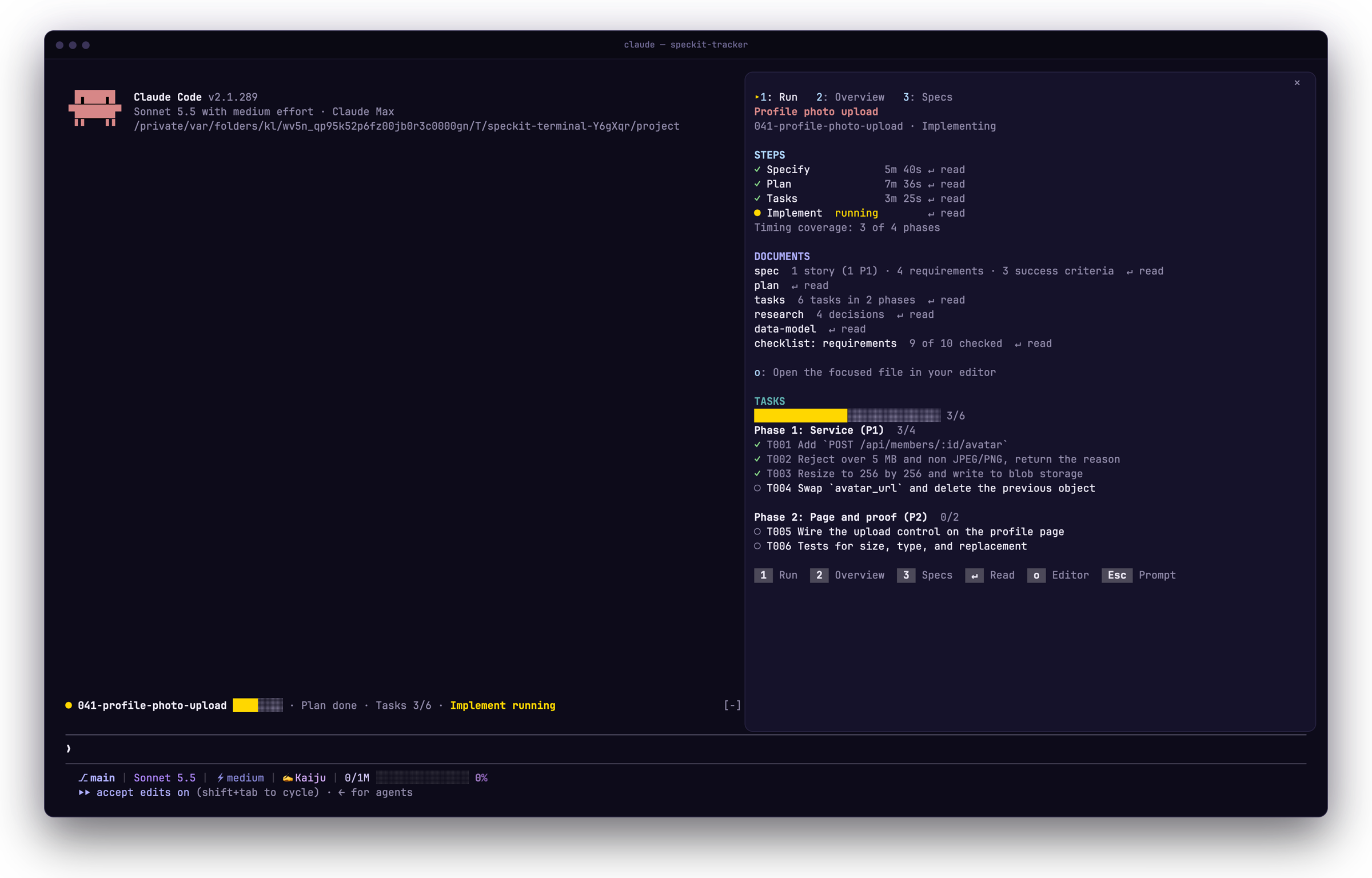 ## Install ```bash claude plugin marketplace add https://speckit-companion.dev/plugins/marketplace.json claude plugin install speckit-companion@speckit-companion ``` You need Claude Code 2.1.287 or later, the first version with mods on by default. Check with `claude --version`. In a session that is already open, run `/reload-plugins`. To update later, run `claude plugin update speckit-companion@speckit-companion`. ## First run Open a project that has a spec. In a terminal at least 144 columns wide the pane opens by itself, and in a narrower one `/speckit-tracker` opens it above the prompt. It has three tabs: Run for the steps, documents and tasks, Overview for what the run recorded, and Specs to pick the spec to follow. 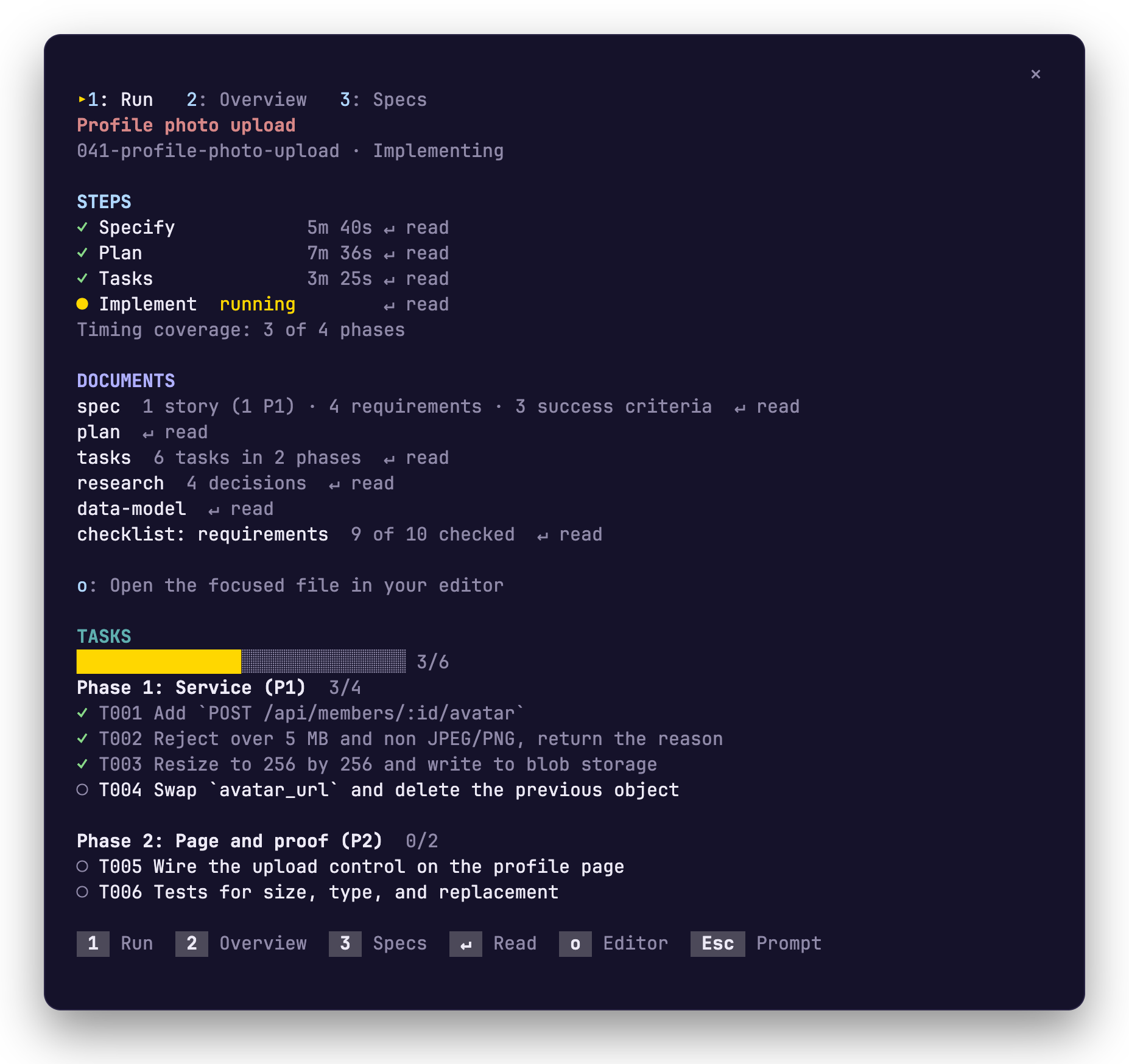 ## Keys | Key | What it does | | --- | --- | | `1` `2` `3` | Switch to Run, Overview or Specs | | Tab or the arrow keys | Move between steps and documents | | `↵` | Read the step or document you are on, inside the pane | | `o` | Open that file in your editor | | `b` | Go back from a document | | `Esc` | Give the keyboard back to the prompt | ## Switch specs with `/speckit-tracker` | You type | What happens | | --- | --- | | `/speckit-tracker` | The pane opens on its Specs tab | | `/speckit-tracker 42` or `/speckit-tracker export-csv` | The band and the pane follow that spec | | `/speckit-tracker auto` | They go back to following the most recently active spec | Your pick is remembered for the project. `/spec` is a shorter name for the same command. ## What it reads, runs and sends The mod only reads. It never writes a spec file or the run record, and it never sends a prompt, so you run the `/speckit-*` commands yourself. - **Reads:** the spec files and the run record in your project, and four environment variables (`VISUAL`, `EDITOR`, `TERM_PROGRAM`, `CURSOR_TRACE_ID`) to pick your editor. It does not read the conversation. - **Runs:** one program, your editor, and only when you press `o`. When no editor can be started, the file's path goes to your clipboard. - **Sends:** nothing. The mod makes no network request and has no telemetry. Tested on Claude Code 2.1.291. The mods API can change between releases. <!-- other-products:start --> ## SpecKit Companion runs in four places | Where | What it is | Start here | |---|---|---| | VS Code | The extension: a sidebar, a spec viewer and the Overview of every run. | [Install](https://speckit-companion.dev/docs/install) | | Spec Kit | The engine half: records each step so every surface can show progress and resume. | [Install](https://speckit-companion.dev/docs/install) | | GitHub Copilot app | A live spec board in the app's side panel. | [Copilot app](https://speckit-companion.dev/docs/copilot-app) | | Claude Code | The followed spec's run above your prompt and in a pane. | [Claude Code](https://speckit-companion.dev/docs/claude-code) | <!-- other-products:end --> ## Docs [Guide](https://speckit-companion.dev/docs/claude-code) · [Changelog](./CHANGELOG.md) · [Develop](https://github.com/alfredoperez/speckit-companion/blob/main/apps/claude-mod/docs/develop.md) · MIT licensed.
© Alfredo Perez · MIT · alfredoperez/speckit-companion
Similar plugins
All plugins for Agent setup: memory, context, orchestration →speckit-companion by other authors comes first.


