speckit-companion · alfredoperez, claude-mod — плагин для Claude Code
Плагин speckit-companion показывает статус выполнения Spec Kit прямо в терминале Claude Code: выводит полосу прогресса над строкой ввода и боковую панель со списком задач и шагов.
MIT ★ 110 обновлён 2026-10-19
/plugin marketplace add alfredoperez/speckit-companion
/plugin install speckit-companion@speckit-companionЧто делает speckit-companion
Мод добавляет статусную строку над полем ввода и отдельную панель с вкладками Run, Overview и Specs. На них отображаются этапы спецификации, затраченное время, список документов и отмеченные задачи. Если ширина терминала не меньше 144 колонок, боковая панель открывается автоматически; на более узких экранах её можно вызвать командой /speckit-tracker.
Перемещаться между шагами и документами можно стрелками или клавишей Tab. Клавиша ↵ открывает просмотр документа прямо в панели, а o запускает внешний редактор через переменные VISUAL или EDITOR.
Плагин работает строго в режиме чтения: он не меняет файлы спецификаций, не создаёт сетевых запросов и не отправляет телеметрию. Для запуска требуется версия Claude Code 2.1.287 или новее, где поддержка модов включена по умолчанию.
Какие задачи решает
- следить за ходом выполнения Spec Kit без переключения окон
- проверять статус и время завершения отдельных шагов
- читать документы спецификации прямо внутри терминального интерфейса
- переключаться между несколькими активными спецификациями проекта
Примеры запросов агенту
- /speckit-tracker
- /speckit-tracker export-csv
- /spec auto
Как установить speckit-companion
Через маркетплейс плагинов
/plugin marketplace add alfredoperez/speckit-companion/plugin install speckit-companion@speckit-companionПо шагам, с командами для каждой платформы: Плагины Claude Code: маркетплейсы, установка и как собрать свой
Вопросы о speckit-companion
Как установить speckit-companion в Claude Code?
Выполните команду /plugin marketplace add alfredoperez/speckit-companion, затем запустите /plugin install speckit-companion@speckit-companion. В уже открытой сессии обновите окружение командой /reload-plugins.
Что делает speckit-companion?
Он визуализирует ход выполнения Spec Kit, показывая статус над строкой ввода, а также панель со временем шагов, документами и списком задач.
Меняет ли плагин файлы спецификаций?
Нет, мод работает исключительно на чтение: он просматривает локальные файлы проекта и переменные окружения, не переписывая данные и не отправляя сетевых запросов.
Исходный текст
claude-mod · MIT
# SpecKit Companion for Claude Code Follow a [Spec Kit](https://github.com/github/spec-kit) run without leaving Claude Code. This [mod](https://code.claude.com/docs/en/plugins/mods/overview) adds a band above the prompt that says where the run stands, and a pane beside the transcript with the steps, their times, the documents and the tasks as they're ticked. It works with stock Spec Kit and with [SpecKit Companion](https://speckit-companion.dev). 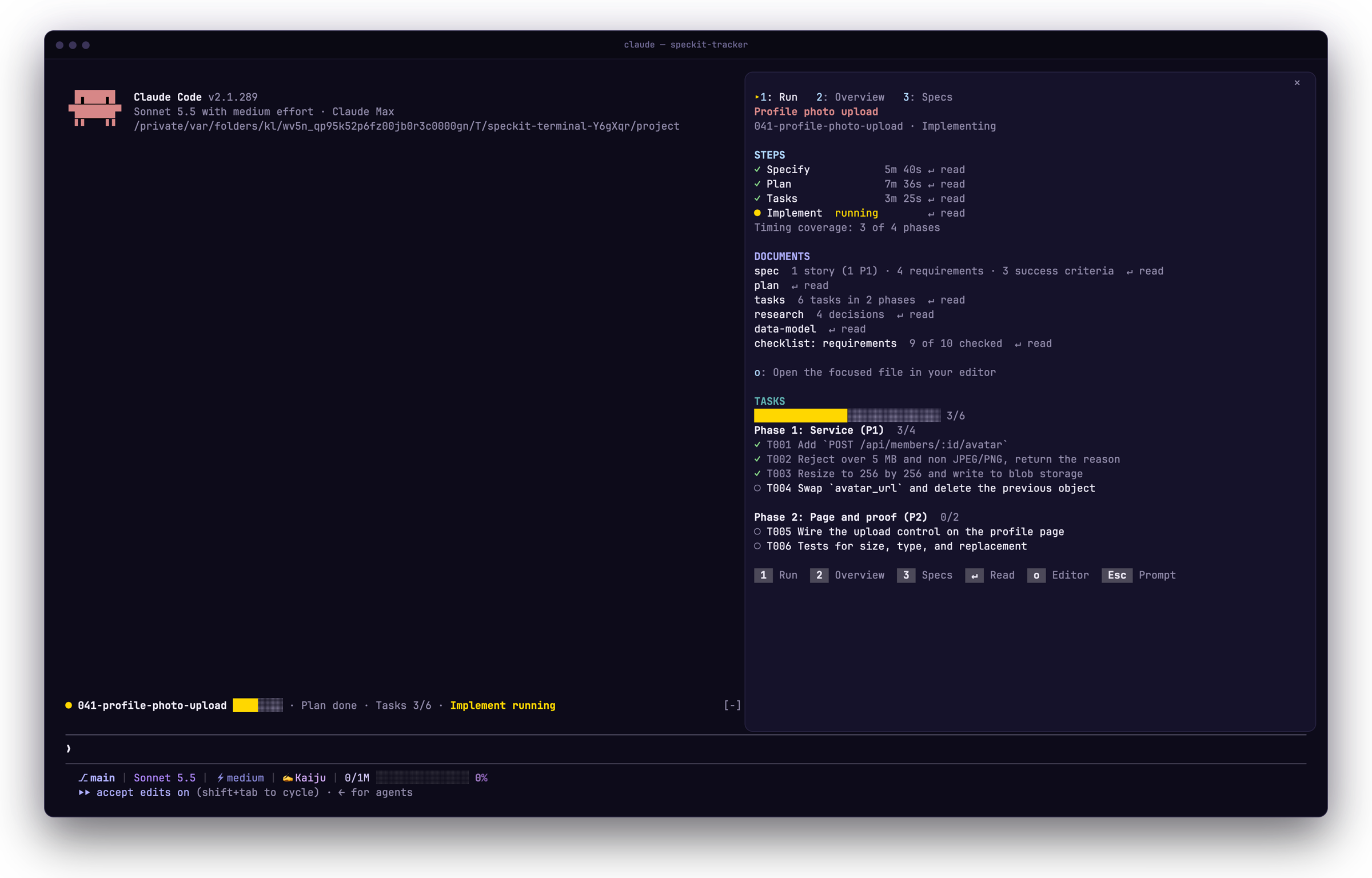 ## Install ```bash claude plugin marketplace add https://speckit-companion.dev/plugins/marketplace.json claude plugin install speckit-companion@speckit-companion ``` You need Claude Code 2.1.287 or later, the first version with mods on by default. Check with `claude --version`. In a session that is already open, run `/reload-plugins`. To update later, run `claude plugin update speckit-companion@speckit-companion`. ## First run Open a project that has a spec. In a terminal at least 144 columns wide the pane opens by itself, and in a narrower one `/speckit-tracker` opens it above the prompt. It has three tabs: Run for the steps, documents and tasks, Overview for what the run recorded, and Specs to pick the spec to follow. 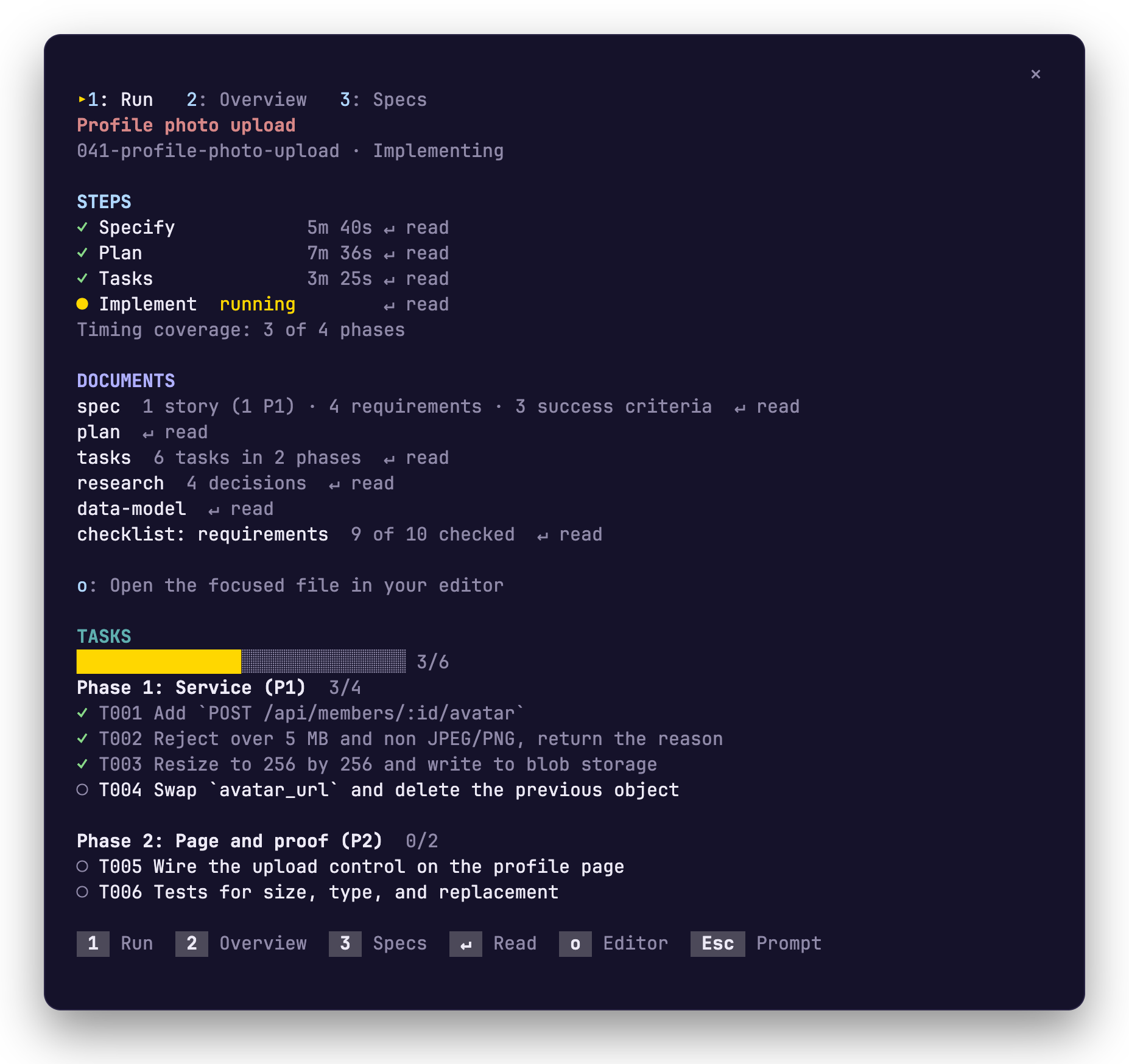 ## Keys | Key | What it does | | --- | --- | | `1` `2` `3` | Switch to Run, Overview or Specs | | Tab or the arrow keys | Move between steps and documents | | `↵` | Read the step or document you are on, inside the pane | | `o` | Open that file in your editor | | `b` | Go back from a document | | `Esc` | Give the keyboard back to the prompt | ## Switch specs with `/speckit-tracker` | You type | What happens | | --- | --- | | `/speckit-tracker` | The pane opens on its Specs tab | | `/speckit-tracker 42` or `/speckit-tracker export-csv` | The band and the pane follow that spec | | `/speckit-tracker auto` | They go back to following the most recently active spec | Your pick is remembered for the project. `/spec` is a shorter name for the same command. ## What it reads, runs and sends The mod only reads. It never writes a spec file or the run record, and it never sends a prompt, so you run the `/speckit-*` commands yourself. - **Reads:** the spec files and the run record in your project, and four environment variables (`VISUAL`, `EDITOR`, `TERM_PROGRAM`, `CURSOR_TRACE_ID`) to pick your editor. It does not read the conversation. - **Runs:** one program, your editor, and only when you press `o`. When no editor can be started, the file's path goes to your clipboard. - **Sends:** nothing. The mod makes no network request and has no telemetry. Tested on Claude Code 2.1.291. The mods API can change between releases. <!-- other-products:start --> ## SpecKit Companion runs in four places | Where | What it is | Start here | |---|---|---| | VS Code | The extension: a sidebar, a spec viewer and the Overview of every run. | [Install](https://speckit-companion.dev/docs/install) | | Spec Kit | The engine half: records each step so every surface can show progress and resume. | [Install](https://speckit-companion.dev/docs/install) | | GitHub Copilot app | A live spec board in the app's side panel. | [Copilot app](https://speckit-companion.dev/docs/copilot-app) | | Claude Code | The followed spec's run above your prompt and in a pane. | [Claude Code](https://speckit-companion.dev/docs/claude-code) | <!-- other-products:end --> ## Docs [Guide](https://speckit-companion.dev/docs/claude-code) · [Changelog](./CHANGELOG.md) · [Develop](https://github.com/alfredoperez/speckit-companion/blob/main/apps/claude-mod/docs/develop.md) · MIT licensed.
© Alfredo Perez · MIT · alfredoperez/speckit-companion
Похожие плагины
Все плагины по теме «Настройка агента: память, контекст, субагенты» →Сначала — speckit-companion от других авторов.


