pcf-events — правило для GitHub Copilot: события в PCF-компонентах
Правило подсказывает Copilot, как объявлять и обрабатывать кастомные события в компонентах Power Apps Component Framework.
.github/instructions/pcf-events.instructions.mdЧто делает pcf-events
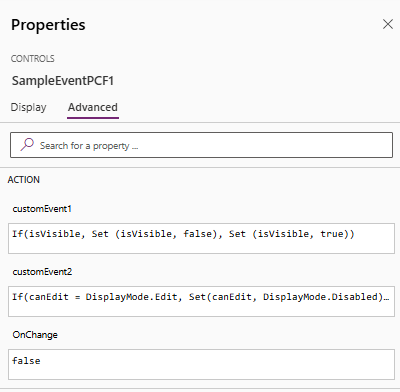
Правило описывает механизм событий в PCF: компонент объявляет события в манифесте через элемент event, поднимает их в коде, а хост-приложение на них реагирует. В Canvas Apps подписка настраивается выражениями Power Fx в панели свойств контрола. В Model-Driven Apps обработчики вешаются методом addEventHandler через formContext.getControl(...).
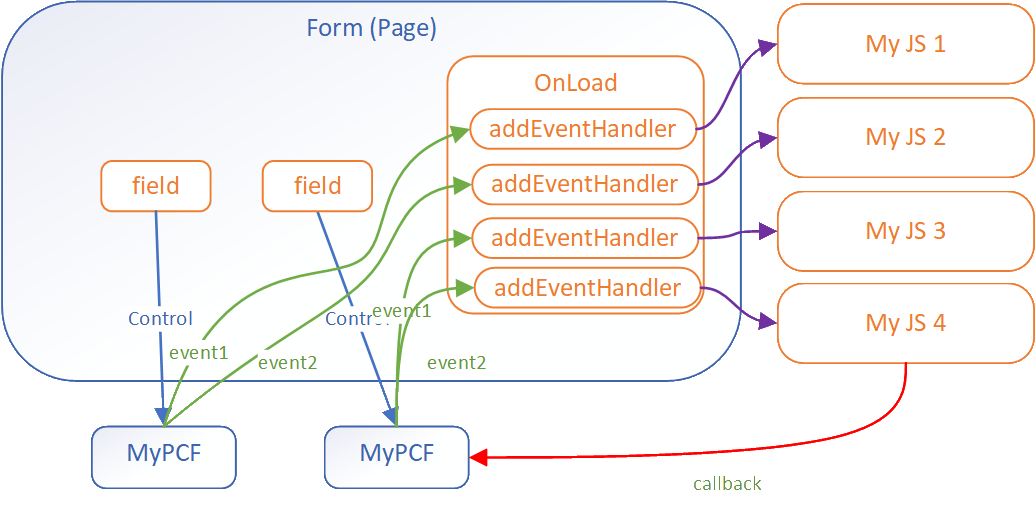
Для Model-Driven Apps событие может нести payload — например, callback-функцию, чтобы скрипт-обработчик мог вернуться в компонент. События срабатывают отдельно для каждого экземпляра компонента на форме, это повод проверить логику, если контролов несколько.
Правило применяется к файлам **/*.{ts,tsx,js,json,xml,pcfproj,csproj}. Тема помечена как pre-release: документация может меняться, так что поведение стоит сверять с актуальной версией.
Какие задачи решает
- объявить кастомное событие в манифесте PCF-компонента
- подписаться на событие контрола в Model-Driven Apps через
addEventHandler - настроить реакцию на событие в Canvas Apps через Power Fx
- передать payload и callback из компонента в скрипт-обработчик
- развести обработчики, когда на форме несколько экземпляров контрола
Примеры запросов агенту
- добавь в манифест компонента событие customEvent1 и подними его в коде
- покажи, как подписаться на customEvent1 через addEventHandler в Model-Driven Apps
- как передать callback-функцию в payload события PCF-компонента
Как установить pcf-events
Вручную: положить файлы
.github/instructions/pcf-events.instructions.mdПоле applyTo задаёт, к каким файлам применять
Вручную: положить файлы
.claude/rules/pcf-events.mdПоле paths во frontmatter ограничивает файлы: applyTo из источника → paths
AGENTS.md
Codex читает AGENTS.md: вставьте текст правила туда
Вручную: положить файлы
.cursor/rules/pcf-events.mdcВо frontmatter: description, globs, alwaysApply. applyTo из источника → globs, иначе правило само не подключится
Вручную: положить файлы
.devin/rules/pcf-events.mdВручную: положить файлы
.clinerules/pcf-events.mdПо шагам, с командами для каждой платформы: AGENTS.md и CLAUDE.md: что это, кто читает и какой выбрать
Из того же набора732
Весь набор →Похожие
Рядом в теме «Фронтенд и UI»
Все правила IDE по теме «Фронтенд и UI» →Вопросы о pcf-events
Как установить pcf-events в GitHub Copilot?
Положите файл по пути .github/instructions/pcf-events.instructions.md в репозитории — Copilot подхватит правило для файлов, подходящих под applyTo.
Что делает pcf-events?
Описывает объявление и обработку кастомных событий в PCF-компонентах: элемент event в манифесте, подписку в Canvas Apps и Model-Driven Apps, передачу payload.
Для каких файлов работает правило?
Для **/*.{ts,tsx,js,json,xml,pcfproj,csproj} — так задан applyTo в его frontmatter.
Исходный текст
pcf-events.instructions.md · MIT
---
description: 'Define and handle custom events in PCF components'
applyTo: '**/*.{ts,tsx,js,json,xml,pcfproj,csproj}'
---
# Define Events (Preview)
[This topic is pre-release documentation and is subject to change.]
A common requirement when building custom components with the Power Apps Component Framework is the ability to react to events generated within the control. These events can be invoked either due to user interaction or programmatically via code. For example, an application can have a code component that lets a user build a product bundle. This component can also raise an event which could show product information in another area of the application.
## Component Data Flow
The common data flow for a code component is data flowing from the hosting application into the control as inputs and updated data flowing out of the control to the hosting form or page. This diagram shows the standard pattern of data flow for a typical PCF component:
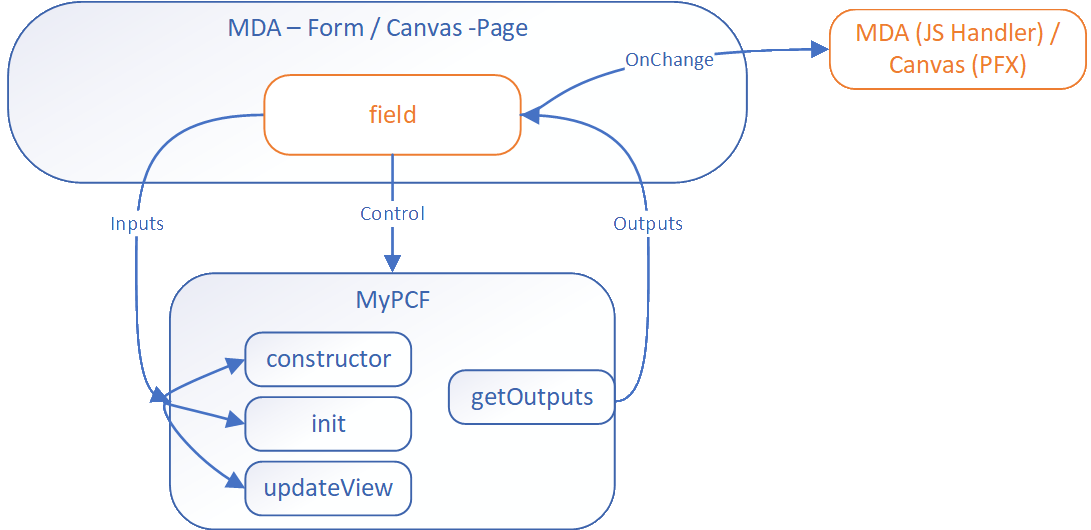
The data update from the code component to the bound field triggers the `OnChange` event. For most component scenarios, this is enough and makers just add a handler to trigger subsequent actions. However, a more complicated control might require events to be raised that aren't field updates. The event mechanism allows code components to define events that have separate event handlers.
## Using Events
The event mechanism in PCF is based on the standard event model in JavaScript. The component can define events in the manifest file and raise these events in the code. The hosting application can listen to these events and react to them.
### Define Events in Manifest
The component defines events using the [event element](https://learn.microsoft.com/en-us/power-apps/developer/component-framework/manifest-schema-reference/event) in the manifest file. This data allows the respective hosting application to react to events in different ways.
```xml
<property
name="sampleProperty"
display-name-key="Property_Display_Key"
description-key="Property_Desc_Key"
of-type="SingleLine.Text"
usage="bound"
required="true"
/>
<event
name="customEvent1"
display-name-key="customEvent1"
description-key="customEvent1"
/>
<event
name="customEvent2"
display-name-key="customEvent2"
description-key="customEvent2"
/>
```
### Canvas Apps Event Handling
Canvas apps react to the event using Power Fx expressions:
### Model-Driven Apps Event Handling
Model Driven Apps use the [addEventHandler method](https://learn.microsoft.com/en-us/power-apps/developer/model-driven-apps/clientapi/reference/controls/addeventhandler) to associate event handlers to custom events for a component.
```javascript
const controlName1 = "cr116_personid";
this.onLoad = function (executionContext) {
const formContext = executionContext.getFormContext();
const sampleControl1 = formContext.getControl(controlName1);
sampleControl1.addEventHandler("customEvent1", this.onSampleControl1CustomEvent1);
sampleControl1.addEventHandler("customEvent2", this.onSampleControl1CustomEvent2);
}
```
> **Note**: These events occur separately for each instance of the code component in the app.
## Defining an Event for Model-Driven Apps
For model-driven apps you can pass a payload with the event allowing for more complex scenarios. For example in the diagram below the component passes a callback function in the event allowing the script handling to call back to the component.
```javascript
this.onSampleControl1CustomEvent1 = function (params) {
//alert(`SampleControl1 Custom Event 1: ${params}`);
alert(`SampleControl1 Custom Event 1`);
}.bind(this);
this.onSampleControl2CustomEvent2 = function (params) {
alert(`SampleControl2 Custom Event 2: ${params.message}`);
// prevent the default action for the event
params.callBackFunction();
}
```
## Defining an Event for Canvas Apps
Makers configure an event using Power Fx on the PCF control in the properties pane.
## Calling an Event
See how to call an event in [Events](https://learn.microsoft.com/en-us/power-apps/developer/component-framework/reference/events).
## Next Steps
[Tutorial: Define a custom event in a component](https://learn.microsoft.com/en-us/power-apps/developer/component-framework/tutorial-define-event)
© github · MIT · github/awesome-copilot


