project-starter — Claude Code plugin: features and install
project-starter adds agents, skills, hooks, and slash commands to Claude Code. Use it to review changes, investigate bugs, and handle Git tasks.
MIT ★ 1,424 updated 2026-10-06
/plugin marketplace add CloudAI-X/claude-workflow-v2
/plugin install project-starter@claude-workflowWhat project-starter does
The plugin includes agents for code review, debugging, security, documentation, refactoring, and tests. Its commands switch working modes and handle tasks such as preparing a commit or checking changes. Skills load domain knowledge when needed; hooks run on events. For instance, one hook formats edited files with the project’s formatter, while another can block an edit that appears to contain an API key.
Install it through the marketplace with the two commands below. The package lists 7 agents, 26 commands, 14 skills, and 14 hooks. Formatting follows the formatter already used by the project, so its output depends on that setup.
What it helps with
- review changes before shipping
- trace the cause of a login error
- generate a commit message
- add tests for recent changes
- format a file after editing
Example prompts for the agent
- Check my changes before shipping with
/project-starter:verify-changes. - Generate a commit message for the staged changes:
/project-starter:commit. - Investigate why login requests are returning 401 errors.
How to install project-starter
Plugin marketplace
/plugin marketplace add CloudAI-X/claude-workflow-v2/plugin install project-starter@claude-workflowStep by step, with commands for each platform: Claude Code plugins: marketplaces, installing, and building your own
Questions about project-starter
How do I install project-starter in Claude Code?
Run these commands in order: /plugin marketplace add CloudAI-X/claude-workflow-v2, then /plugin install project-starter@claude-workflow.
What does project-starter do?
It adds agents, skills, hooks, and slash commands for development work, including code review, debugging, and Git tasks.
How does its formatting hook work?
After an edit, the hook formats the file with the formatter configured for the project.
Source text
SKILL.md · MIT
# project-starter
[](https://opensource.org/licenses/MIT)
[](https://code.claude.com)
[](https://github.com/CloudAI-X/claude-workflow-v2/pulls)
A universal Claude Code workflow plugin with specialized agents, skills, hooks, and mode commands for any software project. Compatible with [skills.sh](https://skills.sh) — works with Claude Code, Cursor, Codex, and 35+ AI agents.
---
## Quick Start
### Option 1: skills.sh (Recommended — Any Agent)
```bash
npx skills add CloudAI-X/claude-workflow-v2
```
Installs skills to Claude Code, Cursor, Codex, Windsurf, Cline, and 35+ other AI agents automatically.
### Option 2: npx (Claude Code — Full Plugin)
```bash
npx install-claude-workflow-v2@latest
```
Copies agents, commands, skills and hook scripts into `.claude/` and registers the hooks in `.claude/settings.json` (existing files and settings are kept). Two differences from a plugin install: commands are not namespaced (`/commit` instead of `/project-starter:commit`), and `permissionMode: acceptEdits` on the debugger, docs-writer, refactorer and test-architect agents takes effect (Claude Code ignores that field for plugin agents).
### Option 3: CLI (Per-Session)
```bash
# Clone the plugin
git clone https://github.com/CloudAI-X/claude-workflow-v2.git
# Run Claude Code with the plugin
claude --plugin-dir ./claude-workflow-v2
```
### Option 4: Agent SDK
```typescript
import { query } from "@anthropic-ai/claude-agent-sdk";
for await (const message of query({
prompt: "Hello",
options: {
plugins: [{ type: "local", path: "./claude-workflow-v2" }],
},
})) {
// Plugin commands, agents, and skills are now available
}
```
### Option 5: Install Permanently
```bash
# Add this repository as a marketplace, then install the plugin from it
claude plugin marketplace add CloudAI-X/claude-workflow-v2
claude plugin install project-starter@claude-workflow
```
### Verify Installation
After loading the plugin, verify it's working:
```
> /plugin
```
Tab to **Installed** - you should see `project-starter` listed.
Tab to **Errors** - should be empty (no errors).
These commands become available:
```
/project-starter:architect # Architecture-first mode
/project-starter:rapid # Ship fast mode
/project-starter:commit # Auto-generate commit message
/project-starter:verify-changes # Multi-agent verification
```
---
## What's Included
| Component | Count | Description |
| ------------ | ----- | ----------------------------------------------------------------------- |
| **Agents** | 7 | Specialized subagents for code review, debugging, security, etc. |
| **Commands** | 26 | Slash commands for workflows, output styles, planning, and onboarding |
| **Skills** | 14 | Knowledge domains with on-demand context loading |
| **Hooks** | 14 | Automation scripts for formatting, security, metrics, and notifications |
---
## Usage Examples
### Commands in Action
**Auto-commit your changes:**
```
> /project-starter:commit
Looking at staged changes...
✓ Created commit: feat(auth): add JWT refresh token endpoint
```
**Full git workflow:**
```
> /project-starter:commit-push-pr
✓ Committed: feat: add user dashboard
✓ Pushed to origin/feature/dashboard
✓ Created PR #42: https://github.com/you/repo/pull/42
```
**Verify before shipping:**
```
> /project-starter:verify-changes
Spawning verification agents...
├─ build-validator: ✓ Build passes
├─ test-runner: ✓ 42 tests pass
├─ lint-checker: ⚠ 2 warnings (non-blocking)
└─ security-scanner: ✓ No vulnerabilities
Ready to ship!
```
### Agents in Action
Agents spawn automatically based on your request:
**You say:** "The login is broken, users get 401 errors"
```
[debugger agent activated]
→ Checking auth middleware... found issue
→ Token validation uses wrong secret in production
→ Fix: Update AUTH_SECRET in .env.production
```
**You say:** "Review my changes"
```
[code-reviewer agent activated]
→ Analyzing 3 files changed...
✓ Logic is correct
⚠ Missing null check on line 42
⚠ Consider adding rate limiting to this endpoint
```
**You say:** "Add authentication to the API"
```
[orchestrator agent activated]
→ Breaking down into subtasks:
1. Design auth schema (applying the designing-architecture skill)
2. Implement JWT middleware
3. Add login/register endpoints
4. Write tests (spawning test-architect)
5. Update API docs (spawning docs-writer)
```
### Skills in Action
Skills provide domain knowledge automatically:
**You ask:** "How should I structure the payment service?"
```
[designing-architecture skill applied]
→ Recommending hexagonal architecture
→ Payment providers as adapters
→ Core domain isolated from infrastructure
```
**You ask:** "Make this endpoint faster"
```
[optimizing-performance skill applied]
→ Adding database indexes
→ Implementing response caching
→ Using pagination for large results
```
### Hooks in Action
Hooks run automatically on events:
**Security block (pre-edit):**
```
🚫 BLOCKED - Security issue detected in src/config.ts:
- Potential API key detected → Move to .env file and use environment variables (e.g., process.env.API_KEY)
```
**Auto-format (post-edit):**
The edited file is formatted silently with the project's own formatter; the hook prints nothing.
**Desktop notifications:**
```
🔔 "Claude needs input" - when waiting for your response
🔔 "Task complete" - when finished
```
---
## Commands Reference
All commands use the format `/project-starter:<command>`.
### Mode Commands (Output Styles)
| Command | Mode |
| ---------------------------- | --------------------------------------------- |
| `/project-starter:architect` | System design mode - architecture before code |
| `/project-starter:rapid` | Fast development - ship quickly, iterate |
| `/project-starter:mentor` | Teaching mode - explain the "why" |
| `/project-starter:review` | Code review mode - strict quality |
### Git Workflow (Inner-Loop)
| Command | Purpose |
| ------------------------------------ | ----------------------------------------- |
| `/project-starter:commit` | Auto-generate conventional commit message |
| `/project-starter:commit-push-pr` | Commit → Push → Create PR (full workflow) |
| `/project-starter:quick-fix` | Fast fix for lint/type errors |
| `/project-starter:add-tests` | Generate tests for recent changes |
| `/project-starter:lint-fix` | Auto-fix all linting issues |
| `/project-starter:sync-branch` | Sync with main (rebase or merge) |
| `/project-starter:summarize-changes` | Generate standup/PR summaries |
### Verification
| Command | Purpose |
| ---------------------------------- | --------------------------------------- |
| `/project-starter:verify-changes` | Multi-subagent adversarial verification |
| `/project-starter:validate-build` | Build process validation |
| `/project-starter:run-tests` | Tiered test execution |
| `/project-starter:lint-check` | Code quality checks |
| `/project-starter:security-scan` | Security vulnerability detection |
| `/project-starter:code-simplifier` | Post-implementation cleanup |
### Parallel
| Command | Purpose |
| ----------------------------------- | ---------------------------------------- |
| `/project-starter:parallel-review` | Review multiple files/dirs via subagents |
| `/project-starter:parallel-analyze` | Multi-perspective analysis via subagents |
### Planning & Refactoring
| Command | Purpose |
| ------------------------------------- | ------------------------------------------ |
| `/project-starter:plan` | Persistent PLAN.md with phase tracking |
| `/project-starter:refactor-guided` | 4-phase systematic refactoring with safety |
| `/project-starter:dependency-upgrade` | Safe dependency upgrades with rollback |
### Onboarding & Knowledge
| Command | Purpose |
| ----------------------------------------- | --------------------------------------------------------------- |
| `/project-starter:tutorial` | Interactive guided tutorial for new users |
| `/project-starter:bootstrap-repo` | 10-agent parallel repo exploration |
| `/project-starter:save-session-learnings` | Persist session discoveries to docs |
| `/project-starter:metrics` | Summarise the per-turn records in `.claude/agent-metrics.jsonl` |
---
## Agents
Agents are specialized subagents that Claude spawns automatically based on your task.
| Agent | Purpose | Auto-Triggers |
| ------------------ | -------------------------------- | ------------------------------------------------------------ |
| `orchestrator` | Coordinate multi-step tasks | "improve", "enhance", "build", "architecture", complex tasks |
| `code-reviewer` | Review code quality | "review", "PR review", "lint", code changes |
| `debugger` | Systematic bug investigation | Errors, crashes, memory leaks, timeouts, race conditions |
| `docs-writer` | Technical documentation | README, changelogs, migration guides, release notes |
| `security-auditor` | Security vulnerability detection | Auth, encryption, secrets, OAuth, JWT, CORS |
| `refactorer` | Code structure improvements | Tech debt, code smells, complexity reduction |
| `test-architect` | Design test strategies | Test plans, mocking, flaky tests, integration/E2E |
---
## Skills
Skills are knowledge domains that Claude uses autonomously when relevant.
| Skill | Domain |
| ----------------------------- | ----------------------------------------------------- |
| `analyzing-projects` | Understand codebase structure and patterns |
| `designing-tests` | Unit, integration, E2E test approaches |
| `designing-architecture` | Clean Architecture, Hexagonal, etc. |
| `optimizing-performance` | Speed up applications, identify bottlenecks |
| `managing-git` | Version control, conventional commits |
| `designing-apis` | REST/GraphQL patterns and best practices |
| `parallel-execution` | Multi-subagent parallel task execution patterns |
| `web-design-guidelines` | Self-contained UI audit (A11Y, PERF, RD, SEC, I18N) |
| `vercel-react-best-practices` | React/Next.js performance optimization (47 rules) |
| `convex-backend` | Convex backend development (functions, schemas, etc.) |
| `database-design` | Schema design, indexing, query optimization |
| `devops-infrastructure` | Docker, CI/CD, deployment, IaC, monitoring |
| `error-handling` | Error patterns, structured logging, retry/circuit |
| `security-patterns` | Auth, RBAC, secrets, CORS, rate limiting, headers |
---
## Hooks
Hooks run automatically on specific events.
| Hook | Trigger | Action |
| --------------------- | ------------- | ----------------------------------------------------------- |
| Security scan | Edit/Write | Blocks edits that contain potential secrets |
| File protection | Edit/Write | Blocks edits to lock files, .env files, .git |
| Auto-format | Edit/Write | Runs the project's prettier/black/gofmt by file type |
| TypeScript check | Edit/Write | Runs the project's `tsc --noEmit`, reports errors to Claude |
| Pre-commit check | Edit/Write | Flags debug statements & temp markers to Claude |
| Branch protection | Bash | Warns on commit/push on protected branches |
| Command logging | Bash | Logs every command to `.claude/command-history.log` |
| Environment check | Session start | Validates Node.js, Python, Git |
| Prompt analysis | User prompt | Suggests appropriate agents |
| Auto-verify | Task complete | Runs tests/lint, reports results |
| Doc update suggest | Task complete | Suggests CLAUDE.md updates for changes |
| Session metrics | Task complete | Logs timestamp, changed-file count, latest commit |
| Input notification | Input needed | Desktop notification |
| Complete notification | Task complete | Desktop notification |
---
## Examples
For detailed multi-agent orchestration examples, see the [examples/](./examples/) directory:
| Example | Description |
| -------------------------------------------------------------------------------- | ------------------------------------------------------ |
| [Comprehensive Code Review](./examples/orchestration/comprehensive-code-review/) | 6-agent sequential workflow for thorough code analysis |
| [Parallel Execution](./examples/orchestration/parallel-execution/) | Fan-out multi-subagent workflow for independent tasks |
The comprehensive-code-review example includes:
- **README.md** - Overview and quick start
- **workflow.md** - Exact prompts to use
- **verification.md** - How to verify it works
- **sample-outputs/** - Example agent outputs
---
## Configuration
### Add Permissions to Your Project
Copy the permissions template to your project:
```bash
mkdir -p /path/to/your/project/.claude
cp templates/settings.local.json.template /path/to/your/project/.claude/settings.local.json
```
This pre-allows a broad set of development commands so you don't get prompted every time. It includes interpreters and package runners (`python`, `npx`, `bun`), network tools (`curl`, `wget`) and `git push`, which together allow arbitrary code execution and data egress without a prompt — trim the list to what your project needs.
### Add Team Conventions
Copy the CLAUDE.md template to your project root:
```bash
cp templates/CLAUDE.md.template /path/to/your/project/CLAUDE.md
```
Then customize with your:
- Package manager commands
- Test/build/lint commands
- Code conventions
- Architecture decisions
### MCP Servers
Copy the MCP template to enable integrations like Slack, GitHub, Sentry:
```bash
cp templates/mcp.json.template /path/to/your/project/.mcp.json
```
Then configure the environment variables for the servers you want to use.
### GitHub Action (@.claude in PRs)
Enable Claude to respond to PR comments by installing the GitHub Action:
```
# Inside Claude Code, in your repository
> /install-github-app
```
This enables:
- Tag `@claude` in PR comments to get code suggestions
- Auto-update `CLAUDE.md` during code review
- Claude responds to review feedback automatically
**Example PR comment:**
```
@claude please add input validation to the email field
```
**Team workflow tip:** Use `@claude` to update your `CLAUDE.md` with learnings from code review:
```
@claude add a note to CLAUDE.md that we should always validate email format before API calls
```
---
## Extending the Plugin
### Add Custom Commands
Create `.md` files in `commands/`:
```markdown
---
allowed-tools: Bash(git:*), Read, Write
description: What this command does
argument-hint: "[optional arguments]"
---
[Command instructions here]
```
### Add Custom Agents
Create `.md` files in `agents/`:
```markdown
---
name: my-agent
description: What it does. Use PROACTIVELY when [triggers].
tools: Read, Write, Edit, Bash
model: sonnet
---
[Agent instructions here]
```
### Add Custom Skills
Create subdirectories in `skills/` with a `SKILL.md` file:
```markdown
---
name: my-skill
description: Guides [domain]. Use when [triggers].
---
[Skill knowledge and patterns here]
```
---
## Plugin Structure
```
claude-workflow/
├── .claude-plugin/
│ ├── plugin.json # Required: Plugin manifest
│ └── marketplace.json # Optional: Marketplace metadata
├── agents/ # 7 specialized agents
│ ├── orchestrator.md
│ ├── code-reviewer.md
│ ├── debugger.md
│ ├── docs-writer.md
│ ├── security-auditor.md
│ ├── refactorer.md
│ └── test-architect.md
├── commands/ # 26 slash commands
│ ├── architect.md # Output styles
│ ├── rapid.md
│ ├── mentor.md
│ ├── review.md
│ ├── commit.md # Git workflow
│ ├── commit-push-pr.md
│ ├── quick-fix.md
│ ├── add-tests.md
│ ├── lint-fix.md
│ ├── sync-branch.md
│ ├── summarize-changes.md
│ ├── verify-changes.md # Verification
│ ├── validate-build.md
│ ├── run-tests.md
│ ├── lint-check.md
│ ├── security-scan.md
│ ├── code-simplifier.md
│ ├── parallel-review.md # Parallel
│ ├── parallel-analyze.md
│ ├── plan.md # Planning & refactoring
│ ├── refactor-guided.md
│ ├── dependency-upgrade.md
│ ├── tutorial.md # Onboarding & knowledge
│ ├── bootstrap-repo.md
│ ├── save-session-learnings.md
│ └── metrics.md
├── skills/ # 14 knowledge domains
│ ├── analyzing-projects/
│ ├── convex-backend/
│ ├── database-design/
│ ├── designing-apis/
│ ├── designing-architecture/
│ ├── designing-tests/
│ ├── devops-infrastructure/
│ ├── error-handling/
│ ├── managing-git/
│ ├── optimizing-performance/
│ ├── parallel-execution/
│ ├── security-patterns/
│ ├── vercel-react-best-practices/
│ └── web-design-guidelines/
├── hooks/
│ ├── hooks.json # Hook configuration
│ └── 14 automation scripts # Pre/post tool, session, metrics, notifications
├── templates/ # User-copyable templates
│ ├── CLAUDE.md.template
│ ├── settings.json.template
│ ├── settings.local.json.template
│ ├── mcp.json.template
│ ├── mcp-servers-template.md
│ └── README.md
├── CLAUDE.md # Plugin development guidelines
└── README.md
```
---
## Requirements
- **Claude Code** v1.0.33 or later
- **Python 3** (for hook scripts)
- **Node.js** (optional, for npm commands)
- **Git** (for version control features)
---
## Multi-Agent Compatibility (skills.sh)
This repo is fully compatible with [skills.sh](https://skills.sh) — the universal agent skills platform. Our 14 skills work with **38+ AI coding agents**:
| Agent | Install Method |
| --------------- | -------------------------------------------------------------------- |
| **Claude Code** | `npx skills add CloudAI-X/claude-workflow-v2` or full plugin install |
| **Cursor** | `npx skills add CloudAI-X/claude-workflow-v2` |
| **Codex** | `npx skills add CloudAI-X/claude-workflow-v2` |
| **Windsurf** | `npx skills add CloudAI-X/claude-workflow-v2` |
| **Cline** | `npx skills add CloudAI-X/claude-workflow-v2` |
| **35+ more** | `npx skills add CloudAI-X/claude-workflow-v2` |
> **Note:** `npx skills add` installs **skills only**. For agents, commands and hooks as well, use `npx install-claude-workflow-v2@latest` or install the plugin (Option 5).
---
## Contributing
Contributions welcome! See [CONTRIBUTING.md](./CONTRIBUTING.md).
1. Fork the repository
2. Create a feature branch (`git checkout -b feature/amazing-feature`)
3. Commit your changes (`git commit -m 'feat: add amazing feature'`)
4. Push to the branch (`git push origin feature/amazing-feature`)
5. Open a Pull Request
---
## Star History
[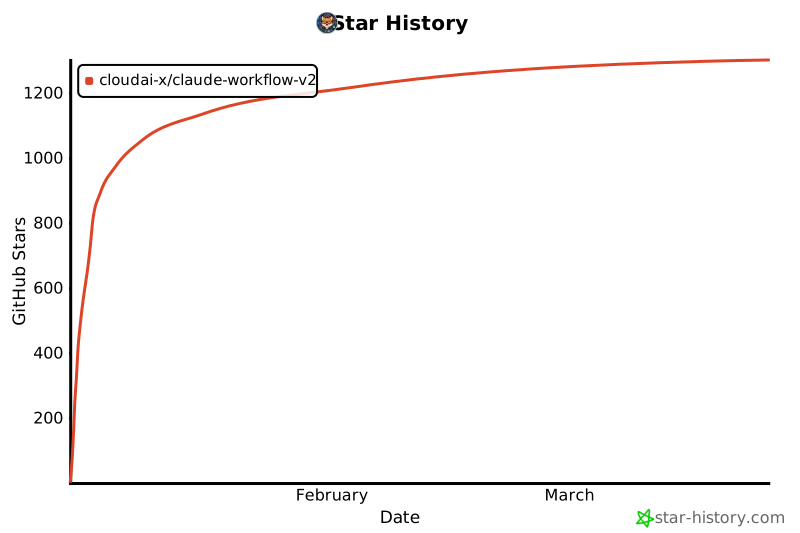](https://www.star-history.com/#CloudAI-X/claude-workflow-v2&type=date&legend=top-left)
## Credits
- Plugin created by [@cloudxdev](https://x.com/cloudxdev)
- Workflow patterns inspired by [Boris Cherny](https://x.com/bcherny) (creator of Claude Code)
## License
MIT - see [LICENSE](./LICENSE) for details.
© CloudAI-X · MIT · CloudAI-X/claude-workflow-v2


