foundry — Claude Code plugin: ad audits and installation
The foundry plugin for Claude Code and Codex audits ad accounts, prepares English and Arabic client reports, and calculates ROAS. Live campaign changes require terminal approval.
MIT ★ 1,596 updated 2026-10-29
/plugin marketplace add hashgraph-online/awesome-codex-plugins
/plugin install foundry@awesome-codex-pluginsWhat foundry does
foundry gives an agency commands for reviewing ad accounts. An audit returns a health score, key fixes, and a 30-day plan; a separate diagnostic command investigates account problems. Client reports can be written in English or Arabic, and the ROAS calculation accounts for cash on delivery.
The plugin also handles actions on live Google and Meta campaigns. Each write needs --confirm and a person to type the campaign key at a real terminal. Budget changes are capped at 20% per campaign over 7 days, so an agent shell cannot apply them on its own.
Use Python 3.10+ and install dependencies with pip install -r requirements.txt; the Google Ads SDK is optional. In Claude Code, install the plugin and run its commands from your project folder, where client workspace data is kept.
What it helps with
- audit an ad account and get a plan of fixes
- diagnose problems with live campaigns
- prepare a client report in English or Arabic
- calculate ROAS with cash-on-delivery costs in mind
- require terminal approval before changing campaign budgets
Example prompts for the agent
- Audit the Acme_Store ad account and give me the main fixes.
- Diagnose Acme_Store campaigns and prepare an Arabic client report.
- Pause the campaign only after I confirm it at the terminal.
How to install foundry
Plugin marketplace
/plugin marketplace add hashgraph-online/awesome-codex-plugins/plugin install foundry@awesome-codex-pluginsStep by step, with commands for each platform: Claude Code plugins: marketplaces, installing, and building your own
Questions about foundry
How do I install foundry in Claude Code?
Run these commands in order: /plugin marketplace add hashgraph-online/awesome-codex-plugins, then /plugin install foundry@awesome-codex-plugins.
What does foundry do?
It audits ad accounts, diagnoses campaign issues, prepares client reports in English or Arabic, and calculates ROAS with cash-on-delivery adjustments.
What does foundry need to run?
It requires Python 3.10+ and dependencies installed with pip install -r requirements.txt. The Google Ads SDK is optional.
Source text
growth-architect-foundry · MIT
# The Foundry
### The multi-agent growth kernel for agencies — now a Claude Code plugin
[](https://github.com/mohamedOmar11111/growth-architect-foundry/actions/workflows/kernel-guard.yml)
[](https://github.com/mohamedOmar11111/growth-architect-foundry/actions/workflows/pylint.yml)
[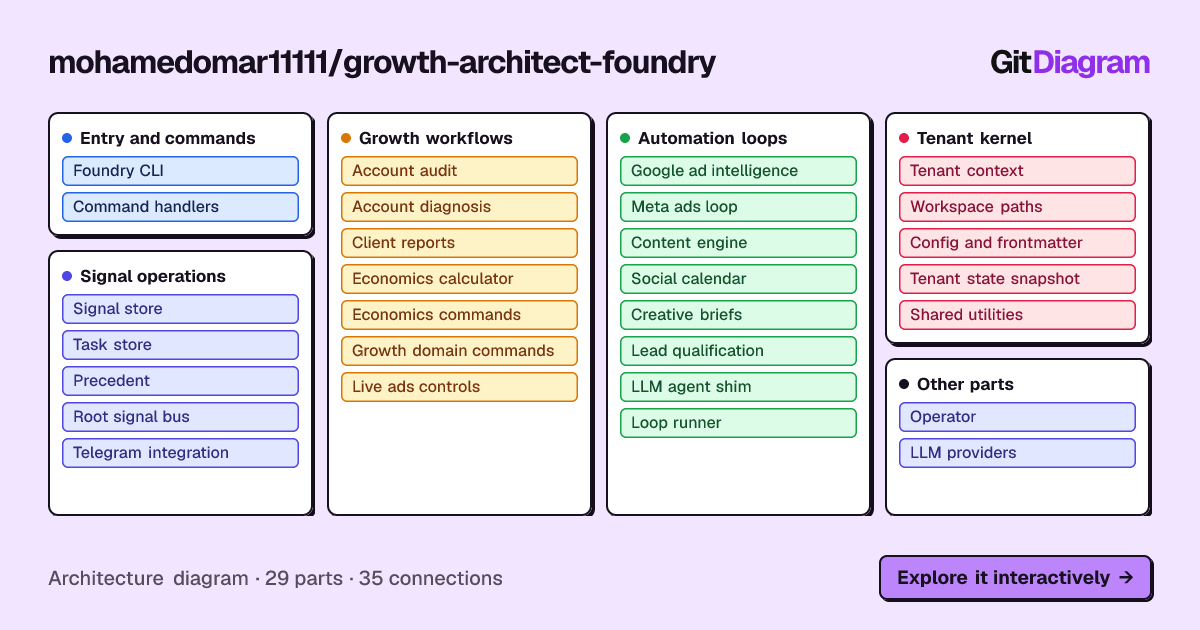](https://gitdiagram.com/mohamedomar11111/growth-architect-foundry?utm_source=readme&utm_medium=picture)
Every client you take on means rebuilding the same ops stack. The Foundry is
that stack, already built — plug in a client, plug in whichever AI tool you
already pay for, go. **31 deterministic commands**, multi-tenant isolation,
maker/checker safety, Arabic-first output.
---
## Install as a Claude Code Plugin
```
/plugin marketplace add mohamedOmar11111/growth-architect-foundry
/plugin install foundry@growth-architect-foundry
```
Then, in **your own project folder** (this is your workspace: tenants, `log.md`,
signals and tasks live here, never inside the plugin, so updates can't touch
client data):
```
/foundry:doctor # checks Python + dependencies, prints the fix commands
/foundry:init Acme_Store # scaffolds 02_Active_Clients/Acme_Store/
/foundry:audit Acme_Store # 0-100 health score, top fixes, 30-day plan
```
Requirements: Python 3.10+ and `pip install -r requirements.txt` (Google Ads SDK
is optional). Or just talk to Claude: "audit my account" / "راجع حسابي".
Slash commands: `/foundry:init`, `doctor`, `audit`, `diagnose`, `report`, `live`.
<p align="center">
<img src="./assets/readme/foundry-engine-vs-workspace.svg" width="100%"
alt="Foundry layout: the read-only engine and tenant template on the left, replaced on plugin update; paths.py sends reports, logs and client folders to your own workspace on the right.">
</p>
The full 31-command surface is available through the skill.
### Works with any coding agent
One Agent Skill (`skills/growth-architect-foundry/`) plus one `AGENTS.md` cover every agent that
follows those conventions.
| Agent | Install |
|---|---|
| Claude Code | the plugin above |
| OpenCode | from your project folder: `python <foundry>/scripts/install_agent.py` |
| Codex (CLI, IDE, app) | same installer (Codex reads `.agents/skills/` and `AGENTS.md`); use a workspace-write sandbox, Foundry saves reports in your workspace |
| Freebuff / Codebuff | same installer (they read `.agents/skills/`) |
| Cursor, others reading `AGENTS.md` | same installer (adds a managed block to your `AGENTS.md`; Cursor also has `.cursor/rules/`) |
| ChatGPT (web) | build the Custom GPT pack, see below |
| claude.ai (web/desktop) | `python scripts/build_claude_web_pack.py`, then Customize, Plugins, Upload plugin (offline: no live ad accounts) |
| Plain terminal / API key only | `python foundry.py account audit --client Aurora_Skincare`, or `python core/engine/agent_shim.py content-engine --task "..."` |
`install_agent.py --scope user` installs the skill for every project. It copies files (no symlinks, works on
Windows) and writes the Foundry path into the installed skill, so the agent knows where `foundry.py` is.
### ChatGPT (web): Custom GPT pack
ChatGPT cannot reach your files or run Foundry on your machine, so the GPT runs the engine inside Code
Interpreter, which has **no network**. That means live ad-account reads and writes are impossible there by
construction; use the Claude Code, OpenCode or Codex install for those. Everything offline works: audit,
diagnose, client reports (EN/AR), and the economics calculator.
```
python scripts/build_chatgpt_pack.py # writes dist/foundry-chatgpt/ and dist/foundry-chatgpt.zip
```
Follow `dist/foundry-chatgpt/SETUP.md` (paste `GPT_INSTRUCTIONS.md`, enable Code Interpreter, upload the
engine zip and `knowledge/*`). The engine needs only the Python standard library. The sandbox resets between
chats, so download the workspace zip at the end and re-upload it next time.
**Support status** (what is actually tested, not just claimed):
| Agent | L0 discovered | L1 runs a command | L2 live writes blocked | Evidence |
|---|---|---|---|---|
| Claude Code | yes | yes | yes | `claude plugin validate`, manual runs |
| OpenCode | yes | yes (manual run, free `big-pickle` model) | yes (code gate) | nightly `agent-conformance` + manual run 2026-10-14 |
| Codex | yes | yes (manual `codex exec`, workspace-write sandbox) | yes (code gate) | nightly `agent-conformance` + manual run 2026-10-15 |
| Freebuff / Codebuff | docs only | not yet | yes (code gate) | not installed in CI |
| Cursor, others | via `AGENTS.md` | not yet | yes (code gate) | not tested |
| ChatGPT (Custom GPT) | n/a | engine verified offline; GPT itself not testable from here | n/a (no network) | `tests/test_chatgpt_pack.py` |
L2 is enforced by Foundry itself (a typed approval on a real terminal), so it holds in any agent.
L1 means a model actually ran `foundry` end to end. One manual run is evidence, not a guarantee: results vary
by model, and no CI job exercises L1. With a read-only sandbox, Codex correctly reported that it could not
save reports instead of inventing a score.
**Keep live writes behind a prompt.** Other agents have no per-command allowlist, so set one yourself. OpenCode
(`opencode.json`, last matching rule wins):
```json
{ "permission": { "bash": {
"*": "ask",
"*foundry.py account *": "allow",
"*foundry.py live pull*": "allow"
} } }
```
Never auto-approve `live pause` or `live budget`.
### Live ad-account safety
<p align="center">
<img src="./assets/readme/foundry-live-write-gate.svg" width="100%"
alt="Flowchart: a live write is applied only if --confirm is given, the data is fresh and within the 20 percent cap, and a human types the campaign key at a terminal; an agent shell has no terminal and is refused with exit 3.">
</p>
- Failed API calls are reported as **FETCH FAILED** and exit non-zero, never as "no campaigns".
- Writes (`live pause`, `live budget`) need `--confirm` **and a person typing the campaign key at a real terminal**
(agent shells have none, so they exit 3 "refused" in every agent), are refused if any platform fetch failed,
and budget changes are capped at **20% cumulative per campaign per 7 days** (ledger in the tenant's `04_Reports/`).
- Agency accounts: set `GOOGLE_ADS_LOGIN_CUSTOMER_ID` (manager account) in the tenant `.env`.
---
## Getting Started (5 minutes, no credentials)
1. **Seed the brain:**
```
python scripts/seed_db.py
```
2. **Activate the demo client:**
```
cp 02_Active_Clients/Aurora_Skincare/.env.example 02_Active_Clients/Aurora_Skincare/.env
```
3. **Run a command:**
```
python foundry.py account audit --client Aurora_Skincare
```
4. **Verify everything works:**
```
python scripts/smoke_test.py
```
---
## Commands (31)
### Account
| Command | Arabic trigger | Output |
|---|---|---|
| `foundry account audit --client <t>` | راجع حسابي | 0-100 score + grade + top fixes + 30-day plan |
| `foundry account diagnose --client <t>` | الروآس وقع | Single biggest constraint + ranked findings |
| `foundry account report --client <t> --lang ar` | تقرير للعميل | Decision-first client readout, EN or AR |
### Economics (deterministic calculator)
| Command | Arabic | Output |
|---|---|---|
| `foundry economics breakeven --price 499 --cogs 150 ...` | نقطة التعادل | Break-even CPA + ROAS |
| `foundry economics cod --spend 20000 --orders 400 ...` | — | Real ROAS + profit verdict |
| `foundry economics learning --cpa 120` | — | Budget to exit learning |
| `foundry economics vat --budget 10000 --country SA` | — | VAT split by MENA country |
| `foundry economics leadgen --deal-value ... --close-rate ...` | — | Break-even CPL and CPQL for lead-gen and WhatsApp funnels |
### Campaigns / Content / Tracking / Leads / Creative / Competitive / Seasonal / Forecast / Ops / Tenants
23 more verbs covering campaign visibility (including `campaigns import` for CSV exports with no API access), live pull/optimize/pause/budget, setup, content pipeline, content pipeline, tracking readiness, lead scoring, creative hooks/angles, competitive positioning, MENA seasonal planning, budget forecasting, engine health, and multi-tenant management. See `skills/growth-architect-foundry/SKILL.md` for the full roster.
---
## How to Verify It Actually Works
`python -m pytest tests` runs unit tests for the money-moving paths (mocked SDK/HTTP). `python scripts/smoke_test.py` is a one-command, self-cleaning test that:
- Seeds the kernel and verifies the squad roster
- Confirms every engine module imports cleanly
- Re-checks the path-traversal security fix
- Runs a real signal through the content-engine pipeline
- Runs all 31 commands against the demo tenant
- Pins the calculator's money math to hand-computed values
12 checks, pass/fail per check, final tally. Same test CI runs on every push.
---
## Loops (scheduled automation)
- **ad-intel** — Google Ads monitoring, budget-burn alerts, content-opportunity signals
- **meta-ads** — same pattern for Meta (Facebook/Instagram) Ads
- **content-engine** — turns signals into draft content briefs
- **social-calendar** — decides WHEN/WHERE briefs publish
- **creative-brief** — turns briefs into image/video generation prompts (the one LLM call)
- **lead-qualify** — scores inbound leads, drafts outreach
---
## Agents & Skills
- **`01_Context_Vault/Agents/`** — 61 agent definitions across marketing, engineering, design, product, testing, and support. Full social media squad: Twitter/X, LinkedIn, Instagram, TikTok, Reddit.
- **`01_Context_Vault/Skills/diagram-design/`** — 40 HTML/SVG diagram types.
- **`01_Context_Vault/Protocols/*/SKILL.md`** — operating procedures, not just personas.
---
## Architecture
<p align="center">
<img src="./assets/readme/foundry-architecture.svg" width="100%"
alt="Foundry architecture: coding agents read the skill and AGENTS.md and run foundry.py; the command engine writes reports to your workspace; a live ad-account write must pass a human gate.">
</p>
Multi-tenant from day one. One kernel, unlimited clients. Each client's
credentials, strategy, and history live in their own isolated folder — no
risk of one client's data leaking into another's run.
- **Engine** (`core/engine/`) — Python state machine: signals, tasks, loops, commands, tenant isolation
- **Context Vault** (`01_Context_Vault/`) — agents, skills, protocols, methodology
- **Clients** (`02_Active_Clients/`) — per-tenant folders with .env, STRATEGY.md, signals, reports
- **Foundry CLI** (`foundry.py`) — unified entry point for all 31 commands
Every command is deterministic Python. No LLM calls in the engine. Judgment
work stays in the AI interface layer (skills and agents). Money figures come
from `calc.py` with assumptions printed alongside every number.
---
## Principles
- **No Magic:** Marketing is engineering.
- **No Slop:** Anti-AI writing protocols enforced.
- **No Waste:** Management by exception only.
- **No Auto-Publish:** Maker/checker built into every task contract.
---
## License
MIT (see LICENSE). Bundled third-party content keeps its own licences: see NOTICE.md and licenses/. Developed by Mohamed Omar (@mohamedOmar11111) | The Growth Architect.
© Mohamed Omar · MIT · hashgraph-online/awesome-codex-plugins


