boss — Claude Code plugin: what it does, how to install
boss chains nine specialist roles from requirements to deployment in Claude Code and Codex. Enforces strict quality contracts and writes disk artifacts.
MIT ★ 1,596 updated 2026-10-29
/plugin marketplace add hashgraph-online/awesome-codex-plugins
/plugin install boss@awesome-codex-pluginsWhat boss does
Boss transforms a coding agent into a full engineering squad covering PM, architecture, UI design, tech review, task planning, implementation, QA, and deployment. The pipeline follows a fixed path: pm → architect → ui → review → tasks → dev → qa → ship. You can trigger the complete run with /boss or jump straight into a specific stage using commands like /boss:review or /boss:dev.
Every stage saves concrete files into .boss/<feature>/, including prd.md, tech-review.md, and qa-report.md. Progression stops automatically if an agent fails its role contract, such as omitting Given-When-Then criteria in requirements or skipping test verification. Development stages follow TDD by default, requiring a failing test before writing production code.
Network telemetry is disabled by default. The tool runs without remote LLM proxies, exposing only an optional preview server bound to 127.0.0.1 for local UI prototypes.
What it helps with
- run a structured development pipeline from spec to deployment
- generate a risk-oriented technical review of an existing codebase
- break requirements down into actionable engineering tasks
- execute test suites and document verifiable evidence in a report
Example prompts for the agent
- /boss Build a local personal todo app --skip-ui
- /boss:review
- /boss:qa
How to install boss
Plugin marketplace
/plugin marketplace add hashgraph-online/awesome-codex-plugins/plugin install boss@awesome-codex-pluginsStep by step, with commands for each platform: Claude Code plugins: marketplaces, installing, and building your own
Questions about boss
How to install boss in Claude Code?
Register the marketplace with /plugin marketplace add hashgraph-online/awesome-codex-plugins, then run /plugin install boss@awesome-codex-plugins.
What does the boss plugin do?
It orchestrates tasks across nine distinct roles, passing outputs through quality gates down to deployment. Each role documents its output inside .boss/<feature>/ on disk.
Can you skip individual pipeline steps?
Yes, pass --skip-ui to omit interface design or use --stop-after <stage> to pause execution at a designated stage.
Source text
boss-skill · MIT
# boss-skill [](https://skills.sh/echovic/boss-skill) [](https://coderabbit.ai) [](https://atomgit.com/echoVic/boss-skill) [](https://atomgit.com/echoVic/boss-skill) [](https://hol.org/registry/plugins/echovic%2Fboss) **Languages / 语言 / 言語 / 언어 / Idiomas / Langues:** [English](./README.md) · [中文](./README.zh-CN.md) · [日本語](./README.ja.md) · [한국어](./README.ko.md) · [Español](./README.es.md) · [Français](./README.fr.md) · [Português](./README.pt-BR.md) 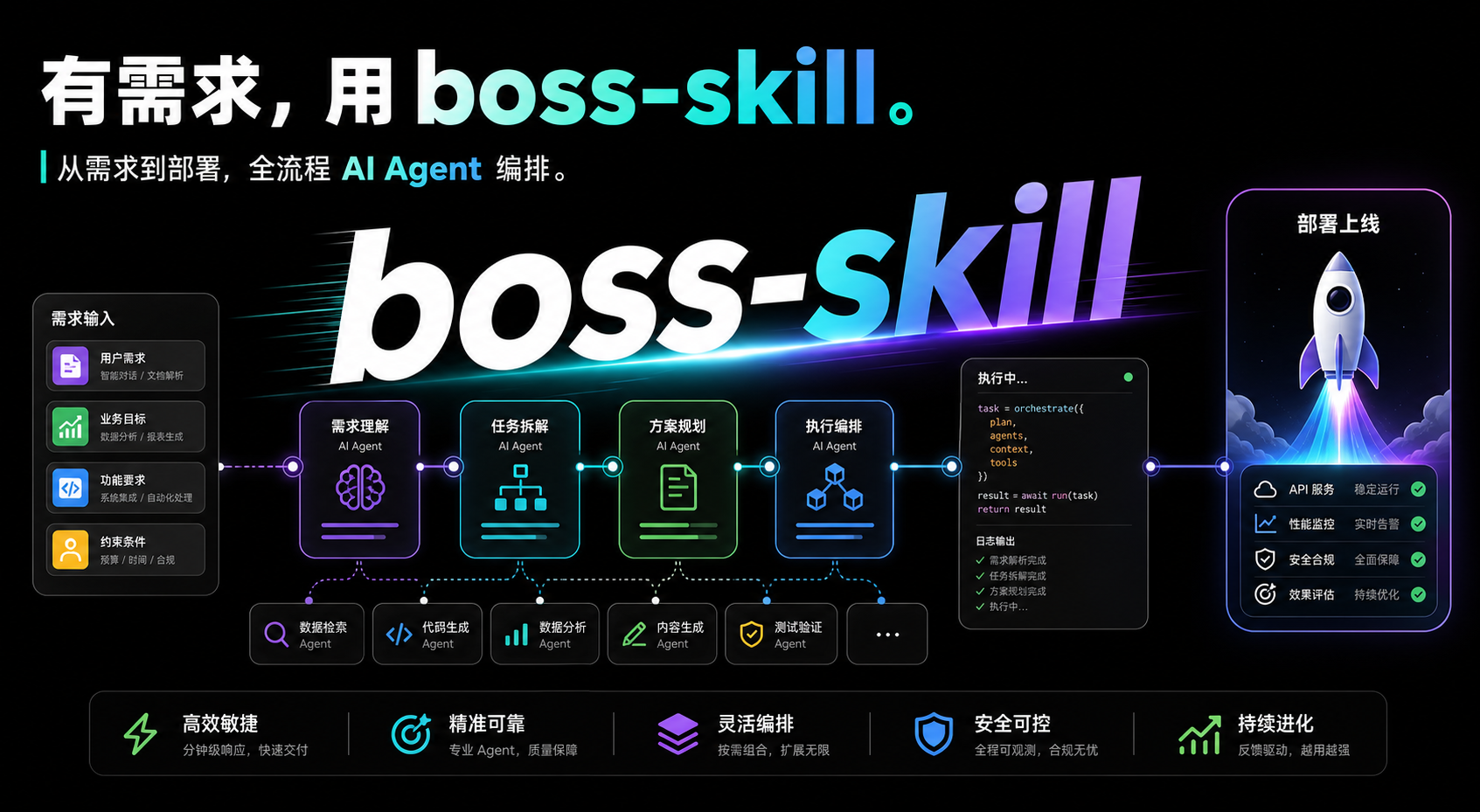 > This project is part of the AtomGit G-Star Incubation Program. GitHub is the canonical repository; AtomGit provides an automatically synchronized mirror for faster access in China. Please submit issues and pull requests on [GitHub](https://github.com/echoVic/boss-skill). > > GitHub: <https://github.com/echoVic/boss-skill> · AtomGit mirror: <https://atomgit.com/echoVic/boss-skill> **Boss is an expert-squad workflow for coding agents.** It turns one coding agent into a structured engineering team: PM, Architect, UI Designer, Tech Lead, Scrum Master, Frontend, Backend, QA, and DevOps. Unlike prompt-only agent teams, Boss enforces hard quality contracts per role, produces replayable artifacts, and chains stages automatically — start anywhere, it runs the rest until you say stop. Boss works with Claude Code, Codex, OpenClaw, Antigravity, and Hermes. ## Why Boss Prompt-only orchestration can sound organized, but it usually cannot prove that the plan was followed, tests were run, or gates passed. Boss is built around evidence and hard contracts: - **Hard quality contracts**: every role has a non-negotiable requirements table (e.g. PRD must have Given-When-Then scenarios; architecture must compare at least two options; QA must record verified or honestly-unverified evidence). Failed contracts block the next stage unless you explicitly override. - **Artifact-driven**: every stage writes a real file under `.boss/<feature>/`. Progress is judged by artifacts on disk, not by what the agent claims. - **Continuation chain**: start at any stage (`/boss:pm`, `/boss:dev`, ...) and Boss auto-runs every downstream stage until `ship` or until you stop it. No manual hand-offs. - **Engineering principles**: the squad shares ten principles — prove it works, fix root causes, build the lever, model the domain, boundary discipline, sequence verifiable units, test behavior, minimize reader load, structured experience, autonomous rules. Each agent cites the principle it applies. - **TDD by default**: development stages must write a failing test first, watch it go RED, then write the minimum code to make it GREEN. - **Zero-network by default**: no telemetry, no phone-home, no remote LLM proxy. The only network surface is an opt-in loopback preview server bound to `127.0.0.1` for UI prototyping. See [PRIVACY.md](./PRIVACY.md). - **Deterministic evals**: captured transcripts are scored without calling a real LLM. ## Expert Squad Commands Boss is not a single monolithic command. Each slash command is an entry point; by default it auto-runs all downstream stages. | Command | Starts at | Auto-runs through | Use when | | ----------------- | ---------------- | ---------------------- | ------------------------------ | | `/boss` | PM | full chain → ship | Go from idea to shippable work | | `/boss:pm` | PM | Architect → ... → Ship | Start from requirements | | `/boss:architect` | Architect | UI → ... → Ship | You have a spec, need design | | `/boss:ui` | UI Designer | Review → ... → Ship | You have architecture, need UI | | `/boss:review` | Tech Lead | Tasks → ... → Ship | Need technical review + plan | | `/boss:tasks` | Scrum Master | Dev → QA → Ship | Need task breakdown | | `/boss:dev` | Frontend/Backend | QA → Ship | Start implementation | | `/boss:qa` | QA | Ship | Need test evidence | | `/boss:ship` | DevOps | (end) | Deploy only | The full chain: ``` pm → architect → ui → review → tasks → dev → qa → ship ``` Stop the chain by saying "stop", "only do this step", or passing `--stop-after <stage>`. ## Quick Start ### 1. Install Boss is a skill you install into your coding agent. Distribution is marketplace-only: no npm package, no global binary. **Claude Code — plugin marketplace (recommended):** ```text /plugin marketplace add echoVic/boss-skill /plugin install boss@boss-skill ``` **Codex — plugin marketplace:** ```bash codex plugin marketplace add echoVic/boss-skill ``` Then open the plugin browser (`/plugins`) and install **boss**. **Any agent — via the `skills` CLI ([vercel-labs/skills](https://github.com/vercel-labs/skills), skills.sh):** ```bash npx skills add echoVic/boss-skill ``` ### 2. Try It On A Project You Already Have The lowest-cost first run is a read-only review against existing code: ``` /boss:review ``` You get `tech-review.md` (and `plan.md`) under `.boss/<feature>/` with risks, findings, and severity. Nothing else in your repo is touched. Want verifiable test evidence instead? `/boss:qa` runs the tests and writes `qa-report.md`. ### 3. Run The Full Pipeline Inside your coding agent: ```text /boss Build a local personal todo app --skip-ui ``` - `--skip-ui` skips the UI design stage (pure API/CLI projects). - `--quick` skips routine clarification prompts. ### 4. Inspect Results Artifacts live under `.boss/<feature>/`: ```text .boss/todo-app/ ├── prd.md ├── architecture.md ├── ui-spec.md ├── ui-design.json ├── tech-review.md ├── plan.md ├── tasks.md ├── qa-report.md └── deploy-report.md ``` Each Markdown artifact starts with a `## 摘要` (summary) section so downstream agents can read the conclusion first. ## Workflow ```text User request → requirement clarification (unless --quick) → PM: requirement discovery → prd.md → Architect: system design → architecture.md → UI Designer: UI/UX spec → ui-spec.md + ui-design.json (skip with --skip-ui) → Tech Lead: technical review + implementation plan → tech-review.md + plan.md → Scrum Master: task breakdown → tasks.md → Frontend / Backend: TDD implementation → QA: test execution, bug reports, evidence → qa-report.md → DevOps: build, deploy, health checks → deploy-report.md ``` ### Roles & Artifacts | Role | Responsibility | Artifact | | ------------ | ------------------------------------------------------ | ------------------------------ | | PM | Requirement discovery, PRD, hidden needs, edge cases | `prd.md` | | Architect | System architecture, technical design, APIs | `architecture.md` | | UI Designer | UI/UX spec, renderable design JSON, HTML prototype | `ui-spec.md`, `ui-design.json` | | Tech Lead | Technical review, risk assessment, implementation plan | `tech-review.md`, `plan.md` | | Scrum Master | Task breakdown and acceptance criteria | `tasks.md` | | Frontend | UI implementation, TDD, frontend tests | source code | | Backend | API, storage, TDD, backend tests | source code | | QA | Test execution, bug reports, verification evidence | `qa-report.md` | | DevOps | Build, deployment, health checks | `deploy-report.md` | ## Quality Contract Boss has two layers of quality control: - **Hard requirements per role**: each agent's prompt defines a non-negotiable requirements table. The agent self-checks before handing off; a failed contract blocks the next stage. - **Quality gates**: real commands whose verdicts are recorded in the stage artifact. | Gate | Stage | Checks | | --------------------- | ----------------------- | ------------------------------------------------------------------------------- | | Gate 0 (code quality) | After dev, before QA | TypeScript/lint pass, no high-severity dependency vulnerabilities | | Gate 1 (testing) | After QA, before deploy | Unit + integration tests pass, coverage ≥ 70%, no P0/P1 bugs, E2E tests written | | Gate 2 (performance) | Before web deploy | Lighthouse ≥ 80, API P99 < 500ms (web projects only) | ## When To Use Boss | Good fit | Poor fit | | ----------------------------------------------------------------------------------------- | --------------------------------------------------------------------- | | New features that need requirements, design, implementation, tests, and delivery evidence | One-line fixes or tiny local edits | | API, full-stack, UI, or medium-sized product work | Pure code reading or explanation | | Work where `.boss/<feature>/` artifacts are valuable | Tasks with a complete existing spec where you only need a quick patch | | Teams that want repeatable quality gates and audit trails | Work that does not need coordination or review evidence | Rule of thumb: if you do not need a traceable `.boss/` folder, you probably do not need the full `/boss` pipeline. Use a single role or let your coding agent edit directly. ## Security & Privacy Boss is local-first and makes no outbound network requests by default. The only network surface is an opt-in, loopback-only (`127.0.0.1`) HTML prototype server used during the UI design stage. Release provenance lives in `.agents/plugins/provenance.json`. It pins the repository HTTPS URL, immutable source commit SHA, publisher identity, and SHA-256 digests for plugin manifests. Verify it with: ```bash npm run provenance:verify ``` See [PRIVACY.md](./PRIVACY.md) for the full data and network boundary. ## Pipeline Artifacts ```text .boss/<feature>/ ├── prd.md # PM — product requirements ├── architecture.md # Architect — system design ├── ui-spec.md # UI Designer — UI/UX spec (skipped with --skip-ui) ├── ui-design.json # UI Designer — renderable design JSON ├── tech-review.md # Tech Lead — technical review ├── plan.md # Tech Lead — implementation plan ├── tasks.md # Scrum Master — task breakdown ├── qa-report.md # QA — test evidence └── deploy-report.md # DevOps — deployment record ``` ## Evals Boss evals score captured fixtures without starting a real LLM: ```bash npm run evals npm run evals:release ``` The release eval includes release-evidence and pipeline-compliance checks — it verifies artifact recording, avoidance of deprecated runtime commands, and expert-squad orchestration behavior. See [test/evals/README.md](./test/evals/README.md). ## Development Requirements: - Node.js >= 22.18 Setup: ```bash git clone https://github.com/echoVic/boss-skill.git cd boss-skill npm install npm run typecheck npm test ``` Useful scripts: ```bash npm run typecheck # tsc --noEmit npm test # vitest (unit + skill behavior + evals) npm run test:skills # skill behavior tests only npm run evals # deterministic transcript evals npm run lint # biome ci ``` ## Repository Layout ```text boss-skill/ ├── skill/ # Skill bundle installed into coding agents (self-contained) │ ├── SKILL.md # Main orchestration entry (invariants + index) │ ├── agents/ # Role prompts (boss-pm, boss-architect, ...) │ ├── commands/ # Slash commands (/boss, /boss:pm, ...) │ ├── references/ # Shared methodology (principles, quality-gate, ...) │ ├── skills/ # Per-domain methodology skills (pm/, qa/, devops/, ...) │ └── templates/ # Artifact templates (.md.template) ├── test/ # Vitest, skill behavior, and eval tests ├── scripts/ # release.js, provenance.js ├── docs/ # Historical specs, plans, reports ├── examples/ # Example projects ├── .claude-plugin/ # Claude Code plugin manifest + marketplace ├── .codex-plugin/ # Codex plugin manifest + marketplace ├── .agents/plugins/ # Repo-scoped plugin marketplace + provenance ├── tsconfig.json # Typecheck-only config (no emit) └── package.json # Private dev workspace (never published) ``` ## Release Use the release script so version numbers stay synchronized across package metadata and skill/plugin manifests: ```bash npm run release -- patch npm run release -- minor npm run release -- major npm run release -- 4.1.0 npm run release -- 4.1.0 --dry-run ``` The release script checks for a clean worktree, runs the full verification chain (typecheck, lint, test), syncs versions across all manifests, verifies consistency, creates a commit and tag, and pushes. Release is the git tag: marketplaces read the repository — there is no npm publish step and no build step. See [CONTRIBUTING.md](./CONTRIBUTING.md). ## Design Boss is inspired by BMAD: Breakthrough Method of Agile AI-Driven Development, and by the "write less, higher quality code" philosophy. The expert-squad model keeps the harness lean — no runtime state machine, no event sourcing, no hooks — while preserving hard quality contracts and artifact-driven collaboration. Read more in [DESIGN.md](./DESIGN.md), `skill/references/bmad-methodology.md`, and `skill/references/principles.md`. ## Star History [](https://star-history.com/#echoVic/boss-skill&Date) ## License MIT
© echoVic · MIT · hashgraph-online/awesome-codex-plugins


