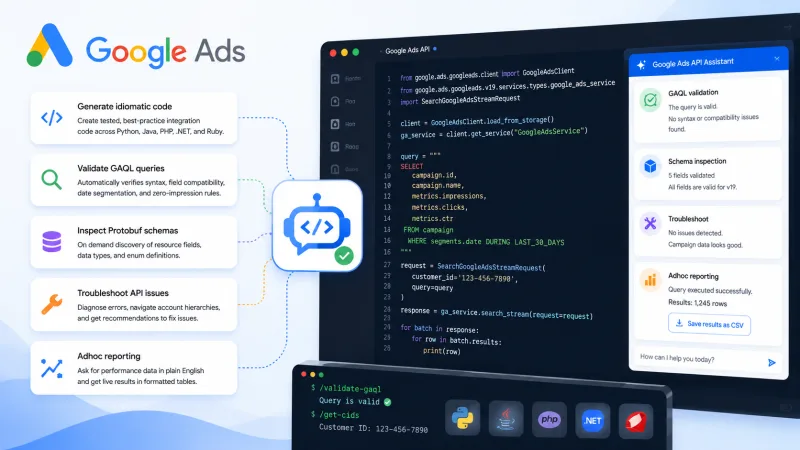
Google Ads API Developer Assistant 4.0.0 shifts the tool from a documentation helper into a working AI agent for ad data and API operations. It now goes beyond answering questions about the docs: the assistant helps build integrations, diagnose errors, generate reports and tie those actions into a single workflow.
For performance teams, agencies and affiliate projects this is a meaningful shift. Working with Google Ads API often means dealing with query structure, campaign statuses, access limitations, GAQL syntax and reporting logic all at once. An AI agent can cut down routine operations, but only if the marketer understands what data they're requesting and how to verify the result.
From documentation to working AI agent
Classic documentation tools answer a question like 'How do I pull keyword stats?' An AI agent operates more broadly. It can interpret a task in project context, suggest a sequence of actions, prepare a sample API request, explain an error and help format data for analysis.
Version 4.0.0 focuses on three specialized areas:
- development via Google Ads API — building and adjusting queries, working with resources and fields;
- troubleshooting — diagnosing errors, auth problems, incompatible parameters and bad API responses;
- reporting — retrieving and interpreting ad performance data.
This is especially useful in teams where one specialist handles traffic buying, another handles analytics, and technical tasks happen irregularly. The assistant lowers the barrier to entry but does not eliminate the need for oversight from a developer or experienced media buyer.
What this changes in Google Ads API work
The main advantage of an AI agent is shortening the path from business task to technical execution. Previously a specialist had to search for the right resource in the docs, check required fields, pick GAQL syntax and then parse the server response. Now those steps can be described in plain language.
For example, a task might sound like this: 'Pull campaign data for the last seven days, keep only active campaigns and show spend, clicks, conversions and cost per conversion.' The agent can turn that description into query structure, flag availability of the needed metrics and explain what limits apply to the chosen report.
For affiliate marketing this opens several practical scenarios:
- daily spend monitoring by GEO, offer and campaign type;
- matching Google Ads data with affiliate network tracking;
- automatic report prep for CPA, ROI and ROAS;
- finding campaigns with rising cost per conversion;
- spotting discrepancies between the ad platform and internal analytics.
One thing to keep in mind: Google Ads API shows ad and conversion data within its own attribution model. If the tracker uses different logic for counting registrations, deposits or first-time deposit, the numbers will not match automatically.
Troubleshooting: where the agent saves the most time
API errors are rarely complex conceptually but often take a long time to diagnose. The cause might be an outdated API version, wrong customer ID, insufficient permissions, bad date format, a missing required field or an attempt to use incompatible resources in one request.
An AI agent is useful here as first-level technical diagnosis. It can classify the problem, decode the error message and suggest a check sequence. A practical algorithm looks like this:
- Pass the assistant the full error text, endpoint, API version and request context.
- Clarify whether the operation runs at manager account level or regular ad account.
- Check OAuth access, customer ID, developer token and permission list.
- Match the fields used against the current API version.
- Run a minimal test request and only then add back filters and extra metrics.
This approach helps avoid fixing code blindly. If a report query fails, it is more useful to first remove filters and secondary fields than to immediately rewrite the whole integration.
In the iGaming segment troubleshooting is especially important because of the high number of GEOs, accounts, domains and tracking setups. An error in one identifier can lead to a wrong report and a bad decision about scaling a campaign. That's why AI diagnosis results need to be confirmed with the actual API response and integration logs.
Reporting without manual routine
The reporting module is most interesting for marketers who work daily with large volumes of campaigns. API queries let you pull more detailed and regularly updated data than manual export from the Google Ads interface. An AI agent can help shape report logic for a specific task rather than an abstract set of metrics.
For traffic buying control it is usually enough to start with a core set:
- impressions and clicks;
- CTR and average cost per click;
- spend;
- recorded conversions;
- cost per conversion;
- revenue and ROAS, if revenue data is passed correctly.
In partner campaigns this is not enough to evaluate real performance. A registration may have low value, while the core event is a deposit or qualified player. That's why Google Ads should be linked with postback data from the affiliate network and tracker. In that setup the API handles spend and ad parameters, while the CRM or affiliate platform handles revenue, CPA, revshare and conversion quality.
An AI agent can prepare the foundation for such a pipeline but should not define business rules on its own. For example, 'conversion' might mean registration, verified account, deposit or a player who generated revenue within 30 days. That decision comes from the team, not from a query generation tool.
How to fit the assistant into workflow
To get value from the update, it helps to sort tasks by risk level in advance.
Low risk — drafting GAQL queries, explaining fields, preparing code examples, converting API response to CSV or JSON. These operations can be used almost immediately after checking syntax.
Medium risk — automatic report generation, ROAS drop alerts, finding campaigns with abnormal CPA. This requires a test period, sample control and comparison with interface and tracker data.
High risk — changing budgets, bids, campaign statuses or targeting. Such actions cannot be fully delegated to the agent without limits. They need role-based permissions, caps, logging and manual confirmation.
The optimal team setup looks like this:
- AI agent forms the query or suggests an action;
- developer checks technical correctness;
- analyst confirms metric meaning;
- automation executes only the approved operation;
- result is logged and available for audit.
This process lets you use AI speed without turning the ad account into an experimental environment.
Risks: hallucinations, access and data quality
The new level of automation does not remove typical language model limitations. The assistant may suggest a field that does not exist in a specific API version, confuse a resource, misinterpret attribution or generate code that looks plausible but does not account for project specifics.
Before launching an integration it is necessary to check:
- whether each resource and parameter is supported by the current Google Ads API version;
- whether the query matches account structure and access level;
- whether tokens, personal data and commercially sensitive information are being passed in the prompt;
- whether the report time zone matches the tracker time zone;
- whether conversions, returns and delayed postback events are counted the same way;
- whether there are request limits and retry handling.
For iGaming projects it is additionally important to respect ad platform rules, GEO restrictions and local requirements for promoting gambling products. A technically correct query does not automatically make ad activity compliant. Compliance checks remain a separate area of team responsibility.
Practical performance assessment
AI agent adoption should be measured not by the number of queries generated but by business outcome. Useful indicators are report prep time, share of API operations that succeed on the first try, number of manual fixes, error diagnosis speed and reduction in discrepancies between data sources.
For a pilot it is enough to pick one process, say a daily spend and CPA report for several GEOs. Over two or three weeks you can compare manual and automated scenarios, check data stability and estimate how much time the team saves.
Google Ads API Developer Assistant 4.0.0 looks most useful not as a standalone autopilot but as an interface between marketing task and technical infrastructure. It speeds up development, simplifies troubleshooting and makes reporting more accessible for performance teams. Maximum effect will appear where events, attribution rules, access rights and data quality criteria are already defined.


