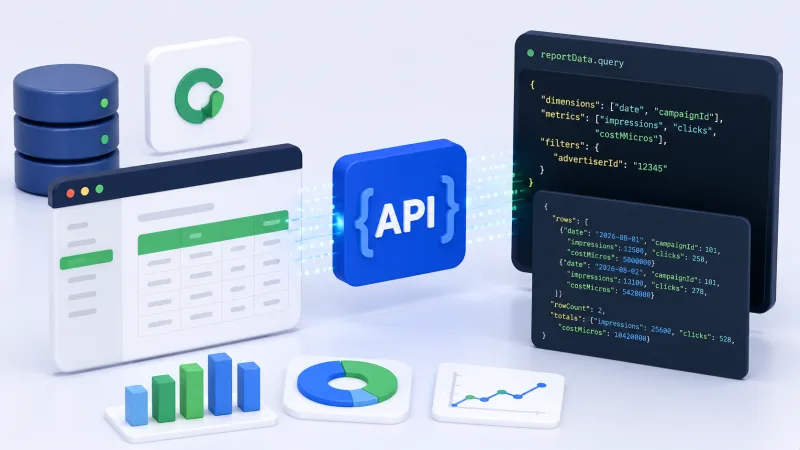
Google has added a real-time reporting endpoint to the Campaign Manager 360 API. Developers can now retrieve reporting data with a single API request instead of waiting for scheduled report updates.
For agencies, advertisers and affiliate teams, this shortens the path from event to action. Data can feed into custom dashboards, alert systems, trackers and automated optimisation scripts without waiting for standard report cycles.
What changed in Campaign Manager 360 API
Campaign Manager 360 handles ad placements, impressions, clicks and other events in display campaigns. Previously the analytics loop often relied on periodic report updates, manual exports or intermediate data processing.
The new real-time reporting endpoint delivers reporting data directly through the API in one request. Practical effect depends on account configuration, dimensions and metrics, but the principle is simple: an external system queries Campaign Manager 360 and receives a fresher slice of statistics without generating a separate long-running report.
This matters for processes where data value decays quickly. If a team is buying traffic for an offer with limited budget, spend and conversion data is needed during the campaign, not at the end of the day. The faster a problem is detected, the less money is wasted before placement is stopped or adjusted.
Real-time reporting should not be confused with streaming every event in the same second. The API request returns data available at the time of the call, subject to processing, delays, attribution and platform limits. Before automating, check how fresh specific fields are and which data is considered final.
Where this will have the biggest effect
Operational budget control
Teams can regularly check spend by campaign, site, format and individual placement. If actual spend exceeds plan, the system sends an alert or temporarily limits further buying at the level of available ad tools.
For affiliate marketing, controlling the 'traffic source plus offer' pairing is useful. If a placement burns through budget quickly but delivers no registrations or deposits, an early signal helps avoid waiting for daily statistics to accumulate.
Creative optimisation
CTR and post-click metrics can differ noticeably even for creatives targeting the same audience. With fresher data, a media buyer sees which format is losing effectiveness and redistributes impressions faster.
CTR cannot be assessed in isolation. In iGaming campaigns, high click-through does not always mean quality traffic. Clicks must be matched with registrations, FTD, deposit conversion, CPA and revshare revenue. The real-time endpoint speeds up retrieval of top-level ad signals, but business metrics may sit in a tracker or affiliate programme and require separate synchronisation.
Automated dashboards
Instead of manual report downloads, data can connect to a BI system, agency internal cabinet or shared client panel. This reduces operations and lowers the risk of errors when moving CSV files.
Optimal dashboard structure usually includes spend and impressions for the selected interval; clicks and CTR; data by campaign, site and format; comparison of planned and actual values; date and time of last successful update; and data quality status and presence of delays.
The last point is often underestimated. The user must understand when statistics were updated and whether an urgent decision can be based on them.
How to design integration
The most common mistake is developers immediately polling the API at high frequency. This approach increases load, consumes quotas and does not guarantee more useful data. First define the use case and acceptable delay.
For budget monitoring, periodic polling is enough. For a dashboard opened by a media buyer, it makes sense to request data on page load and then refresh on a timer. For alerts, better to use a separate service that stores the previous result and compares it with the new one.
Requests should use only necessary dimensions and metrics. The wider the selection, the larger the response and the higher the processing cost. If the system needs data by campaign and hour, there is no reason to include dozens of additional slices by audience, geography, device and format.
Recommended minimum loop: the service authenticates and obtains permission for the required account; a request is formed with a limited time range and specific fields; the response is validated for status, structure, timestamp and errors; data is saved to intermediate storage; the dashboard or alert system works with the saved result, not repeating the same request for each user.
For integration resilience, use retry with increasing delay, request logging and handling of partial responses. Do not treat any successful HTTP response as a guarantee of correct business statistics: check values and correspondence to the expected period.
What to verify before launching automation
Access and security
API keys, tokens and service account credentials cannot be stored in client-side JavaScript, repositories or open configuration files. Access should be minimal: separate service user, limited rights and regular secret rotation.
If data is used for multiple advertisers, separate them at the tenant or other isolated namespace level. A filter error can lead to mixing statistics of different clients, which is critical for agencies.
Limits and request cost
Before implementation, study API restrictions, quota rules and acceptable request frequency. Even if one request technically executes quickly, massive parallel polling of a large number of campaigns can lead to failures.
Caching, batch processing, limiting date range and a unified API access layer help. Internal users should receive data from cache with controlled TTL, not initiate a new external request with every page refresh.
Attribution and late events
An ad click and conversion do not always appear in systems simultaneously. In addition, attribution changes, postbacks and late events can adjust already received values. Real-time reporting should therefore be perceived as an operational snapshot, not a final financial report.
For ROI and ROAS calculation, it is useful to separate two modes: fast monitoring for campaign management and final reporting for reconciling spend, commissions, chargebacks and revenue. In iGaming this approach is especially important because of delay between click, registration, first deposit and player quality confirmation.
Practical scenario for an affiliate team
Suppose a team promotes several offers in CIS countries through display placements. Impression, click and spend data comes from Campaign Manager 360, while registrations and deposits sit in the affiliate tracker.
The service requests current ad statistics every few minutes and combines it with conversion data. If spend grows for a pairing but no registrations appear, the system marks it as requiring review. If CTR drops while impression volume holds, the media buyer gets a signal of creative burnout. If clicks hold but CPA exceeds the set threshold, budget can be redistributed to more effective pairings.
This process should not completely replace a specialist's decision. Automated rules can err due to small data volume, temporary delay or incomplete postback. New campaigns need minimum thresholds of statistical significance and observation mode without sharp actions.
Final assessment of the update
The real-time reporting endpoint makes Campaign Manager 360 more convenient for operational analytics and integration with internal systems. The main advantage is not the API call itself, but the ability to embed fresh ad data into regular decision-making.
To get results, define acceptable delay in advance, separate operational and final metrics, limit the field set, account for quotas and correctly link CM360 data with tracker, CRM or affiliate programme. In this form the update helps react faster to changes in CTR, spend, CPA and ROAS, but does not eliminate verification of attribution and conversion quality.
For a professional team this is another step toward managing advertising through a single measurable loop: data arrives automatically, deviations are captured immediately, and optimisation is built on current statistics, not yesterday's report.


