cassiiopeia — Claude Code plugin: features and install
This plugin adds 20 skills for work from code analysis to release tasks. It supports Spring, Flutter, React, Next.js, Node.js, and Python projects.
/plugin marketplace add anthropics/claude-plugins-community
/plugin install cassiiopeia@claude-communityWhat cassiiopeia does
cassiiopeia adds Claude Code skills for code analysis, design, implementation, testing, reviews, refactoring, documentation, and troubleshooting. It also covers report generation, issue drafting, Git worktree setup, Figma integration, and Spring Boot test generation.
The listed project types include Spring, Flutter, React, Next.js, Node.js, and Python. Available commands include /pro-github, /pro-init-worktree, /pro-commit, /pro-report, and /pro-agent-test. Installation runs through npx and requires Node.js 20.12+. Every skill outputs in Korean, so that language constraint matters before you add it to a project.
What it helps with
- review code changes
- draft an issue from a task description
- set up a Git worktree
- generate a change report
- create Spring Boot tests
Example prompts for the agent
- Open an issue from this task with
/pro-github. - Set up a separate worktree for the issue using
/pro-init-worktree. - Analyze the current diff and write a report with
/pro-report.
How to install cassiiopeia
Plugin marketplace
/plugin marketplace add anthropics/claude-plugins-community/plugin install cassiiopeia@claude-communityStep by step, with commands for each platform: Claude Code plugins: marketplaces, installing, and building your own
Questions about cassiiopeia
How do I install cassiiopeia in Claude Code?
Run /plugin marketplace add anthropics/claude-plugins-community, then run /plugin install cassiiopeia@claude-community.
What does cassiiopeia do?
It adds 20 Claude Code skills for analysis, implementation, testing, review, documentation, Git worktrees, issue work, and related development tasks.
What does cassiiopeia require?
The setup uses npx and requires Node.js 20.12+. Its skills return output in Korean.
Source text
SKILL.md · MIT
<div align="center">
<img src="https://raw.githubusercontent.com/Cassiiopeia/projectops/main/docs/images/hero-en.webp" alt="Projectops: from issue to release" width="100%">
**One install: issue → branch → release PR → deploy, with agent skills that drive each step.**
[한국어](docs/i18n/README.ko.md) | **English** | [简体中文](docs/i18n/README.zh-CN.md) | [日本語](docs/i18n/README.ja.md)
[](https://www.npmjs.com/package/projectops) [](https://github.com/Cassiiopeia/projectops/releases) [](LICENSE) [](https://cassiiopeia.github.io/projectops/)
**Status: actively maintained.** npm `latest` is exactly what is on the `main` branch; work in progress on `develop` is never published. Versions can still ship several times a day. To stay on a version you have tested, run `npx projectops@<version>` ([releases](https://github.com/Cassiiopeia/projectops/releases)).
<!-- AUTO-VERSION-SECTION: DO NOT EDIT MANUALLY -->
## Latest version : v4.75.2 (2026-10-24)
[View full version history](CHANGELOG.md)
</div>
---
## Get started in 30 seconds
| I want to... | Run this |
|---|---|
| Start a new project | Click **Use this template** on GitHub (auto-setup in about a minute) |
| Add it to an existing project | `npx projectops` |
| Install Agent Skills only | `npx projectops --mode skills` |
| Check the install state (read-only) | `npx projectops --mode doctor` |
> You only need Node.js 20.12+. An interactive wizard runs with no separate install.

> This is a **real run** on a sample Spring project (the wizard follows your system language, or use `--lang en|ko`). Version numbers shown were current when it was recorded. For non-interactive use and every option, see the [CLI reference](https://cassiiopeia.github.io/projectops/cli).
---
## Why this template?
This project automates your development workflow on two axes.
**① GitHub Actions**: one push to main handles versioning, changelogs, and CI/CD deployment.
**② Agent Skills**: commands such as `/pro-github`, `/pro-commit`, and `/pro-report` let an AI agent drive each step of that automation for you: issues, commits in your own style, reports, and release PRs.
| The usual way | With Projectops |
|----------|---------------------|
| Bump versions and create tags by hand | At release time the version is bumped from your commit titles and a tag is created |
| Write the changelog yourself | Generated for every release PR (commit analysis, or an AI summary if you add an AI key) |
| Set up CI/CD from scratch | Workflows for your project type, ready immediately |
| Format every issue by hand | `/pro-github` writes and files an issue from the standard template in one step |
| Copy the issue URL into commit messages | `/pro-commit` completes the message from the issue context, in your own style |
| Write PR descriptions and reports by hand | `/pro-report` analyzes the git diff and generates one |
| Re-type prompts for every code review or analysis | 15 skills give consistent results without re-typing |
---
## Compared with other tools
If you only need one piece of this, a smaller tool may suit you better.
| | projectops | release-please | semantic-release | changesets |
|---|---|---|---|---|
| Version decided from | Commit titles (`feat` → minor, `feat!` → major) | Conventional Commits | Conventional Commits (configurable) | Changeset files written in each PR |
| Review step before a release | A release PR (develop → main), merged automatically | A release PR you merge | None by default, releases on push | A "Version Packages" PR |
| Changelog | Written in the release PR (commit analysis, or an AI summary) | Generated | Generated (plugin) | Assembled from changeset files |
| CI/CD workflows for your project type | Yes (Spring, Flutter, React, Node, Python ...) | No | No | No |
| Agent skills that run the cycle (issues, worktrees, commits in your style, reports, release PRs, real-device QA) | Yes | No | No | No |
| What it adds to your repo | About 50 files (below) | A workflow and a config file | A config file and a CI step | A `.changeset/` folder and a CI step |
- Want only versioning and a changelog? release-please or semantic-release is smaller.
- Publishing npm packages from a monorepo where each PR should say what changed? changesets fits better.
- Want the whole cycle (issue → branch → release PR → deploy) in one install, with agent skills on top? That is what projectops is for.
**Footprint, measured.** With v4.36.2 on 2026-10-08, `npx projectops --mode full --type basic --force` in an empty repository added 52 files: 8 workflows, 26 helper scripts under `.github/scripts/`, issue, PR and discussion templates, `version.yml` and a setup guide. `--type spring` added 56 files (12 workflows).
---
## What it actually looks like
Below is a **real run, recorded** after installing projectops in a sample repo in a test organization. The timer in the top right is real elapsed time; only the waiting parts are played back fast.
### 1. Open an issue and a branch name and commit message arrive automatically
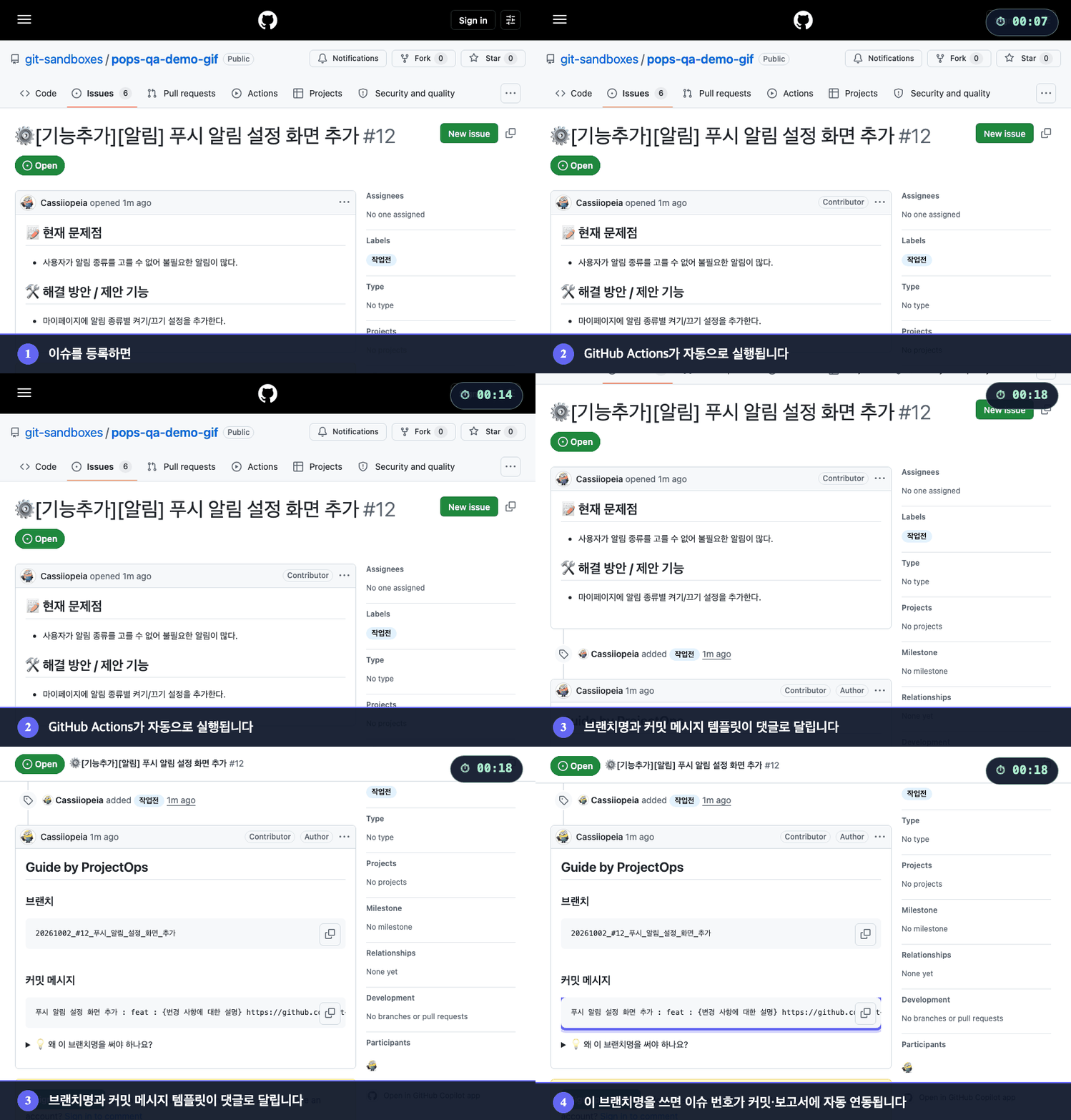
When an issue is opened, GitHub Actions runs on its own and comments a **branch name and a commit message template**. Work on that branch name and the issue number links into your commits and reports automatically.
**Drive it from your agent:** `/pro-github` files the issue, `/pro-init-worktree` sets up the workspace, and `/pro-commit` writes the commit in your format.
### 2. Open a PR and a change summary arrives automatically
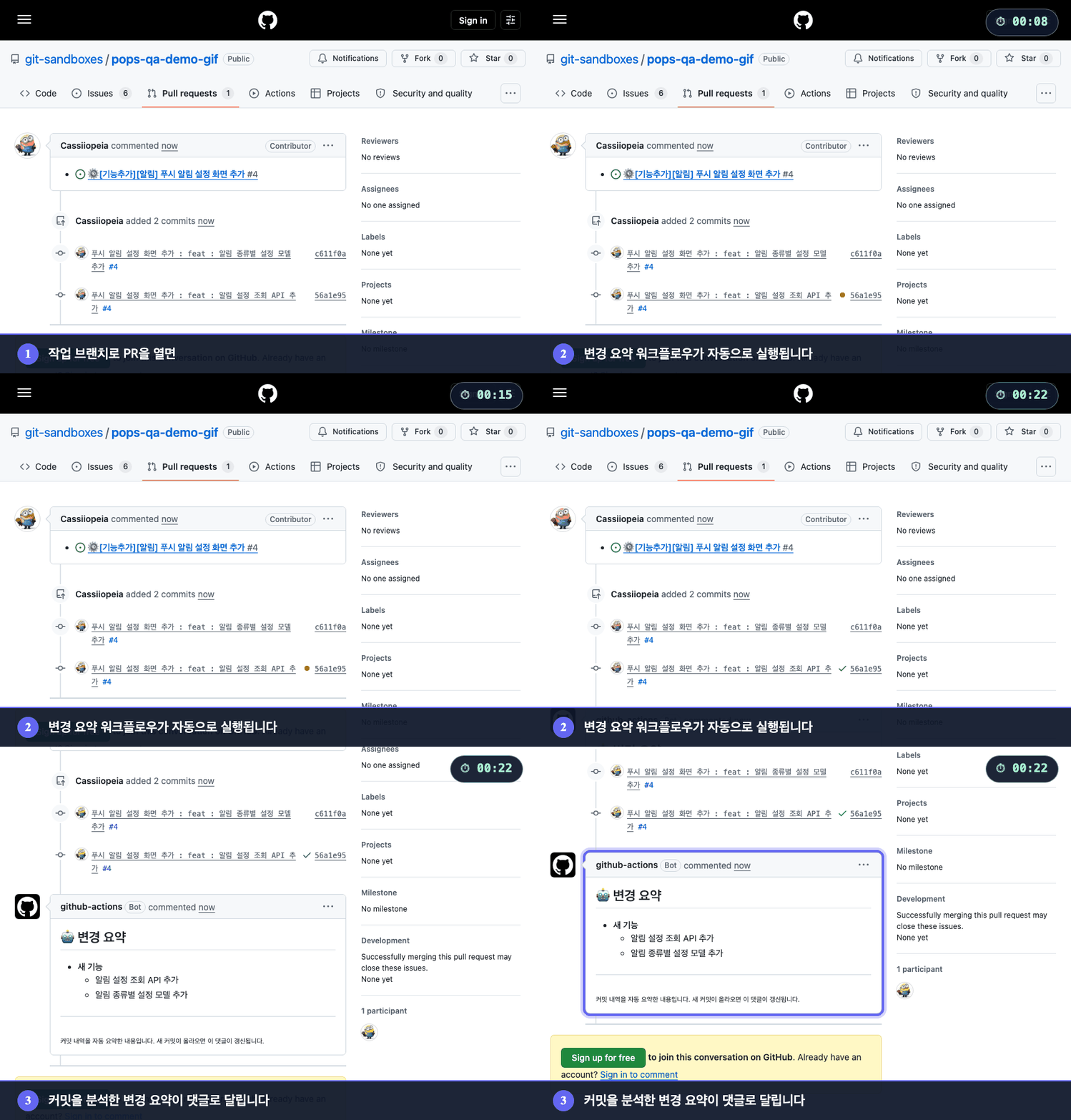
Open a PR from a work branch and a **change summary** built from the commits is posted as a comment. Push more commits and the same comment is updated instead of piling up new ones.
**Drive it from your agent:** `/pro-report` analyzes the diff and posts the implementation report; `/pro-agent-test` verifies the change by actually running it.
### 3. Open a release PR and everything from versioning to merge and tag is automatic
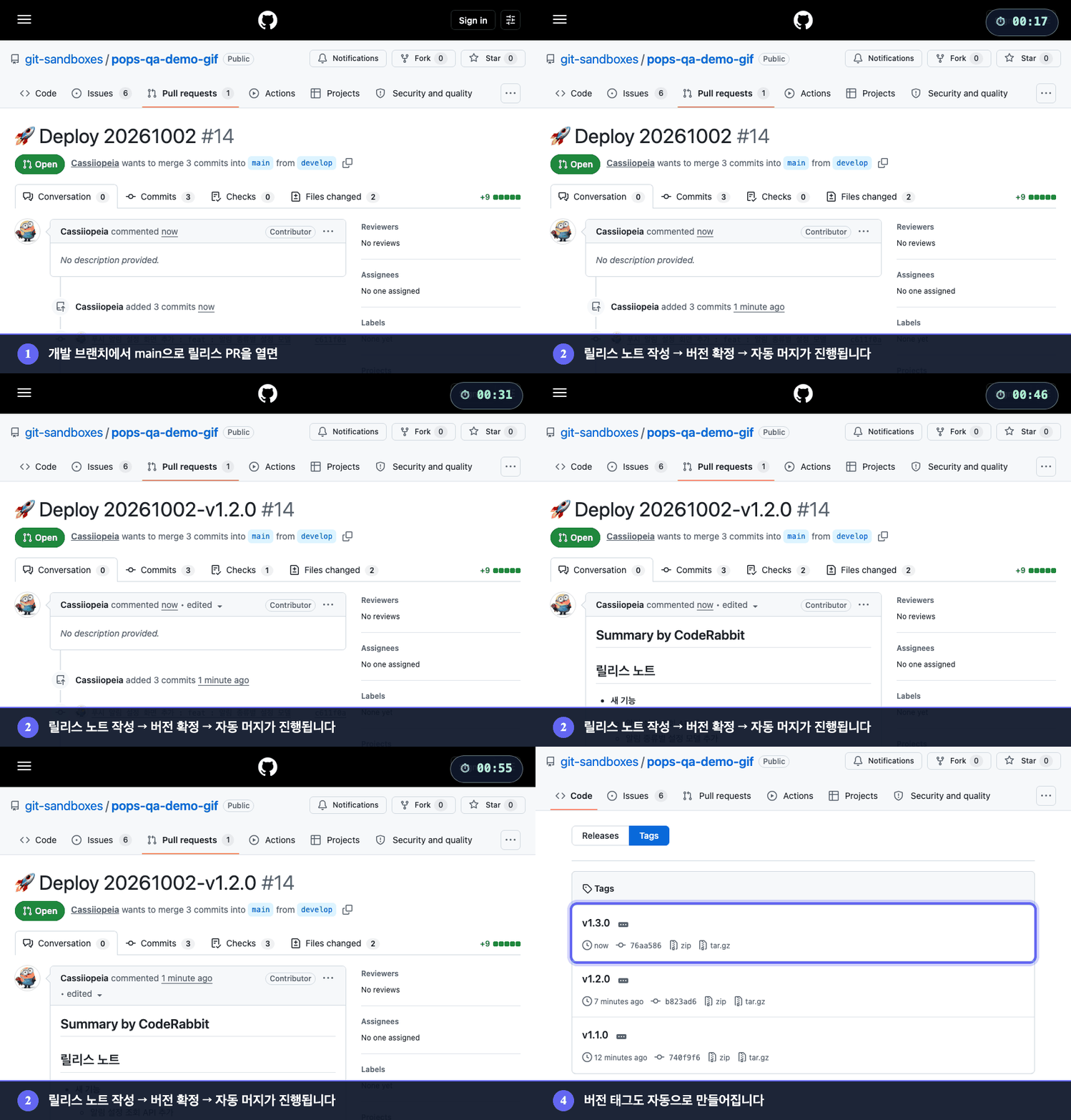
Open a PR from the development branch to `main` and it writes the release notes, decides the version from commit titles (`feat`, `fix`, ...) and puts it in the PR title, merges automatically, and creates the **version tag**. This example had `feat` commits, so the minor version went up.
**Drive it from your agent:** `/pro-changelog-deploy` pushes develop and opens the release PR for you.
---
## Make it yours
Skills write in your style. Put your preferences in `~/.projectops/config/config.json`; nothing is asked on first run.
```json
{
"preferences": { "language": "en", "tone": "short and direct", "rules": ["no emoji"] },
"skills": { "pro-commit": { "preset": "gitmoji" } }
}
```
Team formats in `version.yml` win; your tone still applies. Details: [Skills guide](docs/en/skills.md).
### Example: /pro-oss-consult on this repo
We ran `/pro-oss-consult` on this repo, then fixed what it found (measured 2026-10-13).
| Check | Before | After |
|---|---|---|
| Skill count stated in README and manifests | inconsistent (15 vs 20 stated, actual 15) | consistent: 14 core + 1 in the optional extras plugin |
| Longest skill description | 1,183 chars; 6 over 1,000 | 237 chars; 0 over 300 |
| Skills with no tests (all 15 skills) | 6 | 0 (56 contract test cases cover all 15 skills, 14 core + 1 extras) |
| Commit format | hardcoded in `pro-commit` | configurable via preferences and `version.yml` |
What it changed: descriptions were cut to short English triggers, a shared contract test now checks every skill, and `pro-commit` follows your team's `version.yml` commit template.
---
## What is inside
| Part | What it does | Docs |
|---|---|---|
| **GitHub Actions** | One push to main handles versioning, changelogs, and CI/CD deployment | [Versioning](https://cassiiopeia.github.io/projectops/version-control) |
| **Agent Skills** (15) | `/pro-github`, `/pro-commit`, `/pro-report` and more let an AI agent drive each step: issues, commits in your style, reports, release PRs | [Skills guide](https://cassiiopeia.github.io/projectops/skills) |
| **npx CLI** | Installs and updates workflows in an existing project, and diagnoses its state | [CLI reference](https://cassiiopeia.github.io/projectops/cli) |
<details>
<summary>See all 15 Agent Skills</summary>
### 🔄 Development cycle automation
| Skill | Purpose |
|------|------|
| `/pro-init-worktree` | Create a Git worktree and copy sensitive files automatically |
| `/pro-commit` | Complete a commit message from the issue context, in your own format (preset or template) |
| `/pro-report` | Analyze the git diff → generate an implementation report and post it as a GitHub comment |
| `/pro-changelog-deploy` | Push develop → open the main release PR + write release notes + automerge |
| `/pro-github` | GitHub in general: create issues (one-line description → template + file), view/edit/comment/label/assign, create/merge/view PRs, explore repos, manage Actions and Secrets |
### 📊 Analysis (no code changes)
| Skill | Purpose |
|------|------|
| `/pro-review` | Review from 6 angles (security, performance, bugs, quality...), classified Critical/Major/Minor |
### 🔧 Implementation (writes real code)
| Skill | Purpose |
|------|------|
| `/pro-figma` | Move a Figma design into code, then compare the result with the design pixel by pixel |
| `/pro-launch` | Launch, drive, and capture apps, web, and servers: fixed status bar, width changes, response mocking (empty list, failures), render from code |
| `/pro-desktop-control` | Drive programs on this computer's screen that are not web pages or emulators (installer wizards, OS dialogs, desktop apps): reads elements, presses without moving the mouse, asks before installs, hands security prompts to the user. Windows and macOS (macOS also answers notifications and system dialogs, such as the Apple Account sign-in code) |
| `/pro-design-brief` | A design request for a screen you built before the mockup exists: state captures, alternatives, copy candidates, and must-keep rules as a board for the designer |
| `/pro-oss-consult` | Diagnose a GitHub repo as an open-source project: type detection, 6-axis scoring, maturity stage, and edits to About, topics, labels, and files only after approval. One repo or a whole account |
> Design, planning, and implementation are handled by `superpowers` (brainstorming → writing-plans → executing-plans), not by this plugin.
### 📝 Documents and artifacts
| Skill | Purpose |
|------|------|
| `/pro-testcase` | Analyze an issue → generate a QA checklist |
| `/pro-agent-test` | QA that actually runs apps, web, and servers to find bugs, reporting reproduction steps, evidence, and severity (it does not fix code) |
| `/pro-ssh` | Connect to a remote server over SSH and run commands (AWS EC2, Synology NAS, Linux, and more) |
| `/pro-skill-creator` | Create, review, and improve a Skill (CREATE / REVIEW / IMPROVE modes) |
**Extras** (optional plugin): `/pro-code-consult` (keep AI-written code maintainable: audit, refactor one item at a time, check each diff, freeze violations), `/pro-synology-expose`, `/pro-skill-bug` (report a suspected projectops skill bug from any session) — `claude plugin install projectops-extras@projectops-marketplace --scope user`
</details>
<details>
<summary>See the development cycle and pipeline diagrams</summary>
### AI development cycle
Agent Skills cover the entire development cycle.
```mermaid
flowchart TD
A(["Start work"]) --> B["/pro-github<br/>File an issue"]
B --> C["/pro-init-worktree<br/>worktree + copy sensitive files"]
C --> D{"Type of work"}
D -->|New feature / design / refactor| E1["superpowers:brainstorming<br/>Decide what and why"]
D -->|Bug / outage| E2["superpowers:systematic-debugging<br/>Find the root cause"]
E1 --> P["superpowers:writing-plans<br/>Implementation plan"]
P --> F["superpowers:executing-plans<br/>Run the plan"]
E2 --> F
F --> H["/pro-review<br/>Self-review"]
H --> I["/pro-commit<br/>Issue-linked commit"]
I --> J["/pro-report<br/>Implementation report + GitHub comment"]
J --> K(["Open PR"])
K --> L["/pro-changelog-deploy<br/>Release PR + automerge"]
```
> Full list of Skills and usage: **[docs/en/skills.md](docs/en/skills.md)**
### GitHub Actions pipeline
```mermaid
flowchart TD
A([Push to develop]) --> B[Integrate]
B --> C[develop→main release PR]
C --> D["Finalize version in the PR<br/>commit-based bump + tag + AI changelog"]
D --> E[Auto-merge]
E --> F["Push to main → CI/CD deploy<br/>Flutter / Spring / React, etc."]
F --> G([Done])
```
</details>
<details>
<summary>Install Agent Skills only (Claude Code, Gemini CLI, Codex CLI, Cursor, GitHub Copilot)</summary>
```bash
# Claude Code
claude plugin marketplace add Cassiiopeia/projectops
claude plugin install projectops@projectops-marketplace --scope user
```
```bash
# Gemini CLI
gemini extensions install https://github.com/Cassiiopeia/projectops
```
```bash
# Codex CLI (macOS / Linux)
codex plugin marketplace add Cassiiopeia/projectops
```
The `--mode skills` wizard registers the Codex marketplace and also prepares the native skills fallback. Use `/plugins` only to check or manage the install.
Where the Codex plugin marketplace is unavailable, use the fallback install described in the [Skills guide](docs/en/skills.md).
```bash
# Cursor / GitHub Copilot (~/.copilot/skills) / the full Agent Skills install menu (recommended: npx)
npx projectops --mode skills
```
> Claude Code prefers `/pro-` autocomplete, Gemini prefers its extension, and Codex prefers its plugin marketplace. See the [Skills guide](docs/en/skills.md) for details.
</details>
---
## Supported project types
| Type | Version file | CI/CD |
|------|----------|-------|
| `spring` | build.gradle | SSH + Docker deploy, Nexus |
| `flutter` | pubspec.yaml | TestFlight, Play Store |
| `react` (including Next.js) | package.json | Docker |
| `node` | package.json | Docker |
| `python` | pyproject.toml | SSH + Docker deploy |
| `react-native` | Info.plist + build.gradle | — |
| `react-native-expo` | app.json | — |
| `basic` | version.yml only | — |
---
## Comment commands
Run automation by commenting on an issue or PR.
| Command | What it does | Applies to |
|--------|------|------|
| `@projectops server build` | Deploy a temporary server | Spring, Python |
| `@projectops server destroy` | Delete the server | Spring, Python |
| `@projectops server status` | Check server status | Spring, Python |
| `@projectops build app` | Build iOS + Android | Flutter |
| `@projectops apk build` | Build Android only | Flutter |
| `@projectops ios build` | Build iOS only | Flutter |
| `@projectops create qa` | Create a QA issue automatically | All projects |
> Details: [PR Preview](docs/en/pr-preview.md) | [Flutter builds](docs/en/flutter-test-build-trigger.md) | [Issue automation](docs/en/issue-automation.md)
---
## Setup
### Personal access token (optional)
Everything runs with the built-in `GITHUB_TOKEN`. Add a personal access token as the repository secret `_GITHUB_PAT_TOKEN` only if you need one of these:
| You want | Why the built-in token is not enough | Classic token scopes |
|---|---|---|
| Release PRs to merge even when branch protection blocks the Actions bot | The release workflow retries the merge with `--admin`, which needs an admin's token | `repo`, `workflow` |
| Issue labels synced to a GitHub Projects board | `GITHUB_TOKEN` cannot use the Projects API | `repo`, `project` |
| Other workflows to react to the issue helper's comment in a private repository | Events created with `GITHUB_TOKEN` do not start other workflows | `repo` |
Without a token, workflows that should run after a release merge are started with an explicit dispatch, so you do not need a token for that.
A fine-grained token with **Contents**, **Pull requests**, **Issues** and **Workflows** set to *Read and write* should cover the first row. We have not verified fine-grained tokens end to end yet; for Projects sync we have only tested a classic token. If a fine-grained token fails, please open an issue.
```
Repository Settings → Secrets → Actions → New repository secret
Name: _GITHUB_PAT_TOKEN
```
### Organization settings
```
Settings → Actions → General
├─ ✅ Allow GitHub Actions to create and approve pull requests
└─ ✅ Read and write permissions
```
---
## Things to know
We would rather tell you up front when this is not a fit.
- **GitHub only.** It assumes GitHub Actions and GitHub issues/PRs, so GitLab and others are not supported.
- **Releases assume a develop branch → default branch PR flow.** Branch names can be changed in `version.yml`, but it does not suit a repo that does not use two branches.
- **A personal access token is optional.** You need one only to merge past branch protection or to sync a Projects board. See [Setup](#setup).
- **It adds about 50 files to your repository** (workflows, helper scripts, templates). See [the measurement](#compared-with-other-tools).
- **New versions ship often.** `latest` follows every push to `main` with no delay. Pin a version you have tested with `npx projectops@<version>`.
- **Server deploy workflows assume a Docker server reachable over SSH.**
---
## Documentation
Browse and search everything on the **[docs site](https://cassiiopeia.github.io/projectops/)**. The guides are available in English and [Korean](https://cassiiopeia.github.io/projectops/ko/).
- [Getting started](https://cassiiopeia.github.io/projectops/getting-started)
- [CLI reference](https://cassiiopeia.github.io/projectops/cli)
- [Agent Skills guide](https://cassiiopeia.github.io/projectops/skills)
- [Versioning](https://cassiiopeia.github.io/projectops/version-control)
- [Changelog automation](https://cassiiopeia.github.io/projectops/changelog-automation)
- [PR Preview](https://cassiiopeia.github.io/projectops/pr-preview)
- [Issue automation](https://cassiiopeia.github.io/projectops/issue-automation)
- [SSH + Docker deploy](https://cassiiopeia.github.io/projectops/ssh-docker-deployment-guide)
- [Flutter CI/CD](https://cassiiopeia.github.io/projectops/flutter-cicd-overview)
- [Troubleshooting](https://cassiiopeia.github.io/projectops/troubleshooting)
---
## Support
- [Issues](https://github.com/Cassiiopeia/projectops/issues): bug reports and feature requests
- Finished issues are marked with the `status: done` label and closed automatically when a release is merged (`close_on_release`).
- [CONTRIBUTING.md](CONTRIBUTING.md): contribution guide
- [ARCHITECTURE.md](ARCHITECTURE.md): how the code fits together and how to add a flag, option, provider, language or skill
- [CODE_OF_CONDUCT.md](CODE_OF_CONDUCT.md): how we expect everyone to behave, and where to report problems
- [SECURITY.md](SECURITY.md): please report security vulnerabilities privately, not in a public issue
---
<div align="center">
**MIT License**
</div>
© Cassiiopeia · MIT · Cassiiopeia/projectops


