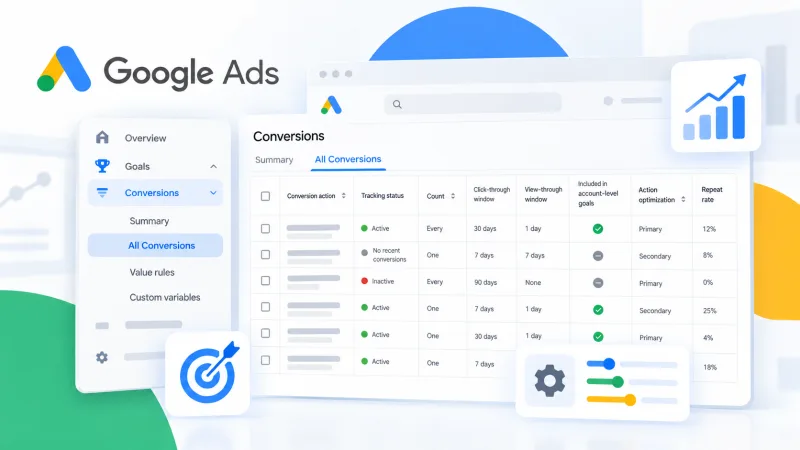
Google Ads has added an All Conversions tab to its interface. The update consolidates all conversion settings in a single view.
Previously, checking which events were tracked and whether they were configured correctly required navigating multiple sections of the account. The new tab addresses that.
Why it matters
Conversions underpin campaign performance. Flawed tracking wastes budget. Google's automated bidding strategies learn from conversion data: accurate data improves optimisation.
Accounts often carry outdated conversions, duplicates or unused events. These distort reporting and complicate analysis.
What the tab shows
The All Conversions tab displays every conversion set up in the account: active, inactive and those with errors. Users can quickly check which events are tracked, whether they fire correctly, whether tracking issues exist and which conversions are included in reports.
This simplifies account audits. It is particularly useful when taking over a project from another specialist or agency.
Practical use
No need to switch between sections to locate a conversion. Everything is in one window.
Errors surface faster. For example, if a conversion stops firing due to site changes or tag modifications.
It is easier to verify which conversions feed into the Conversions column used by automated strategies. This is critical: if the wrong events are included, automation optimises campaigns toward the wrong goals.
Who benefits
The tab serves anyone managing Google Ads. Affiliates can set up tracking for a new offer quickly. Agencies can audit client accounts. In-house teams can keep settings under control.
For those running dozens of campaigns or launching new ones frequently, checking conversions takes time. Now it is faster.
Availability
The tab is live in the Google Ads interface. Access it through Tools and Settings, then Conversions.
Worth checking your accounts: you will likely find something redundant or forgotten. Clean tracking ensures reliable reporting and proper automated bidding performance.


