iris — Claude Code plugin: agent evaluation
iris adds an MCP server that scores agent runs for quality, safety, and cost. It fits local trace review and rule-based checks before deployment.
/plugin marketplace add anthropics/claude-plugins-community
/plugin install iris@claude-communityWhat iris does
iris adds an MCP server to Claude Code for inspecting agent runs. It records traces with hierarchical spans in a local SQLite database, applies built-in checks to outputs, and includes the agent’s tool calls in the evaluation. Rules can be reviewed and edited, while separate runs can be compared.
The checks cover completeness, relevance, personal-data leaks, prompt injection, hallucination signals, and cost thresholds. An optional LLM judge handles semantic checks with your own API key and a per-evaluation cost limit. Data stays local unless you enable OpenTelemetry, the judge, or a webhook. Node.js 22.13 or later is required for the server to start.
What it helps with
- score an agent run against evaluation rules
- detect personal data in an output
- check a response for prompt injection
- compare results from two runs
- track agent call costs
Example prompts for the agent
- Score the latest agent run for quality, safety, and cost.
- Check this output for personal-data leaks, prompt injection, and hallucination signals.
- Compare two agent runs and list the rules that fired.
How to install iris
Plugin marketplace
/plugin marketplace add anthropics/claude-plugins-community/plugin install iris@claude-communityStep by step, with commands for each platform: Claude Code plugins: marketplaces, installing, and building your own
Questions about iris
How do I install iris in Claude Code?
First add the marketplace with /plugin marketplace add anthropics/claude-plugins-community, then install the plugin with /plugin install iris@claude-community.
What does iris do?
It evaluates agent runs for quality, safety, and cost, stores traces in a local SQLite database, and reports which rules matched.
What does iris require to run?
The server requires Node.js 22.13 or later. The optional LLM judge uses your own API key.
Source text
SKILL.md · MIT
# Iris — stop shipping agents on vibes
[](https://glama.ai/mcp/servers/iris-eval/mcp-server)
[](https://cursor.com/install-mcp?name=iris-eval&config=eyJjb21tYW5kIjoibnB4IiwiYXJncyI6WyIteSIsIkBpcmlzLWV2YWwvbWNwLXNlcnZlciJdfQ==)
[](https://vscode.dev/redirect/mcp/install?name=iris-eval&config=%7B%22name%22%3A%22iris-eval%22%2C%22command%22%3A%22npx%22%2C%22args%22%3A%5B%22-y%22%2C%22%40iris-eval%2Fmcp-server%22%5D%7D)
[](https://npmjs.com/package/@iris-eval/mcp-server)
[](https://github.com/iris-eval/mcp-server)
[](https://github.com/iris-eval/mcp-server/actions/workflows/ci.yml)
[](https://securityscorecards.dev/viewer/?uri=github.com/iris-eval/mcp-server)
[](https://www.bestpractices.dev/projects/12849)
[](https://github.com/iris-eval/mcp-server/blob/main/LICENSE)
[](https://github.com/iris-eval/mcp-server/pkgs/container/mcp-server)
[](https://www.pulsemcp.com/servers/iris-eval)
[](https://mcp.so/servers/mcp-server-iris-eval)
**Iris scores every agent run for quality, safety, and cost — on your machine, with no SDK and no account.** Most agent projects check quality by running a few remembered prompts and eyeballing the output. Iris replaces that with numbers you can audit: your agent's runs land in a SQLite database on your disk, 26 built-in rules score them deterministically — PII, prompt injection, hallucination markers, cost thresholds, and the agent's own tool calls — free, with no LLM calls, and an optional LLM judge with a hard per-eval cost cap handles the semantic questions. Every rule is inspectable and editable, because a judge you can't audit is just vibes with a number on it. MIT licensed, no telemetry. Nothing leaves your machine unless you turn one of these on: an OpenTelemetry endpoint (`IRIS_OTEL_ENDPOINT`), which exports traces to the collector you name; the LLM judge with your own key, which sends the text it judges to that provider, and whose citation check fetches the pages an output cites; or a webhook, which posts ids, the verdict and rule names, never the text, to the address you set.
**Requires Node.js 22.13 or later.** Check with `node --version`.
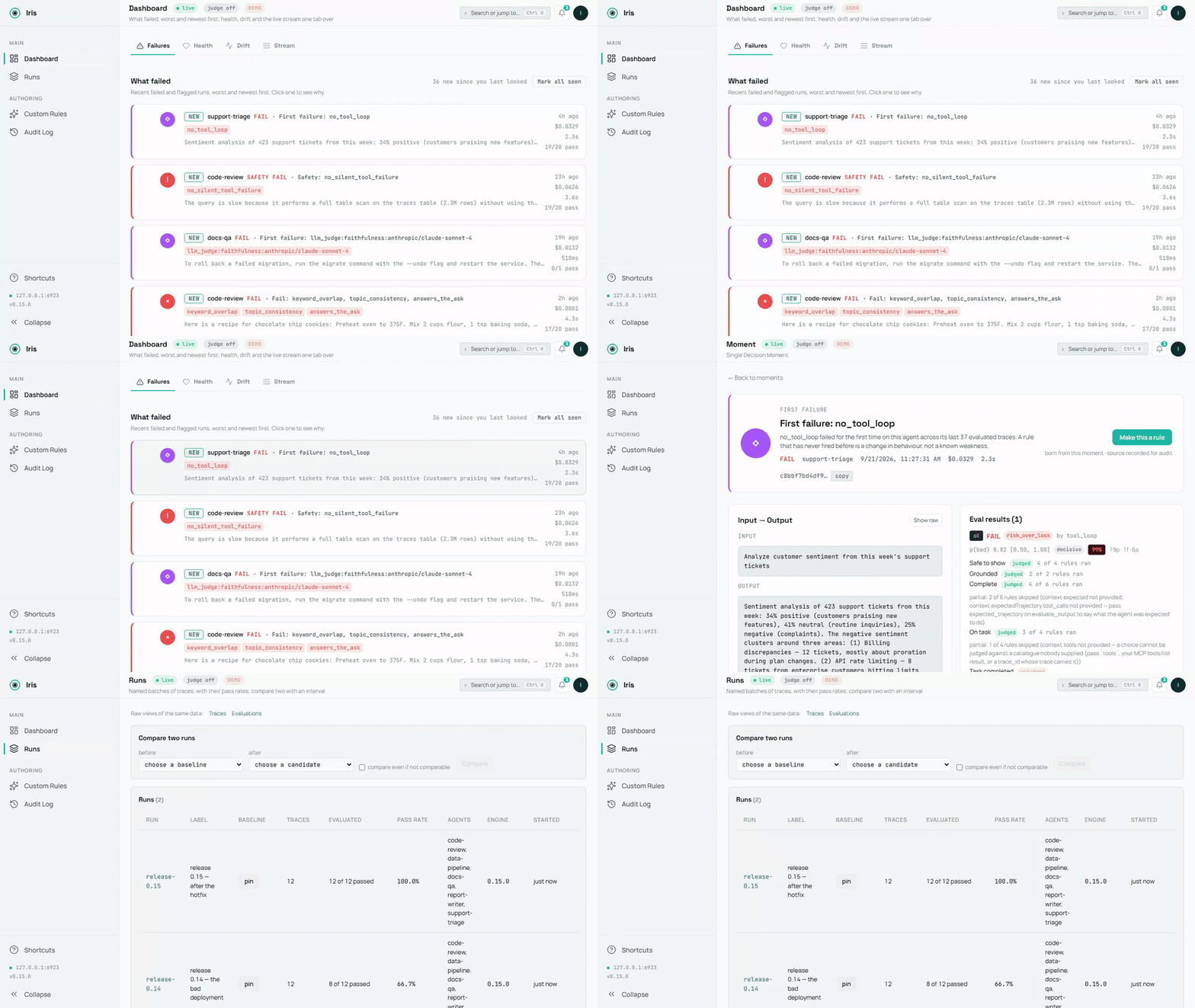
<sub>The demo database, recorded by `scripts/demo-media.mts`; the source is [`demo.mp4`](https://iris-eval.com/demo.mp4). A still: [`dashboard-overview.png`](https://raw.githubusercontent.com/iris-eval/mcp-server/main/docs/assets/dashboard-overview.png).</sub>
## A failure on screen in 60 seconds
No agent wiring, no config — one command:
```bash
npx @iris-eval/mcp-server --demo
```
This seeds a demo database — five small agents, two weeks of runs, every verdict the engine's own — and serves the dashboard against it at **http://localhost:6920** (your browser opens automatically on first run). The dashboard lands on **Failures**: what failed, worst and newest first, each card naming the rule and its evidence. Worth clicking into — a PII leak caught by the safety rules, a hidden directive in a forum post that the summarizer complied with, a number the source document never said, two runs on the same twelve questions compared with an interval (**Runs**), a deployed custom rule and a paused one with their audit rows, and a failed LLM-judge score with its rationale.
Demo data lives in its own database (`demo.db` in your Iris home directory — `~/.iris` on macOS/Linux, `%USERPROFILE%\.iris` on Windows) and never mixes with your real traces. Remove all of it with one command:
```bash
npx @iris-eval/mcp-server --demo-clear
```
## Hook up your own agent
First, prove the install works on this machine — it runs offline and opens nothing of yours:
```bash
npx @iris-eval/mcp-server --self-test # exit 0 = healthy
```
Then add Iris to your MCP client. One command writes the client's own config file, keeps every other server in it, and pins the version you ran:
```bash
npx -y @iris-eval/mcp-server install claude-code
```
The clients: `claude-code`, `claude-desktop`, `cursor`, `windsurf`, `continue`, `vscode`, `cline`, `zed`, `codex`, `gemini`. `install --list` shows the ones found on this machine, the Iris each one runs and the file it reads; `install <client> --uninstall` takes Iris out again. Every client shares one database, so after an upgrade move them all at once with `install --upgrade` ([Updating](#updating)). Restart the client to load it.
**Claude Desktop: one click.** Each release from 0.20.0 on attaches `iris-eval.mcpb`, an [MCP Bundle](https://github.com/modelcontextprotocol/mcpb): download [the latest](https://github.com/iris-eval/mcp-server/releases/latest/download/iris-eval.mcpb), open it, and Claude Desktop shows an install dialog. Nothing on it is required — an Anthropic or OpenAI key for the LLM judge is optional, and the dashboard is a switch that starts off. The bundle holds the npm package and its dependencies, so nothing else needs installing: Claude Desktop runs it under the Node it ships when that Node is 22.13 or newer (Claude Desktop 1.1.6679 ships 24.13), and Iris stores traces with Node's built-in SQLite, in the same `~/.iris` every other install uses. The release notes show how to verify its signature and build attestation.
It runs in any MCP client, and every client it names has a row with what was actually checked. **Verified on every CI run: Claude Code, Gemini CLI** — the real client starts Iris from the config the installer wrote and reports it connected (`claude mcp list`, `gemini mcp list`), on Linux, macOS and Windows; Claude Code's capture plugin hooks are driven through the real scripts too. **Claimed from each client's own MCP documentation** — the installer writes the configuration shape the client documents, and that writer is tested on the shape; nobody on the Iris side has watched it connect: Claude Desktop, Cursor, Devin Desktop (Windsurf), Continue, VS Code, Cline, Zed, OpenAI Codex CLI. Every row with its source and the date it was read: https://iris-eval.com/clients. By hand instead, one block, dashboard included:
```json
{
"mcpServers": {
"iris-eval": {
"command": "npx",
"args": ["-y", "@iris-eval/mcp-server", "--dashboard"]
}
}
}
```
Your client lists Iris's twelve tools on connect, and the dashboard serves at **http://localhost:6920**. Now paste this to your agent:
> Log that last task to Iris and evaluate the output.
The trace lands on the dashboard with its scores. Prefer the MCP server headless? Drop `--dashboard` from the args — you can open the same dashboard any time with `npx @iris-eval/mcp-server --dashboard`.
**One thing worth knowing up front:** MCP tools are called when the model decides to call them. Iris doesn't intercept your agent, so traces are logged when your agent asks it to log them — either because you told it to, or because your code calls the tools directly. Ask your agent to "log this to Iris and evaluate it" and it will. If you want capture that doesn't depend on the model choosing, `POST /api/v1/traces` does exactly that — your code sends the trace over plain HTTP, no model in the loop (see [docs/http-ingest.md](https://github.com/iris-eval/mcp-server/blob/main/docs/http-ingest.md)). The CLI and host hooks on the [roadmap](https://iris-eval.com/#roadmap) will be thin clients over the same endpoint.
### Capture over HTTP (no model in the loop)
The ingest endpoint lives on the **dashboard port** — `6920` by default, not the MCP transport port — and it exists only while the dashboard is running. Pass `--dashboard` (or set `IRIS_DASHBOARD=true`); `--transport http` on its own does **not** start it, and a request to the transport port returns `404`. With the dashboard up, anything that can send an HTTP request can log a trace — and optionally run the deterministic evals in the same request. `GET /api/v1/capabilities` on the same port says what this server can judge, what each rule needs, the judge state with the steps that enable it, and the limits — the same object the MCP resource `iris://capabilities` serves — so an HTTP caller has the frame an MCP client gets at initialize:
```bash
curl -s -X POST "http://127.0.0.1:6920/api/v1/traces" \
-H "Content-Type: application/json" \
-d '{
"agent_name": "support-bot",
"input": "What is the refund policy?",
"output": "Refunds are available within 30 days of purchase.",
"evaluate": true,
"eval_type": "safety"
}'
```
Returns `201` with the stored `trace_id` and the evaluation result (in `--demo` mode the endpoint refuses writes with `403`, so demo data never mixes with yours). The endpoint accepts the same body as the `log_trace` tool and sits behind the same middleware stack as the rest of the dashboard: loopback bind and the DNS-rebinding guard by default, plus Bearer auth when you set one. **Two plain facts about it:** it accepts unauthenticated writes unless Iris was started with `--api-key` (or `IRIS_API_KEY`) — the loopback bind is what keeps it to your machine by default, so set a key before binding beyond loopback; and what it stores is verbatim — `input` and `output` land in `iris.db` exactly as sent, including any text `no_pii` goes on to flag. Full contract, field reference, and error semantics: [docs/http-ingest.md](https://github.com/iris-eval/mcp-server/blob/main/docs/http-ingest.md).
### Capture every Claude Code turn (optional)
```
/plugin marketplace add iris-eval/mcp-server
/plugin install iris-eval-capture@iris-eval
```
A second, separately installed plugin: its hooks record each turn's prompt, tool calls (the failed ones included, with the error the agent received) and final answer, keyed on the prompt, so an interrupted turn's calls and a background sub-agent's are sent too, and hand them to `iris-eval ingest`, detached, with critical spans redacted in the stored evaluation text — capture that does not depend on the model deciding to call a tool. A turn that ended in an API error is stored without being judged; when the model logged the turn too, both traces are kept and the plugin's names the model's. It never prints, never blocks, never sends anything anywhere. Installing `iris-eval` alone changes nothing about your turn loop. Limits and removal: [claude-plugin-capture/README.md](https://github.com/iris-eval/mcp-server/blob/main/claude-plugin-capture/README.md).
### Python
```bash
pip install iris-eval
```
```python
from iris_eval import IrisClient
iris = IrisClient() # IRIS_URL, or the running dashboard's runtime.json
iris.evaluate_output("…", input="…", agent_name="support-bot")["verdict"] # {"state": "pass", "basis": "clean", "by": []}
```
A thin client over the HTTP API of server 0.16.0 and later, versioned on its own — `iris_eval.__version__` and the PyPI page carry its number, which is not the server's: `log_trace()`, `evaluate_output()`, `get_traces()`, `get_trace()`, `health()`, `capabilities()`, sync and async, typed answers, the server's own sentence on a refusal — and a pytest plugin: an `iris` fixture and `assert_iris(output, expect="pass")` that asserts on the verdict's state. [packages/python/README.md](https://github.com/iris-eval/mcp-server/blob/main/packages/python/README.md).
### Record every OpenAI and Anthropic call
```python
from iris_eval import wrap_openai
client = wrap_openai(OpenAI(), agent_name="support-bot") # every call: a GenAI span to POST /v1/traces, scored
```
```ts
import { wrapOpenAI } from '@iris-eval/sdk';
const openai = wrapOpenAI(new OpenAI(), { agentName: 'support-bot' });
```
Wrap the provider client once and each model call becomes one OpenTelemetry GenAI span sent to the OTLP door, stored with its input, output, token usage and tool calls, and scored: capture that does not depend on the model calling a tool. `wrap_openai` / `wrap_anthropic` in the Python client; `wrapOpenAI`, `wrapAnthropic` and `irisMiddleware` for the Vercel AI SDK in `@iris-eval/sdk`. Both are not yet published (the next `iris-eval` release on PyPI; `@iris-eval/sdk` is built from source until its first npm release). Streams, the SDKs' stream helpers and tool calls are covered, the original client is not changed, and Iris being down never breaks a call — [packages/sdk/README.md](https://github.com/iris-eval/mcp-server/blob/main/packages/sdk/README.md), [packages/python/README.md](https://github.com/iris-eval/mcp-server/blob/main/packages/python/README.md#record-every-openai-and-anthropic-call).
### Score every LangChain and LangGraph run
```python
from iris_eval.langchain import IrisCallbackHandler
graph.invoke(inputs, config={"callbacks": [IrisCallbackHandler(agent_name="support-bot")]})
```
Each top-level run becomes one trace (the run, its model calls, its tool calls and its graph nodes as GenAI spans) with its input, output, tool calls, token usage and a verdict. Python in the client (`pip install iris-eval`, 0.2.0 and later), JavaScript as `@iris-eval/langchain` (in this repository, not yet published to npm). Both are proven in CI against a real LangGraph app with a scripted model; LangSmith's own OpenTelemetry export is proven the same way — [docs/otel-recipes.md](https://github.com/iris-eval/mcp-server/blob/main/docs/otel-recipes.md#langgraph-via-langsmiths-export).
### A CI gate, no server needed
```bash
npx -y @iris-eval/mcp-server ingest --file traces.ndjson --evaluate --fail-on any
```
`any` fails the job on every verdict that is not a pass: a failure, and a verdict that was not checked. Name one basis instead (`--fail-on detector_veto`) to fail only on that one.
Or the GitHub Action (0.16.0), which fails the job on the verdicts you name, writes the receipt to the job summary and posts it as one pull-request comment updated in place: `uses: iris-eval/mcp-server/.github/actions/[email protected]` with `traces: traces.ndjson` — [docs/ci-gate.md](https://github.com/iris-eval/mcp-server/blob/main/docs/ci-gate.md#github-actions--the-action-0160).
A fourth door (0.15.0): `POST /v1/traces` on the dashboard port takes the OTLP/HTTP JSON or protobuf your OpenTelemetry instrumentation already emits (the Python SDK's exporter speaks protobuf only, so this is the Python door too), and each OTLP trace becomes an Iris trace with its spans — [docs/otel-integration.md](https://github.com/iris-eval/mcp-server/blob/main/docs/otel-integration.md#traces-arrive-by-otlp); one recipe per framework (Pydantic AI, Google ADK, LangGraph via LangSmith, CrewAI, the OpenAI Agents SDK in Python and JavaScript, LlamaIndex, AutoGen, Microsoft Agent Framework, Semantic Kernel, the Vercel AI SDK and Mastra), each proved by a fixture, in [docs/otel-recipes.md](https://github.com/iris-eval/mcp-server/blob/main/docs/otel-recipes.md). `ingest` reads one JSON trace (or NDJSON, one per line) from stdin or a file, stores it, evaluates it under exactly the rules `evaluate_output` runs, prints one JSON line per trace with the verdict and its basis, and exits 1 when a verdict matches `--fail-on`. `--dataset <id|label>` restricts that gate to the case keys in a dataset (`POST /api/v1/datasets` promotes a run's case keys into one), so a job fails only on the cases you chose. The full recipe, the exit codes and the eight bases are in [docs/ci-gate.md](https://github.com/iris-eval/mcp-server/blob/main/docs/ci-gate.md).
### Write a rule as code
`eval.plugins` in `config.json` loads rules you wrote — an ES module whose default export is `{ name, kind, mechanism, version, needs, evaluate(ctx) }` — pinned by the sha256 of the file, so a file that changed since you pinned it refuses startup rather than running. A loaded plugin fires like a built-in and shows on `list_rules` under `plugins`. The contract, the hash recipe and what a plugin may return: [docs/plugins.md](https://github.com/iris-eval/mcp-server/blob/main/docs/plugins.md).
### Use the engine in your own process
The evaluation engine is importable — no server, no database, no model:
```ts
import { EvalEngine, defaultConfig } from '@iris-eval/mcp-server/engine';
const engine = new EvalEngine(defaultConfig.eval.defaultThreshold, defaultConfig.eval.ruleThresholds, defaultConfig.eval);
const result = await engine.evaluateAll({ output: answer, input: prompt, toolCalls, costUsd });
result.verdict.state; // 'pass' | 'fail' | 'unknown', with result.verdict.basis and result.interpretations
```
The same engine, the same rules and the same composer the server runs; `builtInRules()`, `createCustomRule()`, `compose()` and the published-accuracy readers are exported beside it.
### A typed client for the HTTP route
```ts
import { createClient } from '@iris-eval/mcp-server/client';
const iris = createClient({ baseUrl: 'http://127.0.0.1:6920', apiKey: process.env.IRIS_API_KEY });
const { trace_id, evaluation } = await iris.logTrace({ agent_name: 'support-bot', input, output, tool_calls, evaluate: true });
evaluation?.verdict?.state; // the same object evaluate_output returns
```
One body on every door: it is what `log_trace` and `iris-eval ingest` accept. A refusal throws `IrisClientError` with the server's own sentence and status. Both subpaths are checked from a packed tarball on every build.
### Verify your install
```bash
npx @iris-eval/mcp-server --self-test # offline diagnostic; exit 0 = healthy, 1 = a check failed
npx @iris-eval/mcp-server --version # prints the bare version, e.g. 1.2.3
```
`--self-test` first creates your Iris home if it is missing and checks that it is writable (exit 1, naming the path, if it is not), reports where your database's search index is (whole, how many traces a background build has indexed so far, or no FTS5 on this SQLite), reads your database's schema (exit 1, with the fix, when this version or an MCP client pinned to an older release cannot open it), then runs its checks — storage round-trip, a planted SSN and a planted injection caught by the safety rules, dashboard boot, the DNS-rebinding guard — inside an isolated temp home. Your real database is only read, never changed. Everything Iris writes lives under one directory, your **Iris home**: `~/.iris` by default (`%USERPROFILE%\.iris` on Windows), or wherever `IRIS_HOME` points. That is where `iris.db`, `config.json`, `custom-rules.json`, `audit.log`, `preferences.json` and the demo files live; point `IRIS_HOME` at a scratch directory to try Iris without touching your real data.
<details>
<summary><strong>Setup by tool</strong></summary>
<!-- iris:clients-table:start -->
| Client | Status | What that means | Read |
|---|---|---|---|
| Claude Code | verified | a test drives the real client on every CI run | [2026-09-25](https://code.claude.com/docs/en/mcp) |
| Claude Desktop | claimed | the installer writes the shape the client documents, and that writer is tested on the shape; nobody on the Iris side has watched it connect | [2026-09-25](https://modelcontextprotocol.io/docs/2026-07-28/develop/connect-local-servers) |
| Cursor | claimed | the installer writes the shape the client documents, and that writer is tested on the shape; nobody on the Iris side has watched it connect | [2026-09-25](https://cursor.com/docs/mcp) |
| Devin Desktop (Windsurf) | claimed | the installer writes the shape the client documents, and that writer is tested on the shape; nobody on the Iris side has watched it connect | [2026-09-25](https://docs.devin.ai/desktop/cascade/mcp) |
| Continue | claimed | the installer writes the shape the client documents, and that writer is tested on the shape; nobody on the Iris side has watched it connect | [2026-09-25](https://docs.continue.dev/customize/deep-dives/mcp) |
| VS Code | claimed | the installer writes the shape the client documents, and that writer is tested on the shape; nobody on the Iris side has watched it connect | [2026-09-25](https://code.visualstudio.com/docs/agent-customization/mcp-servers) |
| Cline | claimed | the installer writes the shape the client documents, and that writer is tested on the shape; nobody on the Iris side has watched it connect | [2026-09-25](https://docs.cline.bot/getting-started/config) |
| Zed | claimed | the installer writes the shape the client documents, and that writer is tested on the shape; nobody on the Iris side has watched it connect | [2026-09-25](https://zed.dev/docs/ai/mcp) |
| OpenAI Codex CLI | claimed | the installer writes the shape the client documents, and that writer is tested on the shape; nobody on the Iris side has watched it connect | [2026-09-25](https://learn.chatgpt.com/docs/extend/mcp?surface=cli) |
| Gemini CLI | verified | a test drives the real client on every CI run | [2026-09-25](https://geminicli.com/docs/tools/mcp-server/) |
Every row with what was checked: [iris-eval.com/clients](https://iris-eval.com/clients). No client is called supported without a row.
<!-- iris:clients-table:end -->
`npx -y @iris-eval/mcp-server install <client>` writes each of these for you. By hand, per client:
#### Claude Desktop
Edit your MCP config file:
- **macOS:** `~/Library/Application Support/Claude/claude_desktop_config.json`
- **Windows:** `%APPDATA%\Claude\claude_desktop_config.json`
Add the JSON config above, then restart Claude Desktop.
#### Claude Code
```bash
claude mcp add --transport stdio iris-eval -- npx -y @iris-eval/mcp-server
```
Then restart the session (`/clear` or relaunch) for tools to load.
> **Windows note:** Do *not* use `cmd /c` wrapper — it causes path parsing issues. The `npx` command works directly.
#### Cursor
Add the JSON config above to `~/.cursor/mcp.json` (every project) or `.cursor/mcp.json` in a workspace, with `"type": "stdio"` in the `iris-eval` entry — Cursor's docs mark it required.
#### Devin Desktop (Windsurf)
Add the JSON config above to `mcp_config.json`: `~/.config/devin/mcp_config.json` on macOS and Linux, `%APPDATA%\devin\mcp_config.json` on Windows.
#### Continue
Save the JSON config above as its own file in Continue's `mcpServers` folder: `~/.continue/mcpServers/iris-eval.json` (every workspace) or `.continue/mcpServers/iris-eval.json` in one.
#### VS Code (native MCP)
Add to `.vscode/mcp.json` in your workspace (note: VS Code uses `servers`, not `mcpServers`):
```json
{
"servers": {
"iris-eval": {
"command": "npx",
"args": ["-y", "@iris-eval/mcp-server"]
}
}
}
```
#### Cline
Open Cline's MCP Servers panel → Configure MCP Servers, and add the `mcpServers` JSON config above to `cline_mcp_settings.json` (`~/.cline/data/settings/cline_mcp_settings.json`, shared by Cline in VS Code, JetBrains and the CLI).
#### Zed
Add to Zed `settings.json`:
```json
{
"context_servers": {
"iris-eval": {
"command": "npx",
"args": ["-y", "@iris-eval/mcp-server"],
"env": {}
}
}
}
```
#### OpenAI Codex CLI
Add to `~/.codex/config.toml`:
```toml
[mcp_servers.iris-eval]
command = "npx"
args = ["-y", "@iris-eval/mcp-server"]
```
#### Gemini CLI
Add the `mcpServers` JSON config above to `~/.gemini/settings.json`. Gemini CLI connects to MCP servers only in folders it trusts: if `gemini mcp list` shows `iris-eval` as Disabled, run `/permissions` in that folder.
#### Anything else that speaks MCP
Iris is a standard stdio MCP server — one `npx @iris-eval/mcp-server` command, no SDK, no code changes. If your client supports MCP, it supports Iris. Client config formats change; when in doubt, check your client's MCP docs and point it at that command.
</details>
### Other Install Methods
```bash
# Global install (recommended for persistent data and faster startup)
npm install -g @iris-eval/mcp-server
iris-eval --dashboard
# Docker — two servers, two ports: 3000 = MCP HTTP transport,
# 6920 = dashboard (which also serves the POST /api/v1/traces ingest endpoint).
# The image binds 0.0.0.0 inside the container, so a key is required (see Production).
# The volume is the Iris home: the database, deployed rules and audit log persist in it.
docker run -p 3000:3000 -p 6920:6920 -v iris-data:/data \
-e IRIS_API_KEY="$(openssl rand -hex 32)" ghcr.io/iris-eval/mcp-server
```
> **Tip:** Global install (`npm install -g`) stores traces persistently at `~/.iris/iris.db`. With `npx`, traces persist in the same location, but startup is slower due to package resolution.
## What You Get
| | |
|---|---|
| **Trace Logging** | Hierarchical span trees with per-tool-call latency, token usage, and cost in USD. Stored in SQLite, queryable instantly. |
| **Output Evaluation** | 26 built-in rules across 4 categories: completeness, relevance, safety, cost. PII detection (21 patterns: SSN, credit card, phone, email, IBAN, DOB, MRN, IP, API key, passport, plus AWS/Slack/SendGrid/GitHub/Google/npm/DigitalOcean tokens, credentials inside URLs, secret-named assignments, PEM private-key blocks and seed phrases; date of birth, medical record number, passport and seed phrase fire only beside their label, [by design](https://github.com/iris-eval/mcp-server/blob/main/docs/api-reference.md#safety-rules)), prompt injection (38 patterns, phrase + structural), stub-output detection, hallucination detection (25 context-grounded fabrication/contradiction signals — pass `input` to ground them against the agent's source material), and six trajectory rules that read what the agent DID: an unacknowledged failed tool call, a repeated one (by call, by repeated sequence, or by target once you send `tools`), a call whose arguments the tool's own JSON Schema rejects and the agent never retried, a file, directory or URL the answer cites that appears in nothing the agent read, an instruction that arrived inside a TOOL RESULT and was then obeyed by a later call, and a task that took more tool calls than your step budget. A trajectory can arrive as `tool_calls` or as OpenTelemetry TOOL spans. Add custom rules with Zod schemas. |
| **LLM-as-Judge** | Optional semantic scoring via Anthropic or OpenAI — bring your own API key. Seven templates. With `IRIS_RELEVANCE_JUDGE_MODEL` set, `answers_the_ask` asks the `relevance` judge and fails an off-topic answer; without it the rule reads the ask lexically and advises. Hard per-eval cost cap (`IRIS_LLM_JUDGE_MAX_COST_USD_PER_EVAL`, default $0.25), per-eval pricing disclosed in the result. |
| **Cost Visibility** | Aggregate cost across all agents over any time window. Set budget thresholds. Get flagged when agents overspend. A trace that sends token counts and a model but no cost (most OpenTelemetry and framework traces) is priced at the model's list price and marked estimated everywhere it shows; `pricing.models` in `config.json` prices models the built-in table does not — [docs/cost.md](https://github.com/iris-eval/mcp-server/blob/main/docs/cost.md). |
| **Web Dashboard** | Real-time dark-mode UI that lands on the failures, worst and newest first — trace visualization with full-text search over every trace's text, eval results, cost breakdowns, and a command palette (⌘K) that searches your own rules, traces, and evals. |
| **Local-first** | Everything lives in SQLite on your disk. The self-hosted server needs no account or sign-up and sends no telemetry. Outbound HTTP happens only where you opt in: your own LLM-judge key, citation fetching, an OTel exporter you configure, or a webhook you set. |
Where this is going next: [the capability map](https://iris-eval.com/capabilities) — every question Iris can be asked about every subject, with what it has and what it lacks — and [the three tracks](https://iris-eval.com/#roadmap).
### Measured, not claimed
Every built-in rule has a published precision, recall and F1 with 95% confidence intervals, measured on a labelled corpus that lives in this repository (`proof/corpus/`) and regenerates with one command — `npm run proof` — offline, with no key and no model in the loop. Those numbers are two different kinds, and the page never adds them together: some rules are measured against labels a model gave by reading the failure itself, which measures detection; the rest are checked against their own documented definition, applied independently, which shows the code implements its formula and says nothing about whether the formula catches the failure. `proof/RESULTS.md` and the proof page mark each rule. CI re-runs the measurement on every pull request and fails if the committed numbers differ from what the code produces, so a rule cannot change without its numbers changing with it. The numbers are on [iris-eval.com/proof](https://iris-eval.com/proof) and in [`proof/RESULTS.md`](https://github.com/iris-eval/mcp-server/blob/main/proof/RESULTS.md); how the corpus was made, what it is not, and how to read an interval are in [docs/proof.md](https://github.com/iris-eval/mcp-server/blob/main/docs/proof.md). The corpus is synthetic and model-labelled — a human blind label is pending, and the page says so; `node proof/blind-sample.mjs` draws the reproducible sample that will settle it.
## MCP Tools
Iris registers twelve tools that any MCP-compatible agent can invoke — trace and rule...
© iris-eval · MIT · iris-eval/mcp-server


