speckit-companion · alfredoperez, copilot-canvas — плагин для GitHub Copilot: установка
Плагин speckit-companion для GitHub Copilot показывает ход работы Spec Kit по каждой спецификации проекта. Из панели можно открыть документы и запустить следующий этап.
MIT ★ 110 обновлён 2026-10-19
copilot plugin install speckit-companion@awesome-copilotЧто делает speckit-companion
Плагин выводит рядом с чатом доску спецификаций: для каждой видны этапы specify, plan, tasks и implement, документы, ход задач и история запусков. Кнопка на карточке отправляет в чат команду для следующего этапа, а доска обновляется по мере работы агента.
Доска работает со стандартным Spec Kit и SpecKit Companion и не требует VS Code. Она не меняет документы спецификации: для стандартного проекта записывает начало и завершение этапов в .spec-context.json, а собственные инструкции запуска хранит в .speckit-companion/prompts/. В новой сессии Copilot использует отдельное рабочее дерево без node_modules; если этап implement запускает тесты, зависимости устанавливаются сначала.
После изменения размера панели доска может обрезаться: страницу не удаётся перестроить под узкую панель, поэтому canvas нужно закрыть и открыть снова.
Какие задачи решает
- отследить этапы каждой спецификации в репозитории
- открыть документы выбранной спецификации рядом с чатом
- запустить следующий этап пайплайна кнопкой
- посмотреть ход задач и историю запусков
Примеры запросов агенту
- Открой доску SpecKit Companion в новой сессии Copilot.
- Покажи документы и текущий этап спецификации.
- Запусти следующий этап для этой спецификации.
Как установить speckit-companion
Команда из источника
copilot plugin install speckit-companion@awesome-copilotПо шагам, с командами для каждой платформы: Плагины Claude Code: маркетплейсы, установка и как собрать свой
Вопросы о speckit-companion
Как установить speckit-companion в GitHub Copilot?
Выполни copilot plugin install speckit-companion@awesome-copilot.
Что делает speckit-companion?
Показывает доску спецификаций Spec Kit с документами, этапами, прогрессом задач и историей запусков. Кнопка на карточке запускает следующий этап через команду в чате.
Что нужно для работы speckit-companion?
Нужны приложение GitHub Copilot и проект со стандартным Spec Kit или SpecKit Companion. VS Code не требуется.
Исходный текст
copilot-canvas · MIT
# SpecKit Companion spec board for the GitHub Copilot app A live board of every spec in your repo, next to the chat in the GitHub Copilot app. It's for people who run [Spec Kit](https://github.com/github/spec-kit) with Copilot: you see where each spec stands, read its documents, and run the next step from a button. It works with stock Spec Kit and with [SpecKit Companion](https://speckit-companion.dev), and you don't need VS Code. The clip below is a recreation of one run, sped up. The board is the real one, and the window and chat around it stand in for the Copilot app. 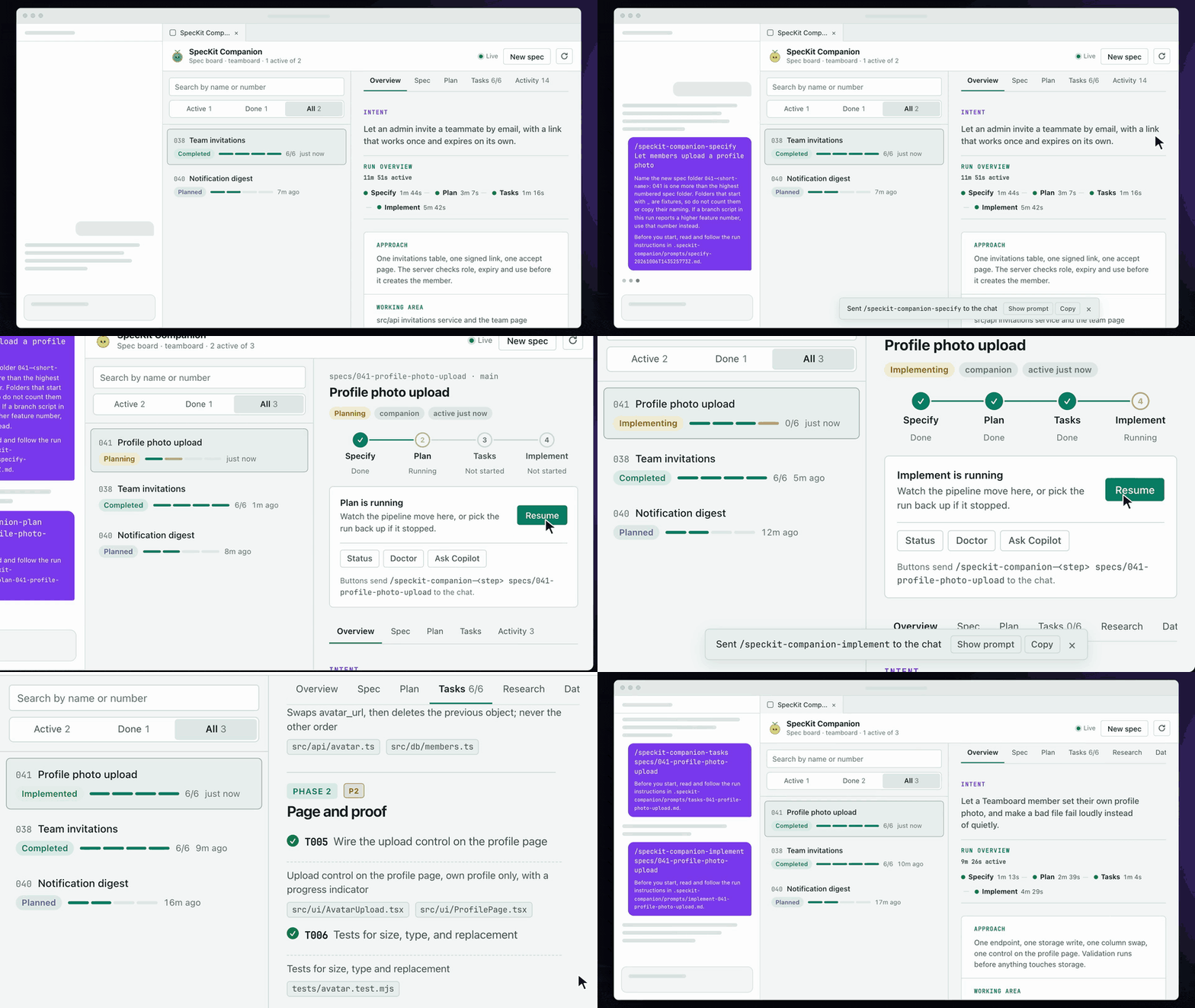 ## Install The board is a [canvas extension](https://docs.github.com/en/copilot/how-tos/github-copilot-app/working-with-canvas-extensions). Copy this folder into your user folder and it shows up in every new session: ```bash git clone https://github.com/alfredoperez/speckit-companion cp -R speckit-companion/apps/copilot-canvas/com.github.copilot/extensions/speckit-companion ~/.copilot/extensions/speckit-companion ``` ## First run Open your project in the Copilot app, start a **new** session, and ask: **Open the SpecKit Companion canvas**. It's also in the session's **+** menu, under **Canvas** → **SpecKit Companion**. Open a spec to read its documents, and press the button on the card under the pipeline to run the next step. The button sends one command into the chat, and the board updates as the agent writes. 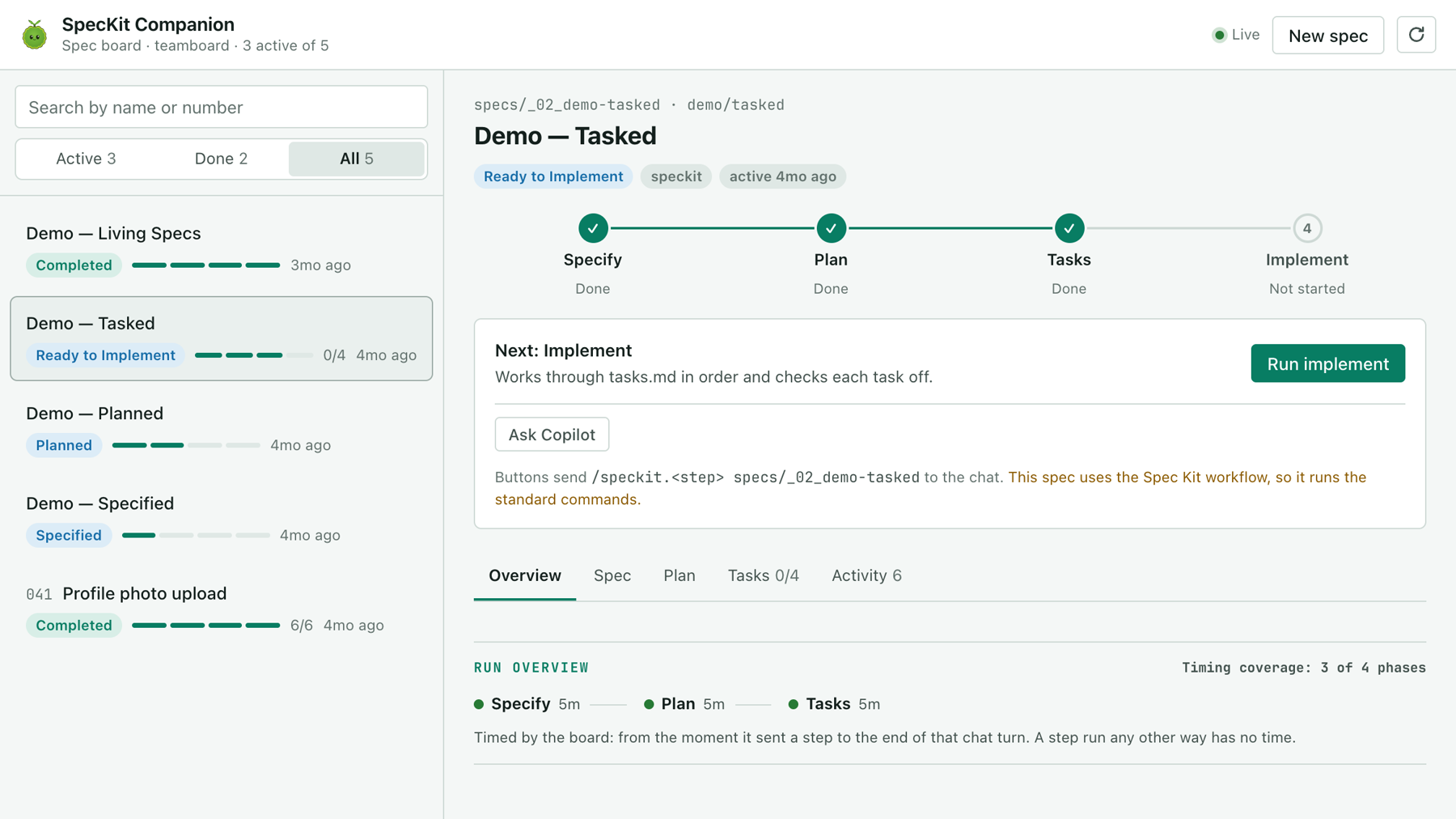 ## Share it with your team Copy the folder into the project and commit it: ```bash cp -R speckit-companion/apps/copilot-canvas/com.github.copilot/extensions/speckit-companion <project>/.github/extensions/speckit-companion ``` A project copy is code, so the app keeps it off until you accept it. Since Copilot app 1.1.26: 1. Merge the copy to your default branch. 2. Choose **Review repository content** on the notice the app shows, then **Accept for new sessions**. 3. Start a new session and open the canvas. A session that was open when you accepted never gets the board. After any change under `.github/extensions/`, new sessions lose it until you accept again. ## What the board writes The board never writes a spec document. It writes two things: - Its own run instructions under `.speckit-companion/prompts/`, with a `.gitignore` beside them so they stay out of your commits. - In a stock project, the start and finish of each step it sent, in the spec's `.spec-context.json`. Where Companion is installed the board does not write that file. The commands it sends do. ## Known limits - **The board is clipped after you narrow the panel.** The Copilot app does not resize the panel's page, so the board can't reflow. Close the canvas and open it again after resizing. - **Each session runs in a fresh worktree** cut from your default branch. It has no `node_modules`, so an implement step that runs tests installs the dependencies first. Companion's commands have to be committed files too, not symlinks from a `--dev` install. <!-- other-products:start --> ## SpecKit Companion runs in four places | Where | What it is | Start here | |---|---|---| | VS Code | The extension: a sidebar, a spec viewer and the Overview of every run. | [Install](https://speckit-companion.dev/docs/install) | | Spec Kit | The engine half: records each step so every surface can show progress and resume. | [Install](https://speckit-companion.dev/docs/install) | | GitHub Copilot app | A live spec board in the app's side panel. | [Copilot app](https://speckit-companion.dev/docs/copilot-app) | | Claude Code | The followed spec's run above your prompt and in a pane. | [Claude Code](https://speckit-companion.dev/docs/claude-code) | <!-- other-products:end --> ## Docs [Guide](https://speckit-companion.dev/docs/copilot-app) · [Changelog](https://speckit-companion.dev/changelog/) · [Develop](https://github.com/alfredoperez/speckit-companion/blob/main/apps/copilot-canvas/docs/develop.md) · MIT licensed.
© Alfredo Perez · MIT · alfredoperez/speckit-companion
Похожие плагины
Все плагины по теме «Настройка агента: память, контекст, субагенты» →Сначала — speckit-companion от других авторов.


