pcf-canvas-apps — правило для GitHub Copilot: суть и установка
Задаёт контекст GitHub Copilot при создании PCF-компонентов для canvas apps. Помогает учесть безопасность токенов, версионирование манифестов и требования к среде.
.github/instructions/pcf-canvas-apps.instructions.mdЧто делает pcf-canvas-apps
Правило инструктирует ассистента при работе с кодом Power Apps component framework. Оно применяется к файлам ts, tsx, js, json, xml, pcfproj и csproj. Ассистент опирается на шаги добавления элементов через Microsoft Power Platform CLI и структуру решений для Microsoft Dataverse.
Для запуска компонентов в приложениях требуется лицензия Power Apps и права системного администратора в среде. Функция активируется в Power Apps Admin Center в параметрах продукта. Без этого переключателя canvas apps не поддерживают пользовательские компоненты кода.
Код компонентов в Power Apps Studio имеет прямой доступ к токенам безопасности, поэтому непроверенные сборки несут прямую угрозу данным при редактировании. Чтобы изменения в логике отобразились в приложении, нужно обязательно повышать поле version в манифесте. Простое удаление и повторное добавление элемента в студии не обновляет сборку.
Какие задачи решает
- настроить параметры безопасности для PCF-компонентов в Power Apps Studio
- обновить номер версии в манифесте для применения правок в canvas app
- включить Power Apps component framework в параметрах среды Dataverse
- подготовить проект
.pcfprojк импорту в решение Power Apps
Примеры запросов агенту
- Помоги настроить свойства компонента в XML-манифесте для canvas app
- Как обновить версию в манифесте PCF, чтобы Power Apps Studio подтянула изменения?
- Какие риски с токенами безопасности нужно учесть перед импортом компонента в студию?
Как установить pcf-canvas-apps
Вручную: положить файлы
.github/instructions/pcf-canvas-apps.instructions.mdПоле applyTo задаёт, к каким файлам применять
Вручную: положить файлы
.claude/rules/pcf-canvas-apps.mdПоле paths во frontmatter ограничивает файлы: applyTo из источника → paths
AGENTS.md
Codex читает AGENTS.md: вставьте текст правила туда
Вручную: положить файлы
.cursor/rules/pcf-canvas-apps.mdcВо frontmatter: description, globs, alwaysApply. applyTo из источника → globs, иначе правило само не подключится
Вручную: положить файлы
.devin/rules/pcf-canvas-apps.mdВручную: положить файлы
.clinerules/pcf-canvas-apps.mdПо шагам, с командами для каждой платформы: AGENTS.md и CLAUDE.md: что это, кто читает и какой выбрать
Вопросы о pcf-canvas-apps
Как установить правило pcf-canvas-apps в GitHub Copilot?
Сохраните файл правила по пути .github/instructions/pcf-canvas-apps.instructions.md в корне вашего репозитория. GitHub Copilot автоматически подхватит инструкции при открытии подходящих файлов проекта.
Что делает правило pcf-canvas-apps?
Оно задаёт Copilot контекст разработки элементов интерфейса через Power Apps component framework. Ассистент опирается на требования к безопасности, манифестам и публикации через Dataverse.
Почему Power Apps Studio не видит правки в коде компонента?
Студия обновляет компонент только при перезапуске приложения и изменённом поле version в манифесте. Простое удаление элемента с холста и повторное добавление не применяет новую сборку.
Исходный текст
pcf-canvas-apps.instructions.md · MIT
---
description: 'Code components for canvas apps implementation, security, and configuration'
applyTo: '**/*.{ts,tsx,js,json,xml,pcfproj,csproj}'
---
# Code Components for Canvas Apps
Professional developers can use Power Apps component framework to create code components that can be used in their canvas apps. App makers can use Power Apps component framework to create, import, and add code components to canvas apps using [Microsoft Power Platform CLI](https://learn.microsoft.com/en-us/power-apps/developer/component-framework/get-powerapps-cli).
> **Note**: Certain APIs might not be available in canvas apps. We recommend that you check each API to determine where it's available.
## Security Considerations
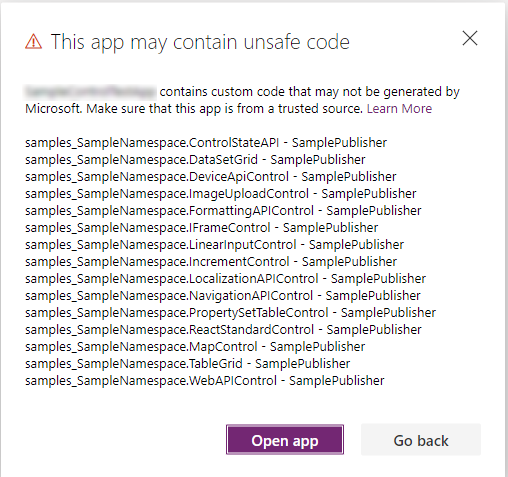
> **Warning**: Code components contain code that may not be generated by Microsoft and can potentially access security tokens and data when rendered in Power Apps Studio. When adding code components to a canvas app, make sure that the code component solutions are from a trusted source. This vulnerability does not exist when playing the canvas app.
### Security Warning in Power Apps Studio
When you open a canvas app that contains code components in Power Apps Studio, a warning message about potentially unsafe code appears. Code components in the Power Apps Studio environment have access to security tokens; hence only components from trusted sources should be opened.
**Best Practices:**
- Administrators and system customizers should review and validate all code components before importing them into an environment
- Make components available to makers only after validation
- The `Default` publisher is shown when you import code components by using an unmanaged solution or when you have used `pac pcf push` to install your code component
## Prerequisites
- A Power Apps license is required. More information: [Power Apps component framework licensing](https://learn.microsoft.com/en-us/power-apps/developer/component-framework/overview#licensing)
- System administrator privileges are required to enable the Power Apps component framework feature in the environment
## Enable the Power Apps Component Framework Feature
To add code components to an app, you need to enable the Power Apps component framework feature in each environment where you want to use them. By default, the Power Apps component feature is enabled for model-driven apps.
### Steps to Enable for Canvas Apps:
1. Sign in to [Power Apps](https://powerapps.microsoft.com/)
2. Select **Settings** , and then select **Admin Center**
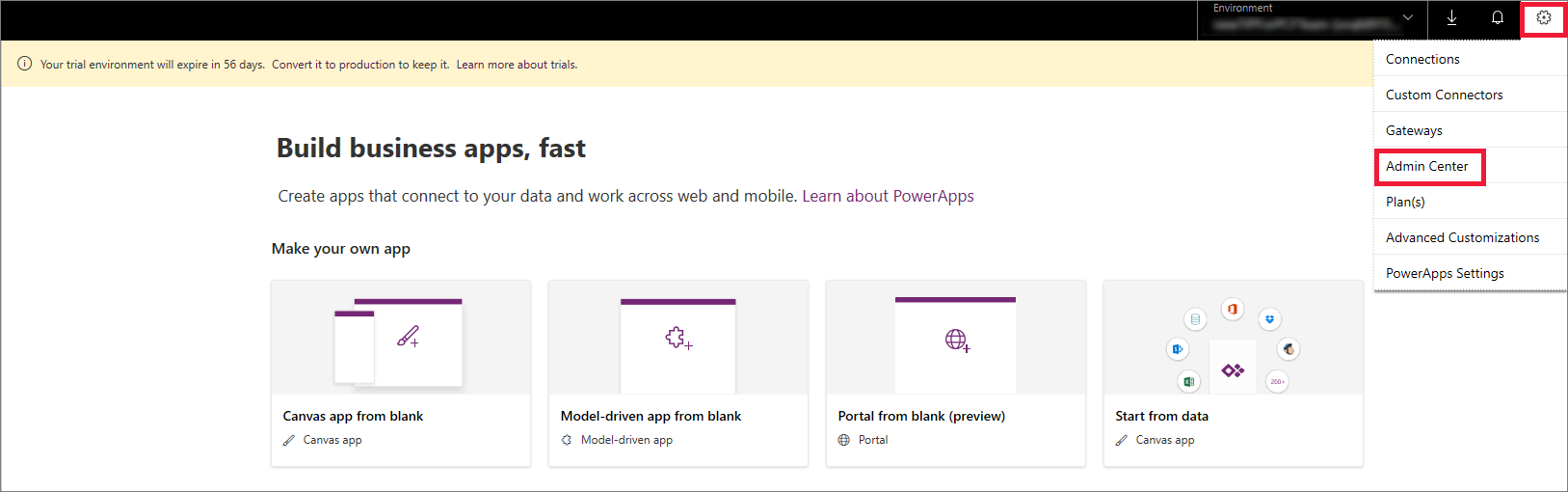
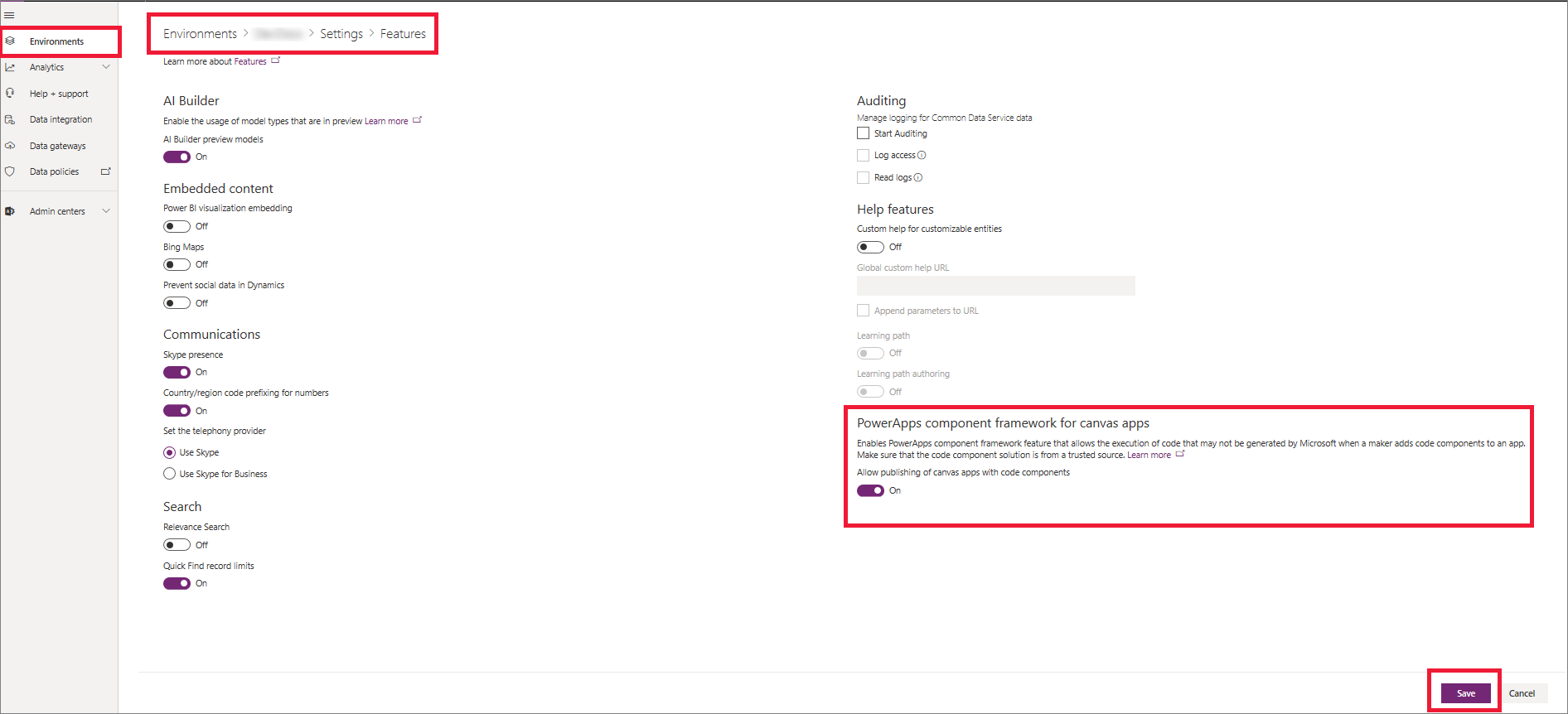
3. On the left pane, select **Environments**, select the environment where you want to enable this feature, and then select **Settings**
4. Expand **Product**, and select **Features**
5. From the list of available features, turn on **Power Apps component framework for canvas apps**, and then select **Save**
## Implementing Code Components
After you enable the Power Apps component framework feature in your environment, you can start implementing the logic for code components. For a step-by-step tutorial, go to [Create your first code component](https://learn.microsoft.com/en-us/power-apps/developer/component-framework/implementing-controls-using-typescript).
**Recommendation**: Check the [limitations](https://learn.microsoft.com/en-us/power-apps/developer/component-framework/limitations) of code components in canvas apps before starting implementation.
## Add Components to a Canvas App
1. Go to Power Apps Studio
2. Create a new canvas app, or edit an existing app to which you want to add the code component
> **Important**: Make sure the solution .zip file containing the code components has already been [imported](https://learn.microsoft.com/en-us/power-apps/maker/data-platform/import-update-export-solutions) into Microsoft Dataverse before you proceed to the next step.
3. On the left pane, select **Add (+)**, and then select **Get more components**
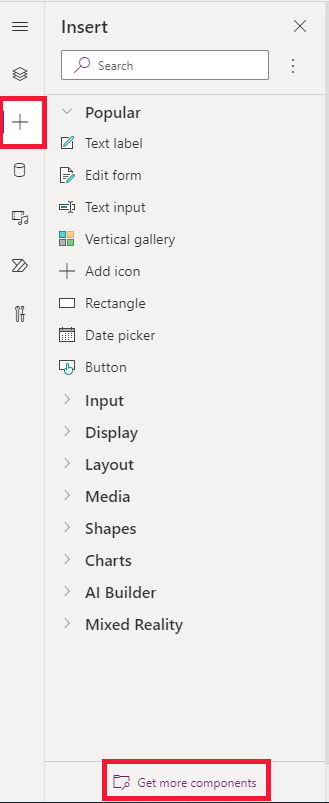
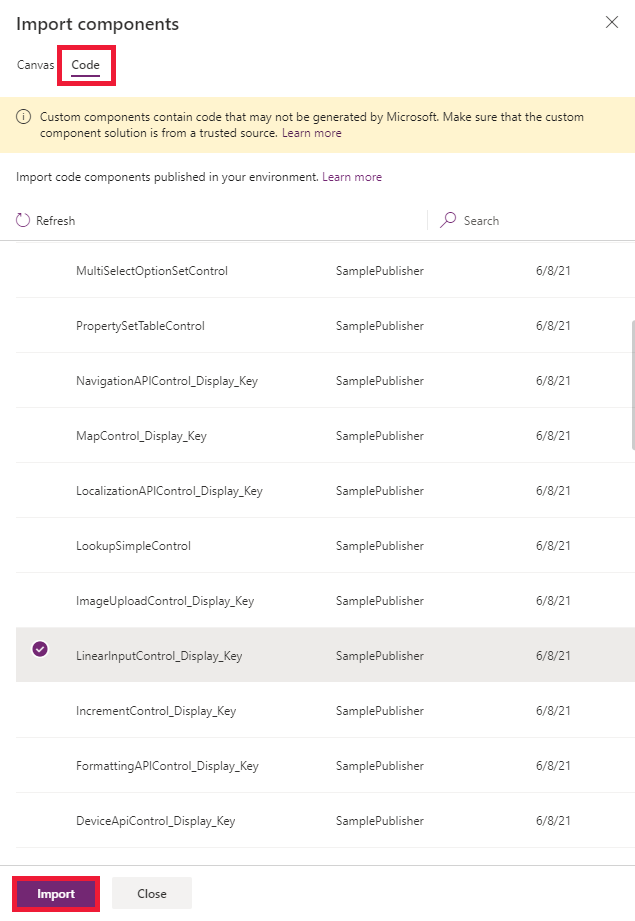
4. Select the **Code** tab, select a component from the list, and then select **Import**
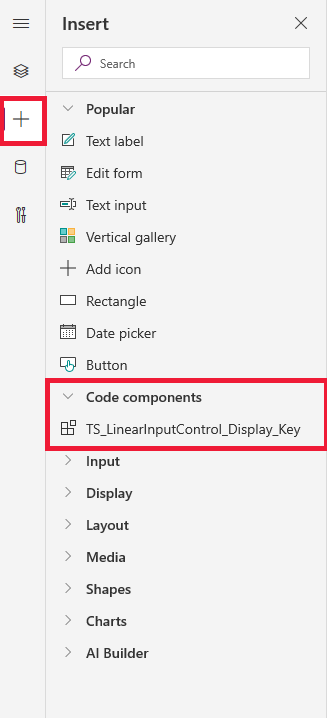
5. On the left pane, select **+**, expand **Code components**, and then select the component to add it to the app
> **Note**: You can also add components by selecting **Insert > Custom > Import component**. This option will be removed in a future release, so we suggest using the flow described above.
### Component Properties
On the Properties tab, you'll notice the code component properties are displayed.
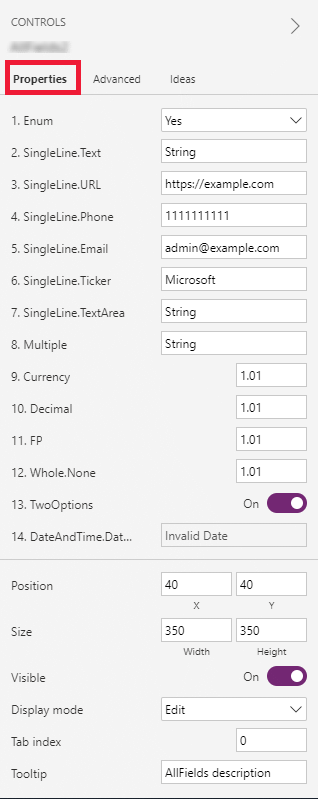
> **Note**: Existing code components can be re-imported by updating the code component's manifest version if you want the properties to be available in the default Properties tab. As before, the properties will continue to be available on the Advanced properties tab.
## Delete a Code Component from a Canvas App
1. Open the app where you've added the code component
2. On the left pane, select **Tree view**, and then select the screen where you've added the code component
3. Next to the component, select **More (...)**, and then select **Delete**
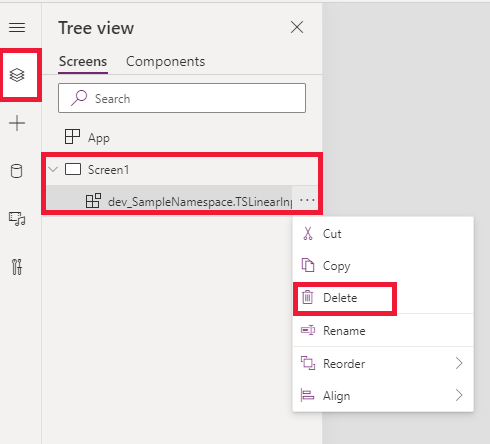
4. Save the app to see the changes
## Update Existing Code Components
Whenever you update the code components and want to see the runtime changes, you need to change the `version` property in the manifest file. We recommend that you change the version of the component whenever you make changes.
> **Note**: Existing code components are updated only when the app is closed or reopened in Power Apps Studio. When you reopen the app, it asks you to update the code components. Simply deleting or adding code components back into the app won't update the components. Publish all the customizations in the updated solution first, otherwise updates made to the code component won't appear.
## See Also
- [Power Apps component framework overview](https://learn.microsoft.com/en-us/power-apps/developer/component-framework/overview)
- [Create your first code component](https://learn.microsoft.com/en-us/power-apps/developer/component-framework/implementing-controls-using-typescript)
- [Learn Power Apps component framework](https://learn.microsoft.com/en-us/training/paths/use-power-apps-component-framework)
© github · MIT · github/awesome-copilot


