rtl-chat — плагин для Claude Code: ровный RTL-текст в ответах
Следит, чтобы ответы Claude с ивритом и английским вперемешку читались слева направо и справа налево без перемешанных слов.
/plugin marketplace add anthropics/claude-plugins-community
/plugin install rtl-chat@claude-communityЧто делает rtl-chat
Плагин берётся за двунаправленный текст. Когда в разговоре есть иврит, ответы Claude начинают перемешивать слова и знаки препинания на стыке языков. rtl-chat отвечает за форматирование таких ответов, чтобы они выглядели нормально, а не как рассыпанные куски строки.
Задумано так, что плагин действует на каждый ответ, если в беседе встречается иврит. Отдельные шаги или скрипты запускать не надо. Английские куски вроде путей, команд и имён файлов должны оставаться на месте, а не разъезжаться по строке.
Ставится из маркетплейса community. Без иврита в диалоге смысла в нём нет: не тот случай, когда плагин что-то чинит в проекте. Это инструмент чтения ответов, и заметить его работу можно только на смешанном тексте.
Какие задачи решает
- Читать ответы Claude с ивритом и английским без перемешанных слов
- Сохранять английские пути и команды внутри RTL-абзаца на своих местах
- Получать каждый ответ в правильном направлении, без ручных просьб
- Разбирать вывод Claude на иврите, не отвлекаясь на порядок слов
Примеры запросов агенту
- Ответь на иврите и объясни, где в проекте лежит конфиг.
- Продолжай беседу на иврите, английские команды оставь как есть.
- Перепиши прошлый ответ на иврите так, чтобы текст не путался.
Как установить rtl-chat
Через маркетплейс плагинов
/plugin marketplace add anthropics/claude-plugins-community/plugin install rtl-chat@claude-communityПо шагам, с командами для каждой платформы: Плагины Claude Code: маркетплейсы, установка и как собрать свой
Вопросы о rtl-chat
Как установить rtl-chat в Claude Code?
Сначала подключите маркетплейс: /plugin marketplace add anthropics/claude-plugins-community. Потом установите плагин: /plugin install rtl-chat@claude-community.
Что делает rtl-chat?
Выравнивает форматирование двунаправленного текста в ответах Claude, когда в разговоре есть иврит, особенно при смешении с английским.
Когда плагин начинает работать?
Он рассчитан на каждый ответ, если беседа включает иврит. Запускать что-то вручную не нужно.
Исходный текст
rtl-chat · MIT
<p align="center">
<a href="https://github.com/MSApps-Mobile/claude-plugins/stargazers"><img src="https://img.shields.io/github/stars/MSApps-Mobile/claude-plugins?style=social" alt="GitHub Stars"></a>
<img src="https://img.shields.io/github/forks/MSApps-Mobile/claude-plugins?style=social" alt="GitHub Forks">
<img src="https://img.shields.io/badge/plugins-29-blue" alt="Plugins">
<img src="https://img.shields.io/badge/SOSA%E2%84%A2-compliant-brightgreen" alt="SOSA Compliant">
<img src="https://img.shields.io/badge/Claude_Code-compatible-8A2BE2" alt="Claude Code">
<img src="https://img.shields.io/badge/Cowork-compatible-8A2BE2" alt="Cowork">
</p>
<p align="center">
<a href="https://github.com/MSApps-Mobile/claude-plugins/stargazers">
</a>
</p>
# MSApps Claude Plugins
> **If you find these plugins useful, please ⭐ star this repo** — it helps other developers discover the marketplace and motivates us to keep building!
**The largest open-source plugin marketplace for Claude.** 29 production-ready plugins for [Claude Code](https://docs.anthropic.com/en/docs/claude-code) (CLI) and [Cowork](https://claude.ai) (desktop app) — built on the SOSA™ security framework.
> Upload to Google Drive. Track time in Toggl. Transcribe YouTube videos. Send WhatsApp messages. Manage WordPress. Prospect with Apollo. Clean your Mac. All from a single Claude conversation.
```bash
# Add the marketplace (one-time)
/plugin marketplace add MSApps-Mobile/claude-plugins
# Install any plugin
/plugin install google-drive-upload@msapps-plugins
```
**That's it.** No API wrappers. No config files (for most plugins). Just install and talk to Claude naturally.
---
## Why This Exists
AI plugins today have a trust problem. Most are demos — not production tools. They hardcode credentials, skip confirmation on destructive actions, and have no concept of agent boundaries.
We built **SOSA™ (Supervised Orchestrated Secured Agents)** to fix that — a four-pillar methodology for production-grade autonomous AI operations. Every plugin in this marketplace declares its compliance level, impact classification, and security posture.
**The four pillars:**
| Pillar | In Practice |
|--------|------------|
| **🛡️ Supervised** | High-impact actions require human approval. An outreach agent can't send 500 emails without your sign-off. |
| **⚙️ Orchestrated** | Agents follow Plan → Act → Verify. Token budgets are enforced — bloated skills waste your money. |
| **🔒 Secured** | No hardcoded credentials (checked in CI). Plugin authors should treat external data as untrusted and pin package versions; neither is enforced here. |
| **🤖 Agents** | Each agent has a formal role spec, declared tool access, and explicit boundaries. A finance agent can't send emails — period. |
> **📄 Read the whitepaper:** [SOSA™ — Supervised Orchestrated Secured Agents](docs/sosa-whitepaper.pdf) (Shatz, 2026)
---
## Available Plugins
| Plugin | What it does | Install |
|--------|-------------|---------|
| [**google-drive-upload**](./plugins/google-drive-upload) | Upload files to Google Drive — unlimited, free | `google-drive-upload@msapps-plugins` |
| [**toggl-time-tracker**](./plugins/toggl-time-tracker) | Track time with Toggl — start/stop timers, reports | `toggl-time-tracker@msapps-plugins` |
| [**youtube-transcriber**](./plugins/youtube-transcriber) | Transcribe YouTube videos & playlists — no API key | `youtube-transcriber@msapps-plugins` |
| [**session-backup**](./plugins/session-backup) | Daily backups of sessions, skills & configs to Drive | `session-backup@msapps-plugins` |
| [**notion-memory**](./plugins/notion-memory) | Long-term memory + the 4 official Anthropic Notion skills (knowledge-capture, meeting-intelligence, research-documentation, spec-to-implementation) bundled in | `notion-memory@msapps-plugins` |
| [**mac-disk-cleaner**](./plugins/mac-disk-cleaner) | Reclaim disk space on macOS — clean caches, find bloat | `mac-disk-cleaner@msapps-plugins` |
| [**mac-agent-hygiene**](./plugins/mac-agent-hygiene) | Daily LaunchAgent + MCP server that keeps agent Macs from filling up — caches and stale pushed worktrees, plan → confirm → apply | `mac-agent-hygiene@msapps-plugins` |
| [**whatsapp-mcp**](./plugins/whatsapp-mcp) | Connect Claude to WhatsApp — search, read, send | `whatsapp-mcp@msapps-plugins` |
| [**apify-scraper**](./plugins/apify-scraper) | Full Apify web scraping — run Actors, manage datasets | `apify-scraper@msapps-plugins` |
| [**apollo**](./plugins/apollo) | Prospect leads & enrich contacts with Apollo.io | `apollo@msapps-plugins` |
| [**wordpress-mcp**](./plugins/wordpress-mcp) | Manage WordPress — posts, users, WooCommerce & more | `wordpress-mcp@msapps-plugins` |
| [**x-content-intelligence**](./plugins/x-content-intelligence) | Scrape X/Twitter for insights & generate content | `x-content-intelligence@msapps-plugins` |
| [**cowork-mem**](./plugins/cowork-mem) | Persistent memory across Cowork sessions — so Claude never loses context | `cowork-mem@msapps-plugins` |
| [**skill-campfire**](./plugins/skill-campfire) | Turn your skills into characters who hang out around a campfire | `skill-campfire@msapps-plugins` |
| [**rtl-chat-fixer**](./plugins/rtl-chat-fixer) | Fix jumbled RTL/LTR text mixing (Hebrew, Arabic) | `rtl-chat-fixer@msapps-plugins` |
| [**vm-disk-cleanup**](./plugins/vm-disk-cleanup) | Fix disk-full errors in Cowork VMs & sandboxes | `vm-disk-cleanup@msapps-plugins` |
| [**cowork-session-fixer**](./plugins/cowork-session-fixer) | Fix stuck Cowork sessions — automated 5-tier recovery | `cowork-session-fixer@msapps-plugins` |
| [**fix-chrome-connection**](./plugins/fix-chrome-connection) | Fix stale Claude in Chrome connections | `fix-chrome-connection@msapps-plugins` |
| [**github-cli-health-check**](./plugins/github-cli-health-check) | Scheduled health check for GitHub CLI | `github-cli-health-check@msapps-plugins` |
| [**zoho-mail-health**](./plugins/zoho-mail-health) | Daily health check for Zoho Mail accounts | `zoho-mail-health@msapps-plugins` |
| [**gcloud-cli-health-check**](./plugins/gcloud-cli-health-check) | Scheduled health check for Google Cloud CLI (gcloud) | `gcloud-cli-health-check@msapps-plugins` |
| [**opsagent-shopify**](./plugins/opsagent-shopify) | Shopify operating skills bundle — Storefront MCP, Symmetry theme install, Partner marketing assessment | `opsagent-shopify@msapps-plugins` |
### Security & Optimization Plugins
| Plugin | What it does | Install |
|--------|-------------|---------|
| [**sosa-compliance-checker**](./plugins/sosa-compliance-checker) | Audit your entire plugin ecosystem against SOSA™ | `sosa-compliance-checker@msapps-plugins` |
| [**token-efficiency-audit**](./plugins/token-efficiency-audit) | Find and fix token waste — typical savings: 20-50% | `token-efficiency-audit@msapps-plugins` |
| [**sosa-governor**](./plugins/sosa-governor) | Real-time SOSA governance layer — classifies, gates, and logs every MCP tool call | `sosa-governor@msapps-plugins` |
| [**sosa-orchestrator**](./plugins/sosa-orchestrator) | Token-aware task prioritization and budget management for Claude sessions | `sosa-orchestrator@msapps-plugins` |
### Developer Tools
| Plugin | What it does | Install |
|--------|-------------|---------|
| [**swift-lsp**](./plugins/swift-lsp) | Real-time Swift code intelligence — diagnostics, go-to-definition, hover types via SourceKit-LSP | `swift-lsp@msapps-plugins` |
| [**kotlin-lsp**](./plugins/kotlin-lsp) | Real-time Kotlin code intelligence — diagnostics, go-to-definition, hover types via kotlin-language-server | `kotlin-lsp@msapps-plugins` |
| [**md-composer**](./plugins/md-composer) | Audit, compose, and refactor CLAUDE.md files — keeps memory under 200 lines, flips negative rules, splits across the 4-level hierarchy ([inspiration](https://medium.com/@kjramsy/your-claude-md-is-eating-your-token-budget-heres-how-to-fix-it-b8d6c4d1c986)) | `md-composer@msapps-plugins` |
| [**agents-md-optimizer**](./plugins/agents-md-optimizer) | Audit bloated CLAUDE.md / AGENTS.md files and rewrite them lean, or author a new one using the 200-line "recipe book" principle | `agents-md-optimizer@msapps-plugins` |
> **Mobile devs:** swift-lsp ships with Xcode — zero extra setup. kotlin-lsp installs via `brew install kotlin-language-server`.
> **Pro tip:** Run `sosa-compliance-checker` on all your installed plugins — not just ours. It checks for hardcoded API keys, missing confirmation gates, unpinned packages, and prompt injection risks in *any* plugin; it is an audit aid that reports findings, not a guarantee.
---
## Quick Start
### Claude Code (CLI)
```bash
# 1. Add marketplace (one-time)
/plugin marketplace add MSApps-Mobile/claude-plugins
# 2. Install what you need
/plugin install mac-disk-cleaner@msapps-plugins
/plugin install youtube-transcriber@msapps-plugins
# 3. Just talk to Claude
# "Clean up my Mac" / "Transcribe this video: https://..."
```
### Cowork (Desktop App)
1. **Settings** → **Plugins** → **Marketplaces** → **Add** → `MSApps-Mobile/claude-plugins`
2. Search for any plugin and click **Install**
3. Start talking — Claude uses the plugin automatically
---
## Setup Guides
<details>
<summary><strong>Google Drive Upload</strong></summary>
One-time Google Apps Script deployment. Save your config to `~/.cowork-gdrive-config.json`:
```json
{
"url": "https://script.google.com/macros/s/YOUR_SCRIPT_ID/exec",
"apiKey": "your-api-key"
}
```
</details>
<details>
<summary><strong>Toggl Time Tracker</strong></summary>
Save your Toggl API token to `~/.toggl-config.json`:
```json
{
"apiToken": "your-toggl-api-token",
"workspaceId": 1234567
}
```
Get your token at [track.toggl.com/profile](https://track.toggl.com/profile).
</details>
<details>
<summary><strong>YouTube Transcriber</strong></summary>
No config needed — just requires the **Claude in Chrome** extension. Paste any YouTube URL and ask Claude to transcribe it.
</details>
<details>
<summary><strong>WhatsApp MCP</strong></summary>
Requires the [WhatsApp MCP bridge](https://github.com/lharries/whatsapp-mcp):
```bash
brew install go uv ffmpeg
git clone https://github.com/lharries/whatsapp-mcp.git ~/whatsapp-mcp
cd ~/whatsapp-mcp/whatsapp-bridge && go build -o whatsapp-bridge && ./whatsapp-bridge
```
Scan the QR code with WhatsApp on first run. Set `WHATSAPP_MCP_PATH="$HOME/whatsapp-mcp"` in your shell profile.
</details>
<details>
<summary><strong>WordPress MCP</strong></summary>
Set environment variables after installing:
| Variable | Description |
|----------|-------------|
| `WP_MCP_URL` | Your site's MCP endpoint (`https://yoursite.com/wp-json/mcp/v1`) |
| `WP_MCP_AUTH` | Base64-encoded `username:application-password` |
Requires [WordPress MCP Adapter](https://developer.wordpress.org/news/2026/02/from-abilities-to-ai-agents-introducing-the-wordpress-mcp-adapter/) on WordPress 6.9+.
</details>
<details>
<summary><strong>Apify Scraper</strong></summary>
Set your token: `APIFY_API_TOKEN=your_token_here`
Get it at [Apify Console](https://console.apify.com/) → Settings → Integrations.
</details>
<details>
<summary><strong>Apollo</strong></summary>
No manual setup — authenticates automatically on first use.
</details>
<details>
<summary><strong>Notion Memory</strong></summary>
Requires a Notion connector:
- **Claude Code:** Add a Notion MCP server to `.mcp.json`
- **Cowork:** Settings → Connectors → Notion
</details>
<details>
<summary><strong>Mac Disk Cleaner</strong></summary>
No config needed. macOS Ventura+. Only touches auto-regenerated caches — never deletes personal files.
</details>
<details>
<summary><strong>Other plugins</strong></summary>
Most other plugins (RTL Chat Fixer, VM Disk Cleanup, Cowork Session Fixer, Fix Chrome Connection, GitHub CLI Health Check, GCloud CLI Health Check, SOSA Compliance Checker) require **no configuration** — just install and use.
</details>
---
## Community
- 💬 [Open an issue](https://github.com/MSApps-Mobile/claude-plugins/issues) for bugs or feature requests
- 🤝 [Read CONTRIBUTING.md](./CONTRIBUTING.md) to get started with your first PR
- ⭐ Star the repo to help others find it
- 🐦 Follow [@MSAppsMobile](https://x.com/MSAppsMobile) for updates
## Contributing
We welcome contributions! Whether it's a new plugin, a bug fix, or documentation improvements:
1. **Fork** this repo
2. **Create a branch** (`git checkout -b my-plugin`)
3. **Follow the SOSA framework** — your plugin should declare its compliance level in `plugin.json`
4. **Submit a PR** with a clear description of what the plugin does and its SOSA classification
Want to build a plugin but not sure where to start? Check the [existing plugins](./plugins/) for reference, or open an issue to discuss your idea.
---
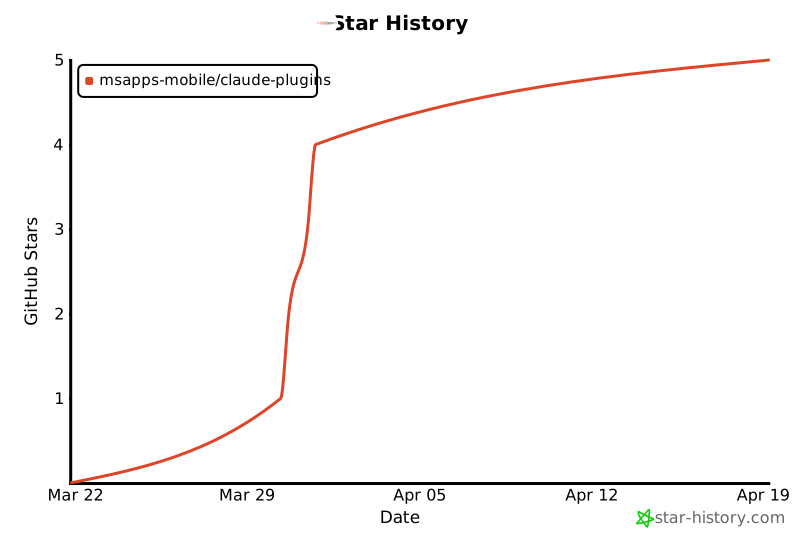
## Star History
If this project is useful to you, consider giving it a ⭐ — it helps others discover these tools.
[](https://star-history.com/#MSApps-Mobile/claude-plugins&Date)
---
## Support
- **Issues:** [GitHub Issues](https://github.com/MSApps-Mobile/claude-plugins/issues)
- **Email:** [email protected]
- **Website:** [msapps.mobi](https://msapps.mobi)
---
<p align="center">
Built by <a href="https://msapps.mobi">MSApps</a> · Powered by SOSA™
</p>
© MSApps-Mobile · MIT · MSApps-Mobile/claude-plugins


