git-ape — плагин для GitHub Copilot: что делает и как установить
Плагин превращает GitHub Copilot в оркестратор развёртывания инфраструктуры Azure с проверкой безопасности и расчётом затрат.
copilot plugin install git-ape@awesome-copilotЧто делает git-ape
Git-Ape организует процесс деплоя в Azure через пошаговый диалог. Агент опрашивает пользователя, генерирует шаблоны ARM, строит схему архитектуры, оценивает затраты и проверяет безопасность. Без подтверждения ничего не создаётся. Ресурсы в облаке появятся только после явного одобрения в чате или через пулл-реквест.
Каждый прогон сохраняется в каталоге .azure/deployments/ для аудита. Плагин умеет настраивать OIDC и RBAC для репозитория, а также отслеживать расхождение состояния облака с артефактами через команду /azure-drift-detector.
Для работы обязательны Bash-совместимая оболочка (git-bash на Windows), az, gh, jq и git. На боевой инфраструктуре запускать нельзя: проект помечен как экспериментальный и рассчитан только на песочницы или локальные тесты.
Какие задачи решает
- развернуть инфраструктуру Azure по ARM-шаблону через диалог
- оценить стоимость и риски безопасности до создания ресурсов
- настроить авторизацию OIDC и окружения GitHub для репозитория
- найти расхождения между живой инфраструктурой Azure и шаблонами
Примеры запросов агенту
- @git-ape разверни веб-приложение с базой данных SQL
- @Git-Ape Onboarding подготовь этот репозиторий для развёртывания в Azure
- @git-ape удали созданное приложение Python Function App
Как установить git-ape
Команда из источника
copilot plugin install git-ape@awesome-copilotПо шагам, с командами для каждой платформы: Плагины Claude Code: маркетплейсы, установка и как собрать свой
Вопросы о git-ape
Как установить git-ape в GitHub Copilot?
Выполните в терминале команду copilot plugin install git-ape@awesome-copilot.
Что делает git-ape?
Он проводит интервью по требованиям к инфраструктуре, формирует шаблоны ARM, оценивает расходы, проверяет безопасность и развёртывает ресурсы в Azure после одобрения пользователем.
Подходит ли git-ape для продакшена?
Нет. Разработчики предупреждают, что проект экспериментальный, поэтому его стоит применять только в песочницах, учебных подписках или локальной разработке.
Исходный текст
SKILL.md · MIT

# Git-Ape 🐒
> [!WARNING]
> EXPERIMENTAL PROJECT: Git-Ape is in active development and is not production-ready.
> Use it for local development, demos, sandbox subscriptions, and learning only.
**📖 Documentation:** [azure.github.io/git-ape](https://azure.github.io/git-ape/) • **🛒 VS Code Marketplace:** [Git-ApeTeam.git-ape](https://marketplace.visualstudio.com/items?itemName=Git-ApeTeam.git-ape)
Git-Ape is a **platform engineering framework** built on GitHub Copilot. It is a multi-agent system that plans, validates, and deploys **any Azure workload** — with security gates, cost analysis, and CI/CD pipeline integration built in.
Nothing is deployed without your explicit confirmation.
## What Git-Ape Does
Git-Ape walks every deployment through the same four steps:
1. **Gather** requirements through a guided interview.
2. **Generate** an ARM template, architecture diagram, cost estimate, and security report.
3. **Confirm** with you (interactive) or via PR review (headless) before anything is created.
4. **Deploy** to Azure and run post-deployment validation.
It is built for:
- Any Azure resource deployable via Azure Resource Manager.
- Repository onboarding: OIDC, RBAC, GitHub environments, and secrets.
- Auditable deployments: every run is saved under `.azure/deployments/`.
- Drift detection between live Azure state and stored deployment artifacts via the `/azure-drift-detector` skill.
## Git-Ape in action
A short demo video of the onboarding and deploy experience using Git-Ape.
[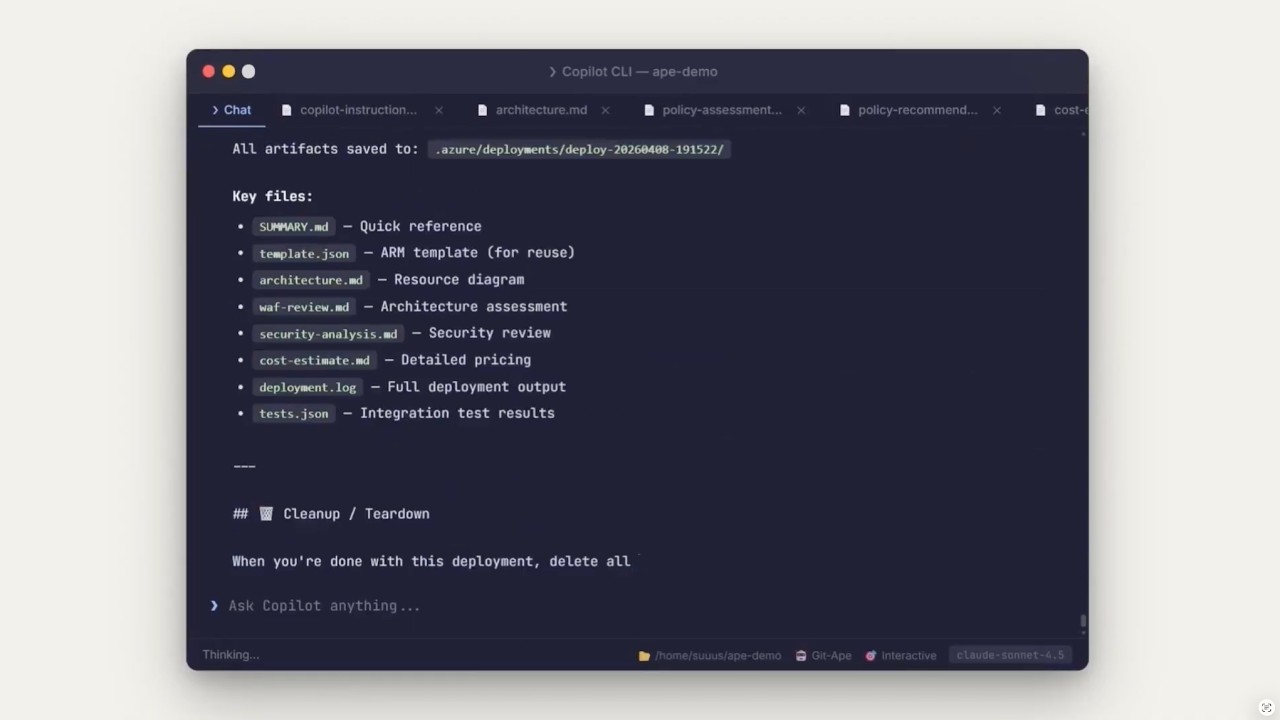](https://www.youtube.com/watch?v=Td6rv_RGArQ)
## Get Started
### Prerequisites
- A Bash-compatible shell (use `git-bash` on Windows). Other shells are untested.
- Azure CLI (`az`), GitHub CLI (`gh`), `jq`, and `git` installed and authenticated.
- Run `/prereq-check` in Copilot Chat to verify everything is in place.
### 1. Install the plugin
Git-Ape ships as a [VS Code agent plugin](https://code.visualstudio.com/docs/copilot/customization/agent-plugins) and as a GitHub Copilot CLI plugin. Pick the path that matches how you use Copilot.
#### Option A: VS Code Marketplace (one-click)
The fastest way to install Git-Ape in VS Code. The published listing bundles all agents and skills as a VS Code extension.
[](https://marketplace.visualstudio.com/items?itemName=Git-ApeTeam.git-ape) [](https://azure.github.io/git-ape/install.html) [](https://azure.github.io/git-ape/install-insiders.html)
1. Open the [Git-Ape listing on the VS Code Marketplace](https://marketplace.visualstudio.com/items?itemName=Git-ApeTeam.git-ape) and click **Install**, or use one of the badges above to open VS Code directly.
2. Verify the agents and skills appear in Copilot Chat — type `@git-ape` or `/prereq-check`.
#### Option B: VS Code marketplaces setting (advanced)
Use this path if you want to pull the latest from GitHub on every update, or if you also want the [`ape-context`](https://github.com/suuus/ape-context) companion plugin from the same marketplace.
1. Add the marketplace in your VS Code `settings.json`:
[](https://azure.github.io/git-ape/open-settings.html) [](https://azure.github.io/git-ape/open-settings-insiders.html)
```jsonc
"chat.plugins.marketplaces": [
"Azure/git-ape"
]
```
2. Open the Extensions view (`⇧⌘X` on macOS, `Ctrl+Shift+X` on Windows/Linux), search for `@agentPlugins`, find **git-ape**, and select **Install**.
3. Alternatively, open the Command Palette (`⇧⌘P` on macOS, `Ctrl+Shift+P` on Windows/Linux), run **Chat: Install Plugin From Source**, and enter `https://github.com/Azure/git-ape`.
4. Verify the agents and skills appear in Copilot Chat (for example, type `@git-ape` or `/prereq-check`).
Use `/git-ape-skills search <capability>` to search the unified core and
[community skill registry](https://azure.github.io/git-ape/docs/skills/registry).
Community sources are reviewed through Azure/git-ape PRs but are not loaded
with core. Explicitly approve `/git-ape-skills install <name>` to copy a selected
skill and its supporting files from a pinned Git-Ape commit. Choose **This project
only** (`<workspace>/.github/skills/`) or **All my projects**
(`os.homedir()/.copilot/skills/`), then approve the preview's resolved destination.
Personal scope requires no project path and installs file-based skills, not a
global plugin or App sidebar groups. Reload and verify client discovery before use.
#### Option C: Copilot CLI plugin
```bash
copilot plugin marketplace add Azure/git-ape
copilot plugin install git-ape@git-ape
copilot plugin list # Should show: git-ape@git-ape
```
Within Copilot CLI:
```text
/plugin marketplace add https://github.com/Azure/git-ape
/plugin install git-ape@git-ape
/plugin list # Should show: git-ape@git-ape
```
#### Option D: Local development install
Clone this repository and register the local checkout as a VS Code plugin in `settings.json`:
```jsonc
"chat.pluginLocations": {
"/absolute/path/to/git-ape": true
}
```
Reload VS Code; the `@git-ape` agent and Git-Ape skills will appear in Copilot Chat.
### 2. Configure Azure access
1. Sign in with `az login`.
2. Configure the Azure MCP server in VS Code — see the [Azure Setup](https://azure.github.io/git-ape/docs/getting-started/azure-setup) guide.
### 3. Use the agents
In Copilot Chat, try one of:
- `@git-ape deploy a Python function app`
- `@git-ape deploy a web app with SQL database`
- `@Git-Ape Onboarding set up this repo for Azure deployments`
### 4. Tear down
When you're done, clean up with:
- `@git-ape destroy Python function app`
## Where To Go Next
- [Examples](https://azure.github.io/git-ape/docs/deployment/examples): End-to-end deployment walkthroughs.
- [Azure Setup](https://azure.github.io/git-ape/docs/getting-started/azure-setup): Azure MCP server configuration for VS Code.
- [State Management](https://azure.github.io/git-ape/docs/deployment/state): How deployment artifacts are stored and reused.
- [Onboarding](https://azure.github.io/git-ape/docs/getting-started/onboarding): Repository onboarding, OIDC, RBAC, and GitHub environment setup.
- [Codespaces](https://azure.github.io/git-ape/docs/getting-started/codespaces): GitHub Codespaces and dev container setup.
## Architecture
`@git-ape` is the central orchestrator. It coordinates a pipeline of specialized subagents, enforces security gates, invokes skills, and manages deployment state. It never deploys anything without explicit user confirmation.
### Agent & Skill Orchestration
```mermaid
%%{init: {'theme':'base','themeVariables':{'fontSize':'13px','lineColor':'#64748b','textColor':'#1e293b','primaryTextColor':'#0f172a','edgeLabelBackground':'#f8fafc','tertiaryColor':'#f1f5f9'}}}%%
graph TD
GA["<b>@git-ape</b><br/>Main Orchestrator<br/><i>Coordinates stages, enforces gates,<br/>delegates to subagents, invokes skills</i>"]
GA --> DP
GA --> AD
GA --> UT
subgraph DP ["Deployment Pipeline"]
RG["<b>Requirements Gatherer</b><br/>Interview user<br/>CAF naming<br/>SKU validation"]
TG["<b>Template Generator</b><br/>ARM template<br/>Architecture diagram<br/>Cost estimate"]
SG{{"Security Gate<br/>(BLOCKING)"}}
WR["WAF Review<br/>(Principal Architect)"]
UC{{"User Confirmation"}}
RD["<b>Resource Deployer</b><br/>az deployment<br/>Monitor & retry<br/>Integration tests"]
RG --> TG --> SG --> WR --> UC --> RD
end
subgraph AD ["Advisory"]
PA["<b>Principal Architect</b><br/>WAF 5-pillar review<br/>Trade-off analysis"]
PO["<b>Policy Advisor</b><br/>Azure Policy compliance<br/>CIS / NIST mapping"]
end
subgraph UT ["Utility"]
IE["<b>IaC Exporter</b><br/>Import live resources"]
OB["<b>Git-Ape Onboarding</b><br/>OIDC + RBAC<br/>GitHub envs & secrets"]
end
classDef orchestrator fill:#1f6feb,stroke:#0b3d91,stroke-width:2px,color:#ffffff
classDef pipeline fill:#dbeafe,stroke:#1f6feb,stroke-width:1px,color:#0b3d91
classDef gate fill:#fde68a,stroke:#b45309,stroke-width:2px,color:#7c2d12
classDef advisory fill:#ede9fe,stroke:#7c3aed,stroke-width:1px,color:#4c1d95
classDef utility fill:#dcfce7,stroke:#15803d,stroke-width:1px,color:#14532d
class GA orchestrator
class RG,TG,RD pipeline
class SG,UC gate
class WR,PA,PO advisory
class IE,OB utility
```
### Skills
Skills are invoked by agents at specific stages. Each skill handles one focused task.
| Phase | Skill | Purpose |
|-------|-------|---------|
| **Pre-Deploy** | `/azure-rest-api-reference` | Look up ARM property schemas and API versions. **Mandatory before any template generation.** |
| | `/azure-naming-research` | CAF abbreviation lookup, naming constraint validation |
| | `/azure-resource-availability` | SKU restrictions, version support, API compatibility, quota |
| | `/azure-security-analyzer` | Per-resource security assessment with blocking gate |
| | `/azure-policy-advisor` | Azure Policy compliance recommendations against CIS, NIST, or general best-practice frameworks |
| | `/azure-deployment-preflight` | What-if analysis and permission checks before deploy |
| | `/azure-role-selector` | Least-privilege RBAC role recommendations |
| | `/azure-cost-estimator` | Real-time cost estimation via Azure Retail Prices API |
| | `/prereq-check` | Verify required CLI tools and auth sessions are ready |
| **Post-Deploy** | `/azure-integration-tester` | Post-deployment health checks and endpoint tests |
| | `/azure-resource-visualizer` | Generate Mermaid diagrams from live Azure resources |
| **Operations** | `/azure-drift-detector` | Detect config drift between live Azure and stored state |
| | `/git-ape-onboarding` | Guided setup for OIDC, RBAC, environments, and secrets |
### Deployment Flow
```mermaid
%%{init: {'theme':'base','themeVariables':{'fontSize':'13px','lineColor':'#64748b','textColor':'#1e293b','primaryTextColor':'#0f172a','edgeLabelBackground':'#f8fafc','tertiaryColor':'#f1f5f9'}}}%%
graph TD
U["User prompt:<br/><i>deploy a Python function app</i>"]
U --> S1
S1["<b>Stage 1: Requirements</b><br/>Requirements Gatherer interviews user"]
SK1["/azure-naming-research<br/>/azure-resource-availability"]
S1 -. skills .-> SK1
S1 --> S2
S2["<b>Stage 2: Template & Analysis</b><br/>Template Generator produces ARM +<br/>architecture + cost + security report"]
SK2["/azure-security-analyzer<br/>/azure-deployment-preflight<br/>/azure-cost-estimator<br/>/azure-role-selector"]
S2 -. skills .-> SK2
S2 --> GATE
GATE{{"Security Gate"}}
GATE -- "BLOCKED" --> FIX["Fix loop"] --> S2
GATE -- "PASSED" --> WAF
WAF["<b>Stage 2.75: WAF Review</b><br/>Principal Architect scores 5 pillars"]
WAF --> CONFIRM
CONFIRM{{"User confirms / PR approved"}}
CONFIRM --> S3
S3["<b>Stage 3: Deploy</b><br/>Resource Deployer runs az deployment"]
S3 --> S4
S4["<b>Stage 4: Validate</b><br/>Health checks, endpoint tests, diagram"]
SK4["/azure-integration-tester<br/>/azure-resource-visualizer"]
S4 -. skills .-> SK4
classDef user fill:#e0e7ff,stroke:#4338ca,stroke-width:2px,color:#1e1b4b
classDef stage fill:#dbeafe,stroke:#1f6feb,stroke-width:1px,color:#0b3d91
classDef skill fill:#f1f5f9,stroke:#64748b,stroke-width:1px,color:#0f172a,stroke-dasharray: 4 2
classDef gate fill:#fde68a,stroke:#b45309,stroke-width:2px,color:#7c2d12
classDef fix fill:#fecaca,stroke:#b91c1c,stroke-width:1px,color:#7f1d1d
classDef deploy fill:#dcfce7,stroke:#15803d,stroke-width:2px,color:#14532d
class U user
class S1,S2,WAF stage
class SK1,SK2,SK4 skill
class GATE,CONFIRM gate
class FIX fix
class S3,S4 deploy
```
### Execution Modes
Git-Ape runs the same agents and skills in two different contexts.
```mermaid
%%{init: {'theme':'base','themeVariables':{'fontSize':'13px','lineColor':'#64748b','textColor':'#1e293b','primaryTextColor':'#0f172a','edgeLabelBackground':'#f8fafc','tertiaryColor':'#f1f5f9'}}}%%
graph LR
subgraph Interactive ["🧑💻 Interactive Mode — VS Code / Chat"]
direction TB
I1["User ↔ @git-ape"]
I2["Real-time Q&A"]
I3["az login session"]
I4["Interactive confirmation"]
I5["Direct deployment"]
I6["@git-ape destroy {id}"]
end
subgraph Headless ["🤖 Headless Mode — Coding Agent / Actions"]
direction TB
H1["Issue → Agent on branch"]
H2["Parse requirements from body"]
H3["OIDC auth via Actions"]
H4["Commit artifacts to PR"]
H5["git-ape-plan.yml (PR)"]
H6["git-ape-deploy.yml (merge)"]
H7["git-ape-destroy.yml (merge)"]
end
classDef interactive fill:#dbeafe,stroke:#1f6feb,stroke-width:1px,color:#0b3d91
classDef headless fill:#ede9fe,stroke:#7c3aed,stroke-width:1px,color:#4c1d95
class I1,I2,I3,I4,I5,I6 interactive
class H1,H2,H3,H4,H5,H6,H7 headless
```
**Interactive** — you talk to `@git-ape` in VS Code Copilot Chat, authenticate via `az login`, and approve each step in real time.
**Headless** — the Copilot Coding Agent picks up a GitHub issue, generates the template on a branch, opens a PR, and the CI/CD workflows (`git-ape-plan`, `git-ape-deploy`, `git-ape-destroy`) handle validation, deployment, and teardown via OIDC.
### CI/CD Workflows
| Workflow | Trigger | Purpose |
|----------|---------|---------|
| `git-ape-plan.yml` | PR with template changes | Validate, what-if, post plan as PR comment |
| `git-ape-deploy.yml` | Merge to main | Execute ARM deployment |
| `git-ape-destroy.yml` | Merge PR with `destroy-requested` | Delete resource group |
| `git-ape-verify.yml` | Manual dispatch | Verify OIDC, RBAC, pipeline health |
> **Note:** These workflows ship as canonical templates inside the onboarding skill at `.github/skills/git-ape-onboarding/templates/workflows/`. The `/git-ape-onboarding` flow scaffolds them into your repository's `.github/workflows/` directory as ready-to-run `.yml` files (skip-with-notice on collision — never overwrites a customized workflow).
## Included Components
Git-Ape is packaged as a Copilot CLI plugin with agents and skills under `.github/`:
```
plugin.json # Plugin manifest
.github/
├── agents/
│ ├── git-ape.agent.md # Main orchestrator
│ ├── git-ape-onboarding.agent.md # Onboarding agent
│ ├── azure-requirements-gatherer.agent.md
│ ├── azure-template-generator.agent.md
│ ├── azure-resource-deployer.agent.md
│ ├── azure-principal-architect.agent.md
│ ├── azure-policy-advisor.agent.md
│ └── azure-iac-exporter.agent.md
├── skills/
│ ├── git-ape-onboarding/ # OIDC, RBAC, env setup + workflow templates
│ │ └── templates/workflows/ # Canonical git-ape-{plan,deploy,destroy,verify}.yml
│ │ # + git-ape-drift.{md,lock.yml}
│ │ # Scaffolded into your repo by /git-ape-onboarding
│ ├── azure-rest-api-reference/ # ARM property + API version lookup
│ ├── azure-naming-research/ # CAF naming
│ ├── azure-resource-availability/ # SKU & quota checks
│ ├── azure-security-analyzer/ # Security assessment
│ ├── azure-policy-advisor/ # Azure Policy compliance
│ ├── azure-deployment-preflight/ # What-if analysis
│ ├── azure-role-selector/ # RBAC recommendations
│ ├── azure-cost-estimator/ # Cost estimation
│ ├── azure-drift-detector/ # Drift detection
│ ├── azure-integration-tester/ # Post-deploy tests
│ ├── azure-resource-visualizer/ # Architecture diagrams
│ └── prereq-check/ # CLI tool + auth session verification
└── workflows/ # CI workflows for the git-ape repo itself
└── git-ape-onboarding-template-check.yml # Verifies scaffold parity
```
See [plugin.json](plugin.json) and [.github/plugin/marketplace.json](.github/plugin/marketplace.json) for packaging details.
## License
MIT License. See [LICENSE](LICENSE).
© Microsoft · MIT · Azure/git-ape


